


Making an Asynchronous Clocking Drum Machine App in Perl
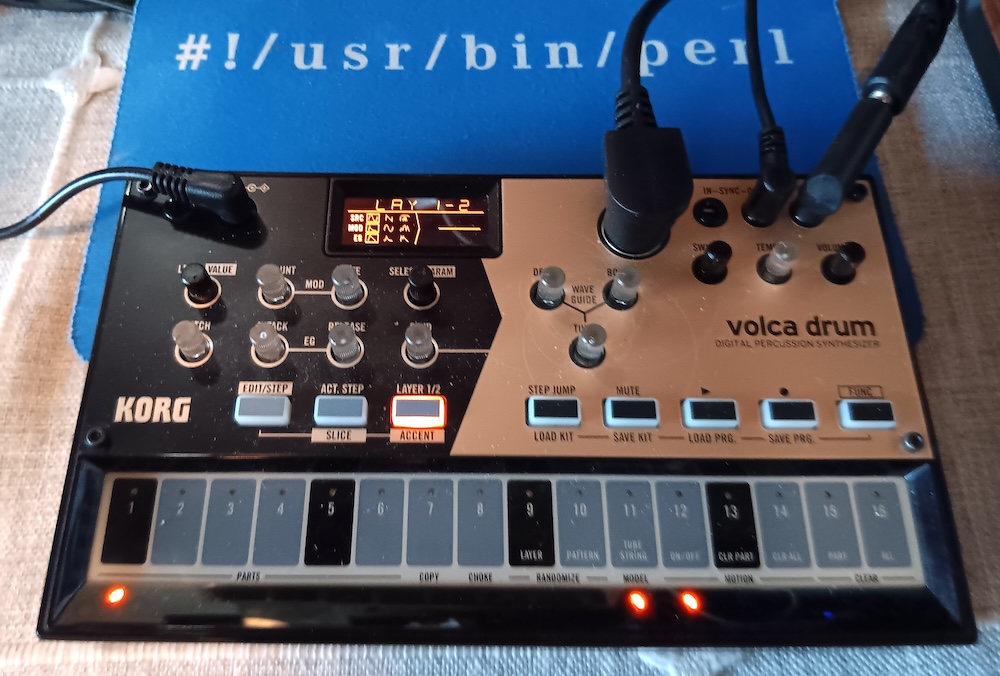
Let’s Make a Drum Machine application! Yeah! :D
There are basically two important things to handle: A MIDI “clock” and a groove to play.
Why asynchronous? Well, a simple while (1) { Time::HiRes::sleep($interval); ... } will not do because the time between ticks will fluctuate, often dramatically. IO::Async::Timer::Periodic is a great timer for this purpose. Its default scheduler uses system time, so intervals happen as close to the correct real-world time as possible.
Clocks
A MIDI clock tells a MIDI device about the tempo. This can be handed to a drum machine or a sequencer. Each clock tick tells the device to advance a step of a measured interval. Usually this is very short, and is often 24 pulses per quarter-note (four quarter-notes to a measure of four beats).
Here is code to do that, followed by an explanation of the parts:
#!/usr/bin/env perl

use v5.36;
use feature 'try';
use IO::Async::Loop ();
use IO::Async::Timer::Periodic ();
use MIDI::RtMidi::FFI::Device ();

my $name = shift || 'usb'; # MIDI sequencer device
my $bpm  = shift || 120; # beats per minute

my $interval = 60 / $bpm / 24; # time / bpm / clocks-per-beat

# open the named midi device for output
my $midi_out = RtMidiOut->new;
try { # this will die on Windows but is needed for Mac
    $midi_out->open_virtual_port('RtMidiOut');
}
catch ($e) {}
$midi_out->open_port_by_name(qr/\Q$name/i);

$midi_out->start; # start the sequencer

$SIG{INT} = sub { # halt gracefully
    say "\nStop";
    try {
        $midi_out->stop; # stop the sequencer
        $midi_out->panic; # make sure all notes are off
    }
    catch ($e) {
        warn "Can't halt the MIDI out device: $e\n";
    }
    exit;
};

my $loop = IO::Async::Loop->new;

my $timer = IO::Async::Timer::Periodic->new(
   interval => $interval,
   on_tick  => sub { $midi_out->clock }, # send a clock tick!
);
$timer->start;

$loop->add($timer);
$loop->run;
The above code does a few things. First it uses modern Perl, then the modules that will make execution asynchronous, and finally the module that makes real-time MIDI possible.
Next up, a $name variable is captured for a unique MIDI device. (And to see what the names of MIDI devices on the system are, use JBARRETT’s little list_devices script.) Also, the beats per minute is taken from the command-line. If neither is given, usb is used for the name, and the BPM is set to “dance tempo.”
The clock needs a time interval to tick off. For us, this is a fraction of a second based on the beats per minute, and is assigned to the $interval variable.
To get the job done, we will need to open the named MIDI device for sending output messages to. This is done with the $name provided.
In order to not just die when we want to stop, $SIG{INT} is redefined to gracefully halt. This also sends a stop message to the open MIDI device. This stops the sequencer from playing.
Now for the meat and potatoes: The asynchronous loop and periodic timer. These tell the program to do its thing, in a non-blocking and event-driven manner. The periodic timer ticks off a clock message every $interval. Pretty simple!
As an example, here is the above code controlling my Volca Drum drum machine on a stock, funky groove. We invoke it on the command-line like this:
perl clock-gen-async.pl
Grooves
What we really want is to make our drum machine actually play something of our own making. So it’s refactor time… Let’s make a 4/4 time groove, with 16th-note resolution, that alternates between two different parts. “4/4” is a “time signature” in music jargon and means that there are four beats per measure (numerator), and a quarter note equals one beat (denominator). Other time signatures like the waltz’s 3/4 are simple, while odd meters like 7/8 are not.
In order to generate syncopated patterns, Math::Prime::XS and Music::CreatingRhythms are added to the use statements. “What are syncopated patterns?”, you may ask. Good question! “Syncopated” means, “characterized by displaced beats.” That is, every beat does not happen evenly, at exactly the same time. Instead, some are displaced. For example, a repeated [1 1 1 1] is even and boring. But when it becomes a repeated [1 1 0 1] things get spicier and more syncopated.
The desired MIDI channel is added to the command-line inputs. Most commonly, this will be channel 9 (in zero-based numbering). But some drum machines and sequencers are “multi-timbral” and use multiple channels simultaneously for individual sounds.
Next we define the drums to use. This is a hash-reference that includes the MIDI patch number, the channel it’s on, and the pattern to play. The combined patterns of all the drums, when played together at tempo, make a groove.
Now we compute intervals and friends. Previously, there was one $interval. Now there are a whole host of measurements to make before sending MIDI messages.
Then, as before, a named MIDI output device is opened, and a graceful stop is defined.
Next, a Music::CreatingRhythms object is created. And then, again as before, an asynchronous loop and periodic timer are instantiated and set in motion.
The meaty bits are in the timer’s on_tick callback. This contains all the logic needed to trigger our drum grooves.
As was done in the previous clock code, a clock message is sent, but also we keep track of the number of clock ticks that have passed. This number of ticks is used to trigger the drums. We care about 16 beats. So every 16th beat, we construct and play a queue of events.
Adjusting the drum patterns is where Math::Prime::XS and Music::CreatingRhythms come into play. The subroutine that does that is adjust_drums() and is fired every 4th measure. A measure is equal to four quarter-notes, and we use four pulses for each, to make 16 beats per measure. This routine reassigns either Euclidean or manual patterns of 16 beats to each drum pattern.
Managing the queue is next. If a drum is to be played at the current beat (as tallied by the $beat_count variable), it is added to the queue at full velocity (127). Then, after all the drums have been accounted for, the queue is played with $midi_out->note_on() messages. Lastly, the queue is “drained” by sending $midi_out->note_off() messages.
#!/usr/bin/env perl

use v5.36;
use feature 'try';
use IO::Async::Loop ();
use IO::Async::Timer::Periodic ();
use Math::Prime::XS qw(primes);
use MIDI::RtMidi::FFI::Device ();
use Music::CreatingRhythms ();

my $name = shift || 'usb'; # MIDI sequencer device
my $bpm  = shift || 120; # beats-per-minute
my $chan = shift // 9; # 0-15, 9=percussion, -1=multi-timbral

my $drums = {
    kick  => { num => 36, chan => $chan < 0 ? 0 : $chan, pat => [] },
    snare => { num => 38, chan => $chan < 0 ? 1 : $chan, pat => [] },
    hihat => { num => 42, chan => $chan < 0 ? 2 : $chan, pat => [] },
};

my $beats = 16; # beats in a measure
my $divisions = 4; # divisions of a quarter-note into 16ths
my $clocks_per_beat = 24; # PPQN
my $clock_interval = 60 / $bpm / $clocks_per_beat; # time / bpm / ppqn
my $sixteenth = $clocks_per_beat / $divisions; # clocks per 16th-note
my %primes = ( # for computing the pattern
    all  => [ primes($beats) ],
    to_5 => [ primes(5) ],
    to_7 => [ primes(7) ],
);
my $ticks = 0; # clock ticks
my $beat_count = 0; # how many beats?
my $toggle = 0; # part A or B?
my @queue; # priority queue for note_on/off messages

# open the named midi output device
my $midi_out = RtMidiOut->new;
try { # this will die on Windows but is needed for Mac
    $midi_out->open_virtual_port('RtMidiOut');
}
catch ($e) {}
$midi_out->open_port_by_name(qr/\Q$name/i);

$SIG{INT} = sub { # halt gracefully
    say "\nStop";
    try {
        $midi_out->stop; # stop the sequencer
        $midi_out->panic; # make sure all notes are off
    }
    catch ($e) {
        warn "Can't halt the MIDI out device: $e\n";
    }
    exit;
};

# for computing the pattern
my $mcr = Music::CreatingRhythms->new;

my $loop = IO::Async::Loop->new;

my $timer = IO::Async::Timer::Periodic->new(
    interval => $clock_interval,
    on_tick  => sub {
        $midi_out->clock;
        $ticks++;
        if ($ticks % $sixteenth == 0) {
            # adjust the drum pattern every 4th measure
            if ($beat_count % ($beats * $divisions) == 0) {
                adjust_drums($mcr, $drums, \%primes, \$toggle);
            }
            # add simultaneous drums to the queue
            for my $drum (keys %$drums) {
                if ($drums->{$drum}{pat}[ $beat_count % $beats ]) {
                    push @queue, { drum => $drum, velocity => 127 };
                }
            }
            # play the queue
            for my $drum (@queue) {
                $midi_out->note_on(
                    $drums->{ $drum->{drum} }{chan},
                    $drums->{ $drum->{drum} }{num},
                    $drum->{velocity}
                );
            }
            $beat_count++;
        }
        else {
            # drain the queue with note_off messages
            while (my $drum = pop @queue) {
                $midi_out->note_off(
                    $drums->{ $drum->{drum} }{chan},
                    $drums->{ $drum->{drum} }{num},
                    0
                );
            }
            @queue = (); # ensure the queue is empty
        }
    },
);
$timer->start;

$loop->add($timer);
$loop->run;

sub adjust_drums($mcr, $drums, $primes, $toggle) {
    # choose random primes to use by the hihat, kick, and snare
    my ($p, $q, $r) = map { $primes->{$_}[ int rand $primes->{$_}->@* ] } sort keys %$primes;
    if ($$toggle == 0) {
        say 'part A';
        $drums->{hihat}{pat} = $mcr->euclid($p, $beats);
        $drums->{kick}{pat}  = $mcr->euclid($q, $beats);
        $drums->{snare}{pat} = $mcr->rotate_n($r, $mcr->euclid(2, $beats));
        $$toggle = 1; # set to part B
    }
    else {
        say 'part B';
        $drums->{hihat}{pat} = $mcr->euclid($p, $beats);
        $drums->{kick}{pat}  = [qw(1 0 0 0 0 0 0 0 1 0 0 0 0 0 0 1)];
        $drums->{snare}{pat} = [qw(0 0 0 0 1 0 0 0 0 0 0 0 1 0 1 0)];
        $$toggle = 0; # set to part A
    }
}
(You may notice the inefficiency of attempting to drain an empty queue 23 times every 16th note. Oof! Fortunately, this doesn’t fire anything other than a single while loop condition. A more efficient solution would be to only drain the queue once, but this requires a bit more complexity that we won’t be adding, for brevity’s sake.)
On Windows, this works fine:
perl clocked-euclidean-drums.pl "gs wavetable" 90
To run with fluidsynth and hear the General MIDI percussion sounds, open a fresh new terminal session, and start up fluidsynth like so (mac syntax):
fluidsynth -a coreaudio -m coremidi -g 2.0 ~/Music/soundfont/FluidR3_GM.sf2
The FluidR3_GM.sf2 is a MIDI “soundfont” file and can be downloaded for free.
Next, enter this on the command-line (back in the previous terminal session):
perl clocked-euclidean-drums.pl fluid 90
You will hear standard kick, snare, and closed hihat cymbal. And here is a poor recording of this with my phone:
To run the code with my multi-timbral drum machine, I enter this on the command-line:
perl clocked-euclidean-drums.pl usb 90 -1
And here is what that sounds like:
The Module
I have coded this logic, and a bit more, into a friendly CPAN module. Check out the eg/euclidean.pl example program in the distribution. It is a work in progress. YMMV.
Credits
Thank you to Andrew Rodland (hobbs), who helped me wrap my head around the “no-sleeping asynchronous” algorithm.
To-do Challenges
-
Make patterns other than prime number based Euclidean phrases.
-
Toggle more than two groove parts.
-
Add snare fills to the (end of the) 4th bars. (here’s my version)
-
Make this code handle odd meter grooves.
Resources
-
The IO::Async::Loop module
-
The IO::Async::Timer::Periodic module
-
The Math::Prime::XS module
-
The MIDI::RtMidi::FFI::Device module
-
The Music::CreatingRhythms module
-
The Music::SimpleDrumMachine WIP module based on this logic
-
The cross-platform fluidsynth application
-
My original music: https://www.youtube.com/@GeneBoggs
Tags
Gene Boggs
Gene Boggs is a musician, software engineer, and epistemologist-at-large.
Browse their articles
Feedback
Something wrong with this article? Help us out by opening an issue or pull request on GitHub







