


Making Perl Reusable with Modules
Perl software development can occur at several levels. When first developing the idea for an application, a Perl developer may start with a short program to flesh out the necessary algorithms. After that, the next step might be to create a package to support object-oriented development. The final work is often to create a Perl module for the package to make the logic available to all parts of the application. Andy Sylvester explores this topic with a simple mathematical function.
Creating a Perl Subroutine
I am working on ideas for implementing some mathematical concepts for a method of composing music. The ideas come from the work of Joseph Schillinger. At the heart of the method is being able to generate patterns using mathematical operations and using those patterns in music composition. One of the basic operations described by Schillinger is creating a “resultant,” or series of numbers, based on two integers (or “generators”). Figure 1 shows a diagram of how to create the resultant of the integers 5 and 3.
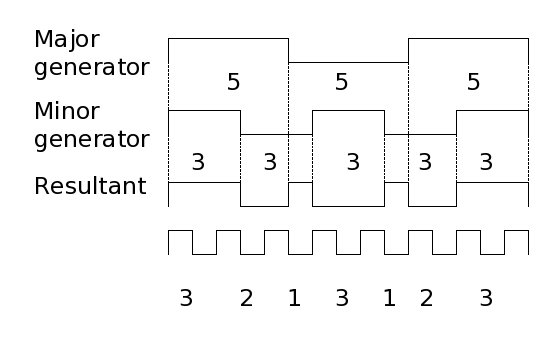 Figure 1. Creating the resultant of 5 and 3
Figure 1 shows two line patterns with units of 5 and units of 3. The lines continue until both lines come down (or “close”) at the same time. The length of each line corresponds to the product of the two generators (5 x 3 = 15). If you draw dotted lines down from where each of the two generator lines change state, you can create a third line that changes state at each of the dotted line points. The lengths of the segments of the third line make up the resultant of the integers 5 and 3 (3, 2, 1, 3, 1, 2, 3).
Schillinger used graph paper to create resultants in his System of Musical Composition. However, another convenient way of creating a resultant is to calculate the modulus of a counter and then calculate a term in the resultant series based on the state of the counter. An algorithm to create the terms in a resultant might resemble:
Read generators from command line
Determine total number of counts for resultant
   (major_generator * minor_generator)
Initialize resultant counter = 0
For MyCounts from 1 to the total number of counts
   Get the modulus of MyCounts to the major and minor generators
   Increment the resultant counter
   If either modulus = 0
     Save the resultant counter to the resultant array
     Re-initialize resultant counter = 0
   End if
End for
From this design, I wrote a short program using the Perl modulus operator (%):
#!/usr/bin/perl
#*******************************************************
#
# FILENAME: result01.pl
#
# USAGE: perl result01.pl major_generator minor_generator
#
# DESCRIPTION:
#    This Perl script will generate a Schillinger resultant
#    based on two integers for the major generator and minor
#    generator.
#
#    In normal usage, the user will input the two integers
#    via the command line. The sequence of numbers representing
#    the resultant will be sent to standard output (the console
#    window).
#
# INPUTS:
#    major_generator - First generator for the resultant, input
#                      as the first calling argument on the
#                      command line.
#
#    minor_generator - Second generator for the resultant, input
#                      as the second calling argument on the
#                      command line.
#
# OUTPUTS:
#    resultant - Sequence of numbers written to the console window
#
#**************************************************************

   use strict;
   use warnings;

   my $major_generator = $ARGV[0];
   my $minor_generator = $ARGV[1];

   my $total_counts   = $major_generator * $minor_generator;
   my $result_counter = 0;
   my $major_mod      = 0;
   my $minor_mod      = 0;
   my $i              = 0;
   my $j              = 0;
   my @resultant;

   print "Generator Total = $total_counts\n";

   while ($i < $total_counts) {
       $i++;
       $result_counter++;
       $major_mod = $i % $major_generator;
       $minor_mod = $i % $minor_generator;
       if (($major_mod == 0) || ($minor_mod == 0)) {
          push(@resultant, $result_counter);
          $result_counter = 0;
       }
       print "$i \n";
       print "Modulus of $major_generator is $major_mod \n";
       print "Modulus of $minor_generator is $minor_mod \n";
   }

   print "\n";
   print "The resultant is @resultant \n";
Run the program with 5 and 3 as the inputs (perl result01.pl 5 3):
Generator Total = 15
1
Modulus of 5 is 1
Modulus of 3 is 1
2
Modulus of 5 is 2
Modulus of 3 is 2
3
Modulus of 5 is 3
Modulus of 3 is 0
4
Modulus of 5 is 4
Modulus of 3 is 1
5
Modulus of 5 is 0
Modulus of 3 is 2
6
Modulus of 5 is 1
Modulus of 3 is 0
7
Modulus of 5 is 2
Modulus of 3 is 1
8
Modulus of 5 is 3
Modulus of 3 is 2
9
Modulus of 5 is 4
Modulus of 3 is 0
10
Modulus of 5 is 0
Modulus of 3 is 1
11
Modulus of 5 is 1
Modulus of 3 is 2
12
Modulus of 5 is 2
Modulus of 3 is 0
13
Modulus of 5 is 3
Modulus of 3 is 1
14
Modulus of 5 is 4
Modulus of 3 is 2
15
Modulus of 5 is 0
Modulus of 3 is 0

The resultant is 3 2 1 3 1 2 3
This result matches the resultant terms as shown in the graph in Figure 1, so it looks like the program generates the correct output.
Creating a Perl Package from a Program
With a working program, you can create a Perl package as a step toward being able to reuse code in a larger application. The initial program has two pieces of input data (the major generator and the minor generator). The single output is the list of numbers that make up the resultant. These three pieces of data could be combined in an object. The program could easily become a subroutine to generate the terms in the resultant. This could be a method in the class contained in the package. Creating a class implies adding a constructor method to create a new object. Finally, there should be some methods to get the major generator and minor generator from the object to use in generating the resultant (see the perlboot and perltoot tutorials for background on object-oriented programming in Perl).
From these requirements, the resulting package might be:
#!/usr/bin/perl
#*******************************************************
#
# Filename: result01a.pl
#
# Description:
#    This Perl script creates a class for a Schillinger resultant
#    based on two integers for the major generator and the
#    minor generator.
#
# Class Name: Resultant
#
# Synopsis:
#
# use Resultant;
#
# Class Methods:
#
#   $seq1 = Resultant ->new(5, 3)
#
#      Creates a new object with a major generator of 5 and
#      a minor generator of 3. These parameters need to be
#      initialized when a new object is created, as there
#      are no methods to set these elements within the object.
#
#   $seq1->generate()
#
#      Generates a resultant and saves it in the ResultList array
#
# Object Data Methods:
#
#   $major_generator = $seq1->get_major()
#
#      Returns the major generator
#
#   $minor_generator = $seq1->get_minor()
#
#      Returns the minor generator
#
#
#**************************************************************

{ package Resultant;
  use strict;
  sub new {
    my $class           = shift;
    my $major_generator = shift;
    my $minor_generator = shift;

    my $self = {Major => $major_generator,
                Minor => $minor_generator,
                ResultantList => []};

    bless $self, $class;
    return $self;
  }

  sub get_major {
    my $self = shift;
    return $self->{Major};
  }

  sub get_minor {
    my $self = shift;
    return $self->{Minor};
  }

  sub generate {
    my $self         = shift;
    my $total_counts = $self->get_major * $self->get_minor;
    my $i            = 0;
    my $major_mod;
    my $minor_mod;
    my @result;
    my $result_counter = 0;

   while ($i < $total_counts) {
       $i++;
       $result_counter++;
       $major_mod = $i % $self->get_major;
       $minor_mod = $i % $self->get_minor;

       if (($major_mod == 0) || ($minor_mod == 0)) {
          push(@result, $result_counter);
          $result_counter = 0;
       }
   }

   @{$self->{ResultList}} = @result;
  }
}

#
# Test code to check out class methods
#

# Counter declaration
my $j;

# Create new object and initialize major and minor generators
my $seq1 = Resultant->new(5, 3);

# Print major and minor generators
print "The major generator is ", $seq1->get_major(), "\n";
print "The minor generator is ", $seq1->get_minor(), "\n";

# Generate a resultant
$seq1->generate();

# Print the resultant
print "The resultant is ";
foreach $j (@{$seq1->{ResultList}}) {
  print "$j ";
}
print "\n";
Execute the file (perl result01a.pl):
The major generator is 5
The minor generator is 3
The resultant is 3 2 1 3 1 2 3
This output text shows the same resultant terms as produced by the first program.
Creating a Perl Module
From a package, you can create a Perl module to make the package fully reusable in an application. Also, you can modify our original test code into a series of module tests to show that the module works the same as the standalone package and the original program.
I like to use the Perl module Module::Starter to create a skeleton module for the package code. To start, install the Module::Starter module and its associated modules from CPAN, using the Perl Package Manager, or some other package manager. To see if you already have the Module::Starter module installed, type perldoc Module::Starter in a terminal window. If the man page does not appear, you probably do not have the module installed.
Select a working directory to create the module directory. This can be the same directory that you have been using to develop your Perl program. Type the following command (though with your own name and email address):
$ module-starter --module=Music::Resultant --author="John Doe" \
    --email=john@johndoe.com
Perl should respond with:
Created starter directories and files
In the working directory, you should see a folder or directory called Music-Resultant. Change your current directory to Music-Resultant, then type the commands:
$ perl Makefile.PL
$ make
These commands will create the full directory structure for the module. Now paste the text from the package into the module template at Music-Resultant/lib/Music/Resultant.pm. Open Resultant.pm in a text editor and paste the subroutines from the package after the lines:
=head1 FUNCTIONS

=head2 function1

=cut
When you paste the package source code, remove the opening brace from the package, so that the first lines appear as:
 package Resultant;
  sub new {
    use strict;
    my $class = shift;
and the last lines of the source appears without the the final closing brace as:
   @{$self->{ResultList}} = @result;
  }
After making the above changes, save Resultant.pm. This is all that you need to do to create a module for your own use. If you eventually release your module to the Perl community or upload it to CPAN, you should do some more work to prepare the module and its documentation (see the perlmod and perlmodlib documentation for more information).
After modifying Resultant.pm, you need to install the module to make it available for other Perl applications. To avoid configuration issues, install the module in your home directory, separate from your main Perl installation.
-
In your home directory, create a lib/ directory, then create a perl/ directory within the lib/ directory. The result should resemble:
/home/myname/lib/perl -
Go to your module directory (Music-Resultant) and re-run the build process with a directory path to tell Perl where to install the module:
$ perl Makefile.PL LIB=/home/myname/lib/perl $
make install
Once this is complete, the module will be installed in the directory.
The final step in module development is to add tests to the .t file templates created in the module directory. The Perl distribution includes several built-in test modules, such as Test::Simple and Test::More to help test Perl subroutines and modules.
To test the module, open the file Music-Resultant/t/00-load.t. The initial text in this file is:
#!perl -T

use Test::More tests => 1;

BEGIN {
    use_ok( 'Music::Resultant' );
}

diag( "Testing Music::Resultant $Music::Resultant::VERSION, Perl $], $^X" );
You can run this test file from the t/ directory using the command:
perl -I/home/myname/lib/perl -T 00-load.t
The -I switch tells the Perl interpreter to look for the module Resultant.pm in your alternate installation directory. The directory path must immediately follow the -I switch, or Perl may not search your alternate directory for your module. The -T switch is necessary because there is a -T switch in the first line of the test script, which turns on taint checking. (Taint checking only works when enabled at Perl startup; perl will exit with an error if you try to enable it later.) Your results should resemble the following(your Perl version may be different).
1..1
ok 1 - use Music::Resultant;
# Testing Music::Resultant 0.01, Perl 5.008006, perl
The test code from the second listing is easy to convert to the format used by Test::More. Change the number at the end of the tests line from 1 to 4, as you will be adding three more tests to this file. The template file has an initial test to show that the module exists. Next, add tests after the BEGIN block in the file:
# Test 2:
my $seq1 = Resultant->new(5, 3);  # create an object
isa_ok ($seq1, Resultant);        # check object definition

# Test 3: check major generator
my $local_major_generator = $seq1->get_major();
is ($local_major_generator, 5, 'major generator is correct' );

# Test 4: check minor generator
my $local_minor_generator = $seq1->get_minor();
is ($local_minor_generator, 3, 'minor generator is correct' );
To run the tests, retype the earlier command line in the Music-Resultant/ directory:
$ perl -I/home/myname/lib/perl -T t/00-load.t
You should see the results:
1..4
ok 1 - use Music::Resultant;
ok 2 - The object isa Resultant
ok 3 - major generator is correct
ok 4 - minor generator is correct
# Testing Music::Resultant 0.01, Perl 5.008006, perl
These tests create a Resultant object with a major generator of 5 and a minor generator of 3 (Test 2), and check to see that the major generator in the object is correct (Test 3), and that the minor generator is correct (Test 4). They do not cover the resultant terms. One way to check the resultant is to add the test code used in the second listing to the .t file:
# Generate a resultant
$seq1->generate();

# Print the resultant
my $j;
print "The resultant is ";
foreach $j (@{$seq1->{ResultList}}) {
  print "$j ";
}
print "\n";
You should get the following results:
1..4
ok 1 - use Music::Resultant;
ok 2 - The object isa Resultant
ok 3 - major generator is correct
ok 4 - minor generator is correct
The resultant is 3 2 1 3 1 2 3
# Testing Music::Resultant 0.01, Perl 5.008006, perl
That’s not valid test output, so it needs a little bit of manipulation. To check the elements of a list using a testing function, install the Test::Differences module and its associated modules from CPAN, using the Perl Package Manager, or some other package manager. To see if you already have the Test::Differences module installed, type perldoc Test::Differences in a terminal window. If the man page does not appear, you probably do not have the module installed.
Once that module is part of your Perl installation, change the number of tests from 4 to 5 on the Test::More statement line and add a following statement after the use Test::More statement:
use Test::Differences;
Finally, replace the code that prints the resultant with:
# Test 5: (uses Test::Differences and associated modules)
$seq1->generate();
my @result   = @{$seq1->{ResultList}};
my @expected = (3, 2, 1, 3, 1, 2, 3);
eq_or_diff \@result, \@expected, "resultant terms are correct";
Now when the test file runs, you can confirm that the resultant is correct:
1..5
ok 1 - use Music::Resultant;
ok 2 - The object isa Resultant
ok 3 - major generator is correct
ok 4 - minor generator is correct
ok 5 - resultant terms are correct
# Testing Music::Resultant 0.01, Perl 5.008006, perl
Summary
There are multiple levels of Perl software development. Once you start to create modules to enable reuse of your Perl code, you will be able to leverage your effort into larger applications. By using Perl testing modules, you can ensure that your code works the way you expect and provide a way to ensure that the modules continue to work as you add more features.
Resources
Here are some other good resources on creating Perl modules:
- Perl Module Mechanics goes into detail about the various files created when you create a module directory.
- Creating (and Maintaining) Perl Modules includes information on coding, documentation, testing, and installation.
- Jose’s Guide for creating Perl modules gives some helpful tips on getting a module ready for CPAN distribution.
Here are some good resources for using Perl testing modules like Test::Simple and Test::More:
- Test::Tutorial gives the basics of using
Test:SimpleandTest::More. - An Introduction to Testing presents the benefits of developing tests and code at the same time, and provides a variety of examples.
Tags
Feedback
Something wrong with this article? Help us out by opening an issue or pull request on GitHub





