


Generating UML and Sequence Diagrams
Imagine yourself in a meeting with management. You’re about to begin your third attempt to explain how to process online credit card payments. After a couple of sentences, you see some eyes glazing over. Someone says, “Perhaps you could draw us a picture.”
Imagine me handling a recent request from my boss. He came in to the bat cave and said (in summary), “We want customers to sign up for email accounts without calling customer service. All the account creation code is in the customer care app.” It didn’t take long to find the relevant web screen, where the CSR presses Save to kick off the account creation, but there sure were a lot of layers between there and the final result. Keeping them in mind is hard enough when I’m deep in the problem. Three months from now, when an odd bug surfaces, it’ll be nearly impossible without the right memory aid.
In both of these cases, the right diagram is the sequence diagram. (I’d show you mine for the situations above, but they’re secret.) Sequence diagrams clearly show the time flow of method or function calls between modules. For complex systems, these diagrams can save a lot of time–like the time you and your fellow programmers spend during initial design, the time spent explaining what’s possible to management, the time you spend remembering how things work when you revisit an old system that needs a new feature, and especially the time it takes a new programmer in your shop to get up to speed.
In short, sequence diagrams help with complex call stacks just as data model diagrams help with complex database schema.
While the sequence diagram is useful to me, I don’t like on-screen drawing tools. Therefore, I wrote the original UML::Sequence to make the drawings for me. With recent help from Dean Arnold, the current version has many nice features and is closer to standards compliance (but, both Dean and I prefer a useful diagram to a compliant one). Using UML::Sequence, you can quickly make proposed diagrams of systems not yet built. You can even run it against existing programs to have it diagram what they actually do.
Reading a Sequence Diagram
If you already know how to read sequence diagrams, you can skip to the next section.
Because most uses of UML involve object-oriented projects, that’s where I’ve drawn my examples. Don’t think that objects are necessary for sequence diagrams. I’ve diagrammed many non-OO programs with it (including some in COBOL).
A simple example will work best for a first look at UML sequence diagrams, so consider rolling two dice. My over-engineered solution gives a nice diagram to discuss. In it, I made each die an object of the Die class and the pair of dice an object of the DiePair class. To roll the dice, I wrote a little script. Here are these pieces:
    package Die;
    use strict;

    sub new {
        my $class = shift;
        my $sides = shift || 6;
        return bless { SIDES => $sides }, $class;
    }

    sub roll {
        my $self       = shift;
        $self->{VALUE} = int( rand * $self->{SIDES} ) + 1;

        return $self->{VALUE};
    }

    1;
The Die constructor takes an optional number of sides for the new die object, but supplies six as a default. It bundles that number of sides into a hash reference, blesses, and returns it.
The roll() method makes a random number and uses it to pick a new value for the die, which it returns.
DiePair is equally scintillating:
    package DiePair;
    use strict;

    use Die;

    sub new {
        my $class     = shift;
        my $self      = {};
        $self->{DIE1} = Die->new( shift );
        $self->{DIE2} = Die->new( shift );

        return bless $self, $class;
    }

    sub roll {
        my $self   = shift;
        my $value1 = $self->{DIE1}->roll();
        my $value2 = $self->{DIE2}->roll();

        $self->{TOTAL}   = $value1 + $value2;
        $self->{DOUBLES} = ( $value1 == $value2 ) ? 1 : 0;

        return $self->{TOTAL}, $self->{DOUBLES};
    }

    1;
The constructor makes two die objects and stores them in a hash reference, which it blesses and returns.
The roll() method rolls each die, storing the value, then totals them and decides whether the roll was doubles. It returns both total and doubles, saving the driver from having to call back for them.
Rather than modeling a real game like craps, I use a small driver, which will simplify the resulting diagram.
    #!/usr/bin/perl
    use strict;

    use DiePair;

    my $die_pair          = DiePair->new(6, 6);
    my ($total, $doubles) = $die_pair->roll();

    print "Your total is $total ";
    print "it was doubles" if $doubles;
    print "\n";
Figure 1 shows the sequence diagram for this driver.
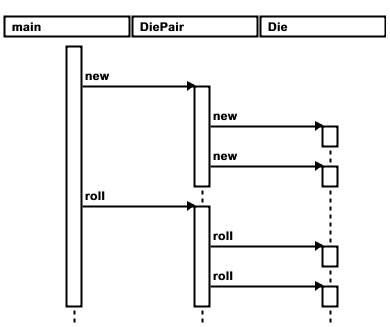 Figure 1. The sequence diagram for the die roller
Each package has a box at the top of the diagram. The script is in the main package (which is always Perl’s default). Time flows from top to bottom. Arrows represent method (or function) calls.
The vertical boxes, or activations, represent the life of a call. Between the activations are dashed lines called the life lines of the objects.
You can see that main begins first (because its first activation is higher than the others). It calls new() on the DiePair class. That call lasts long enough for DiePair’s constructor to call new() on the Die class twice.
After making the objects, the script calls roll() on the DiePar, which forwards the request to the individual dice.
This diagram is unorthodox. The boxes at the top should represent individual instances, not classes. Sometimes I prefer this style because it compacts the diagram horizontally. Figure 2 shows a more orthodox diagram (divergent only in the lack of name underlining).
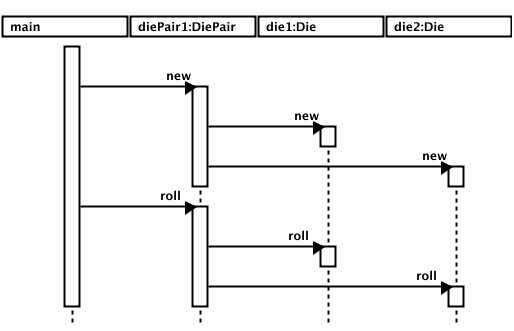 Figure 2. A more orthodox UML diagram
You can see the individual Die objects that the DiePair instance aggregates, because there is now a box at the top for each object (use your imagination when thinking about the driver as an instance). The names do not come from the code; they are sequentially assigned from the class name.
Diagrams like this are especially helpful when many classes interact. For instance, many of them start with a user event (like a button press on a GUI application) and show how the view communicates with the controller and how the controller in turn communicates with the data model.
Another particularly useful application is for programs communicating via network sockets. In their diagrams, each program has a box, and the arrows represent writing on a socket. Note that UML sequence diagrams may also have dashed arrows, which show return values going back to callers. Unless there is something unusual about that value, there is no use to waste space on the diagram for those returns. However, in a network situation, showing the back and forth can be quite helpful. UML::Sequence now has support for return arrows.
Using UML::Sequence
Now that you understand how to read a sequence diagram, I can show you how to make them without mouse-driven drawing tools.
Making diagrams with UML::Sequence is a three-step process:
- Create a program or a text file.
- Use genericseq.pl to create an XML description of the diagram.
- Use a rendering script to turn the XML into an image file.
If the image is in the wrong format for your purposes, you might need an extra step to convert to another format.
Running Perl Programs
Here is how I generated Figure 1 above by running the driver program. If your program is in Perl, you can use this approach (see the next subsection for Java programs).
First, create a file listing the subs you want to see in the diagram:
    DiePair::new
    DiePair::roll
    Die::new
    Die::roll
I called this file roller.methods to correspond to the script’s name, roller. When you make your method list, remember that sequence diagrams are visual space hogs, so pick a short list of the most important methods.
Then, run the program through the genericseq.pl script:
$ genericseq.pl UML::Sequence::PerlSeq roller.methods roller > roller.xml
UML::Sequence::PerlSeq uses the Perl debugger’s hooks to profile the code as it runs, watching for the methods listed in roller.methods. The result is an XML file describing the calls that actually happened during this run.
To turn this into a picture, use one of the image scripts:
$ seq2svg.pl roller.xml > roller.svg
Obviously, seq2svg.pl makes SVG images. If you have no way to view those, get Firefox 1.5, use a tool like the batik rasterizer, or use seq2rast.pl, which makes PNG images directly using the GD module.
If you want diagrams like Figure 2, use UML::Sequence::PerlOOSeq in place of UML::Sequence::PerlSeq when you run genericseq.pl.
Running Java Programs
I wrote UML::Sequence while working as a Java programmer, so I made it work on Java (at least sometimes it works). The process is similar to the above. First, make a methods file:
    ALL
    Roller
    DiePair
    Die
Here I use ALL to mean all methods from the following classes. You can also list full signatures (but they have to be full, valid, and expressed in the internal signature format as if generated by javap).
Then run genericseq.pl with UML::Sequence::JavaSeq in place of UML::Sequence::PerlSeq. Of course, this requires you to have a Java development environment on your machine. In particular, it must be able to find tools.jar, which provides the debugger hooks necessary to watch the calls.
Produce the image from the resulting XML file as shown earlier for Perl programs.
Text File Input
While I pat myself on the back every time I make a sequence diagram of a running program, that’s not always (or even usually) practical. For instance, you might want to show the boss what you have planned for code you haven’t written yet. Alternately, you might have a program that is so complex that no amount of tweaking the methods file will restrict the diagram enough to make it useful.
In these cases, there is a small text language you can use to specify the diagram. It is based on indentation and uses dot notation for method names. Here is a sample:
At Home.Wash Car
    Garage.retrieve bucket
    Kitchen.prepare bucket
        Kitchen.pour soap in bucket
        Kitchen.fill bucket
    Garage.get sponge
    Garage.open door
    Driveway.apply soapy water
    Driveway.rinse
    Driveway.empty bucket
    Garage.close door
    Garage.replace sponge
    Garage.replace bucket
Each line will become an arrow in the final diagram (except the first line). Indentation indicates the call depth. The “class” name comes before the dot and the “method” name after it.
There is no need for a methods file in this case, because presumably you didn’t bother to type things you didn’t care about. You may go directly to running genericseq.pl:
$ genericseq.pl UML::Sequence::SimpleSeq inputfile > wash.xml
Once you have the XML file, render it as before.
Getting Fancy
As I mentioned earlier, Dean Arnold recently added lots of cool features to amaze and impress your bosses and/or clients. In particular, he expanded the legal syntax for text outlines. Here is his sample of car washing with the new features:
AtHome.Wash Car
        /* the bucket is in the garage */
    Garage.retrieve bucket
    Kitchen.prepare bucket
        Kitchen.pour soap in bucket
        Kitchen.fill bucket
    Garage.get sponge
    Garage.checkDoor
            -> clickDoorOpener
        [ ifDoorClosed ] Garage.open door
    * Driveway.apply soapy water
    ! Driveway.rinse
    Driveway.empty bucket
    Garage.close door
    Garage.replace sponge
    Garage.replace bucket
There are several new features here:
- You can include UML annotations by using C-style comments, as shown on the second line of the example. Each annotation attaches to the following line as a footnote (or tooltip, if you install a third-party open source library).
- There is a
->in front ofclickDoorOpener. This becomes an asynchronous message arrow. When->comes between a method and additional text, it indicates that a regular method is returning the value on the righthand side of the arrow. The return appears as a dashed arrow from the called activation back to the caller. ifDoorClosedis in brackets, which mark a conditional in UML. These appear in the diagram in front of the method name.- There is a star in front of
Driveway.apply, which indicates a loop construct in UML. (UML people call this iteration.) - There is an exclamation point in front of
Driveway.rinse, indicating urgency.
In addition to these changes to the outline syntax, both seq2svg.pl and seq2rast.pl now support options to control appearance (including colors) and to generate HTML imagemaps for raster versions of the diagrams. The imagemaps hyperlink diagram elements–columns header and method call names–to supporting documents. For example, clicking on the Garage header will open Garage.html, while clicking on checkDoor will also open Garage.html, but at the #checkDoor anchor.
Summary
UML Sequence diagrams are a great way to see how function or method calls (or network messages) flow through a multi-module application, whether it is object-oriented or not. Using UML::Sequence and its helper scripts, you can make those diagrams without having to point and click in a drawing program.
References
The imagemapped HTML version of car washing is viewable online.
To read more about UML diagrams, check out the aptly named UML Distilled, by Martin Fowler, available from your favorite bookseller.
I recommend Walter Zorn’s JavaScript, DHTML tooltips package to display embedded annotations.
Batik is an Apache project for managing and viewing SVG.
Tags
Feedback
Something wrong with this article? Help us out by opening an issue or pull request on GitHub





