


Using Ajax from Perl
If you’re even remotely connected to web development, you can’t have failed to have heard of Ajax at some point in the last year. It probably sounded like the latest buzzword and was one of those things you stuck on the “must read up on later” pile. While it’s definitely a buzzword, it’s also quite a useful one.
Ajax stands for “Asynchronous JavaScript and XML.” It’s a term coined by Jesse James Garret in “Ajax: A New Approach to Web Applications.” Ignore the football team, they’re mere impostors. ;-)
What does that actually mean? In short, it’s about making your web pages more interactive. At the core, Ajax techniques let you update parts of your web page without reloading the whole page from scratch. This enables some very cool effects. Many people cite Google Maps and Gmail as great examples of what you can do with this, but my favorite bit of Ajax is part of Flickr.
When you log in to Flickr, you can see the photos that you have just uploaded. In this example, it’s something I’ve snapped from my camera while out cycling. Unfortunately, the phone has given it a default filename, which is quite uninformative (Figure 1).
 *Figure 1. The original photo in Flickr*
If you click on the title, it turns into a highlighted text box (Figure 2).
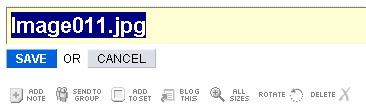 *Figure 2. Editing the photo title*
After changing it to something more suitable, hit the Save button and the screen briefly tells you what it’s doing, before returning to its original form (Figure 3).
 *Figure 3. Finished editing the photo title*
Behind the scenes, Flickr uses JavaScript to make a separate call back to the server to update the details. It does so by using something called XMLHttpRequest. You’ll hear a lot about this as you explore Ajax.
Flickr lets you edit most of the details of your photo without having to go to a separate edit page. It’s a very simple enhancement, but one that makes the whole application much easier to use. It’s well worth getting to know these sorts of techniques in order to spice up your own applications. It’s also worth pointing out that they are enhancements. If you have JavaScript turned off, Flickr will still let you edit the photo details. You just have to use a separate edit screen and a round trip to the server. Using Ajax lets you streamline your users’ experience.
What about all this messy JavaScript? Didn’t we get rid of all that a few years ago? Well, yes. The kind of JavaScript that looks like Perl Golf is long gone, and good riddance. I’m sure you feel the same way about those Perl 4 scripts you wrote a few years back, before you discovered how modules work in Perl 5. Modern JavaScript is a different beast. It’s relatively standard, so the cross-browser problems of the past are gone or greatly diminished. There’s also a renewed focus on making JavaScript as unobtrusive as possible. With all of this change, there’s even an attempt to rebrand JavaScript in the browser as DOM scripting.
There are several bits to Ajax:
- Asynchronous: Making sure that any activity doesn’t lock up the browser while it happens.
- JavaScript: For manipulating the page inside of the web browser.
- XML: For returning data from the server.
Ajax and Perl: CGI::Ajax
You could spend a lot of time figuring out all the pieces of JavaScript on the client side and Perl on the server side in order to work out how to use Ajax in your code. However, this is Perl; we like to be a bit lazy. Thankfully, there’s already a module on CPAN to take the pain out of it: CGI::Ajax.
CGI::Ajax provides a small bit of infrastructure for your CGI programs. You tell it about some of your functions and it sets up JavaScript to call them and return the results to your page. You don’t need to worry about writing the JavaScript to do this, because CGI::Ajax takes care of it. All you have to do is add some JavaScript calls to the functions defined in your script and let CGI::Ajax deal with the plumbing.
The functions that CGI::Ajax creates in JavaScript for you all follow more or less the same pattern. They take two parameters: a list of HTML IDs to get input from, and a second list of HTML IDs to insert the results into. Having ID attributes in your HTML is a prerequisite for enabling this behavior. CGI::Ajax handles querying your web page for the input values and inserting the results when the answer comes back from the server.
By making functions in your CGI script available to the browser, you have the ability to do things that you can’t ordinarily do. For instance, you can look up values in a database, or query the system load average. Anything you can do in Perl that you couldn’t in JavaScript now becomes possible.
Checking Usernames
To explore CGI::Ajax, consider a typical problem. You have a signup page for an application. You have to enter a username and password in order to register with the application. Because this is such a wildly popular application, the username you want is probably taken. Unfortunately, you have to resubmit the entire form and wait for the server to receive it before being told that you can’t have the username fluffykitten. How can CGI::Ajax can help you to solve this?
Start by making a basic CGI script to handle registrations. I’m going to make it very minimal in order to try and focus on the problem at hand. Feel free to embellish it once you have it up and running. I’ll walk through the script below, but you can also download the registration script.
It starts off like all good Perl code, by using the strict and warnings modules, followed by the only other necessary module: CGI.pm. It creates a new CGI object and then calls main() to do the real work.
#!/usr/local/bin/perl
# User registration script.
use strict;
use warnings;

use CGI;
my $cgi  = CGI->new();
main();
Most of main() deals with putting together bits of HTML. For a real-world script, use something like HTML::Template or Template Toolkit instead of putting HTML directly in the script.
The interesting stuff happens in the middle. First it checks for a passed-in user parameter. If so, the code checks that it looks good and records that username in our database. If there were any problems, it mentions those as well. At the end, it sends the created HTML to the browser for display.
sub main {
    my $html = <<HTML;
<html><head>
<title>Ordinary CGI demo</title>
</head><body>
<h1>Signup!</h1>
HTML
    if ( my $user = $cgi->param('user') ) {
        my $err = check_username( $user );
        if ( $err ) {
            $html .= "<p class='problem'>$err</p>";
        } else {
            save_username( $user );
            $html .= "<p>Account <em>$user</em> created!</p>\n";
        }
    }
    my $url = $cgi->url(-relative => 1);
    $html .= <<HTML;
<form action="$url" method="post">
<p>Please fill in the details to create a new Account.</p>
<p>Username: <input type="text" name="user" id="user"/></p>
<p>Password: <input type="password" name="pass" id="pass"/></p>
<p><input type="submit" name="submit" value="SIGNUP"/></p>
</form></body></html>
HTML
    print $cgi->header();
    print $html;
}
In order to implement a user database simply, I decided to store a list of users in a text file, one per line. To check if a username is taken, the code reads the file and compares each line to the passed-in value, case-insensitively. If there are any problems, they’re returned as a string. If the file doesn’t exist, then the code allows any username (this helps to avoid errors the first time you run the script). Again, a real application would probably store users in a database using DBI.
sub check_username {
    my ( $user ) = @_;
    return unless -f '/tmp/users.txt';
    open my $fh, '<', '/tmp/users.txt'
      or return "open(/tmp/users.txt): $!";
    while (<$fh>) {
        chomp;
        return "Username taken!" if lc $_ eq lc $user;
    }
    return;
}
Lastly, in order to save a username, the code must append it onto the end of the file.
sub save_username {
    my ( $user ) = @_;
    open my $fh, '>>', '/tmp/users.txt'
      or die "open(>>/tmp/users.txt): $!";
    print $fh "$user\n";
    close $fh;
    return;
}
Now you should have a script that lets you enter usernames and record them into a file. If you try to enter the same name twice, it will stop you, just like Hotmail. Now imagine that, like Hotmail, you also had to spend a while trying to interpret a captcha image as well. Then, when you’ve finally managed to work out what letter that strange squiggle represents, you hit Submit only to be told that the username you entered doesn’t matter. Then you have to think of another username and try to decipher another set of odd-looking lines. You can see it’s important to tell the user as soon as possible that a username is unavailable.
Enter CGI::Ajax
With a few small modifications, you can make the script use Ajax to check whether the username is valid. That way, any problems will show up immediately. There aren’t many changes. At the top of the script, load the CGI::Ajax module and make a new object. At the same time, register the function check_username() as being callable via Ajax. After that, instead of calling main() directly, call build_html(), passing in a reference to main(). This is a very important part of how CGI::Ajax does its work. It gives CGI::Ajax the ability to intercept the regular flow of control when it needs to. You can also download the Ajax-enabled login code.
#!/usr/local/bin/perl
# User registration script.

use strict;
use warnings;

use CGI;
use CGI::Ajax;

my $cgi  = CGI->new();
my $ajax = CGI::Ajax->new( check_username => \&check_username );
print $ajax->build_html( $cgi, \&main );
The only other structural change is in the main() function. Instead of printing a header and the generated HTML, it now returns the content.
sub main {
    # ...
    # print $cgi->header();
    # print $html;
    return $html;
}
After doing that, CGI::Ajax will send the content to the browser for you.
With the server side of Ajax covered, it’s time to look at the client side. The client needs to take advantage of the features that CGI::Ajax provides. To do this, you need a little bit of JavaScript. If you view the source of this second script, you’ll see that CGI::Ajax has inserted some JavaScript at the end of the <head> section. This is the code that exposes your Perl functions to JavaScript. All that remains is to connect up events that occur in the page to those exposed Perl functions.
If you’ve used JavaScript before, you’re probably thinking about an onchange attribute now. That’s the right thought (to trigger the Ajax call when the username field changes), but it’s not an ideal way of doing things, because it’s intrusive. There’s really no need for there to be JavaScript in the HTML at all. Instead, create a small file to bind the markup to the exposed Perl functions (download binding.js).
It starts off with the addLoadEvent function from Simon Willison. This function takes a piece of JavaScript and runs it when the page has finished loading. The useful bit is that you can call it more than once without ill effects. You could use the window.onload handler directly, but that would remove any previous code that had attached itself. By using addLoadEvent() everywhere, this ceases to be a problem.
// Run code when the page loads.
function addLoadEvent(func) {
  var oldonload = window.onload;
  if (typeof window.onload != 'function') {
    window.onload = func;
  } else {
    window.onload = function() {
      oldonload();
      func();
    }
  }
}
The next bit of JavaScript does the real work. Before doing anything, though, there is a small check to make sure that the browser is capable of handling all of this Ajax. By specifying the name of a browser function (document.getElementById) without the trailing parentheses, JavaScript returns a reference to it. If the function doesn’t exist, it will return null instead. If that function doesn’t exist, the code just returns straight away, resulting in no Ajax features on this page. This is graceful degradation, as it lets the ordinary page behavior occur if the enhanced behavior won’t work.
When the code knows that it’s safe to proceed, it queries the document for our username input element. If it finds it, the code arranges to call the check_username() function every time the username field changes. The two parameters are lists of IDs in the document. The first one is a list of parameters whose values to pass into check_username() on the server. The second list contains IDs where to insert the return values from the function.
// Set up functions to run when events occur.
function installHandlers() {
  if (!document.getElementById) return;
  var user = document.getElementById('user');
  if (user) {
      // When the user leaves this element, call the server.
      user.onchange = function() {
          check_username(['user'], ['baduser']);
      }
  }
}
With installHandlers() defined, all that remains is to ensure that it actually runs when the page loads.
addLoadEvent( installHandlers );
With binding.js completed, you need to make two small changes to the generated HTML. First, include a script tag to actually load it:
<script type="text/javascript" src="binding.js"></script>
Secondly, to create an element with an ID of baduser into which to insert the results. I created an empty emphasis tag just after the username field.
<p>Username: <input type="text" name="user" id="user"/>
<em id="baduser"></em></p>
With that in place, you should be able to register a username, and then watch it fail when you try to register it a second time. See how it’s immediately noticeable that the username is invalid.
Inside CGI::Ajax
Now you know how to use CGI::Ajax to update your web pages dynamically. What actually happens inside to make it all work? You’ve already seen how the JavaScript version of check_username() gathers the values from the input fields and passes them back to your original CGI script. You can see the calls that happen when you insert an extra line into the script, just after you create the CGI::Ajax object.
$ajax->JSDEBUG(1);
With that in place, CGI::Ajax will log each call that it makes to the server at the bottom of your web page. On my server, it looks something like this:
http://localhost/~dom/cgi-ajax/ajax.cgi?fname=check_username&args=dom&user=dom
If you click on the link, you’ll see that it returns the string Username 'dom' taken! and nothing else. It completely ignores the bulk of the program and just sends the result of check_username(). When the main part of the program calls $ajax->build_html(), CGI::Ajax checks for the presence of a parameter called fname. If it finds one, then it checks to see if that function has been registered. If so, it calls it, passing in any args parameters. It then returns the results of that single function back to the browser, completely sidestepping the main program.
CGI::Ajax in the Real World
Ajax is a tool, just like the many others you already have available when programming for the Web. There are places when it’s more or less appropriate to use it, the same as table elements in HTML. The reason I chose username validation as an example is because I think it’s a good example of where Ajax can be used to really add something to an existing web application. Using Ajax to enhance forms, particularly long complicated ones, can work wonders for usability. There are other places, as well. As I pointed out at the start with Flickr, inline editing can be a great boon.
Like all tools, knowing when not to use it is as important as when to use it. Packages like CGI::Ajax make it astonishingly easy to use Ajax, so you need to exercise restraint. It’s all too simple to add a dash of Ajax where perhaps it would be more appropriate to reload the whole page. If you find that you’re updating most of the page with an Ajax call, then it’s more than likely not worth bothering with Ajax at all. Really, the best guideline is to do some usability testing. Think about how your users interact with your application. What’s the best way that you can help them achieve what they are trying to do?
There are several good resources available for deciding when to and not to use Ajax. The most complete appears to be Ajax Patterns, which should arrive as an O’Reilly book at some time. A weblog post from Alex Bosworth gives his opinions on “Ten Places You Must Use Ajax” (even though it’s only really six). Alex also has a good piece on “Ajax Mistakes,” which is also worth paying attention to.
There are also technical reasons to consider when implementing Ajax in your application. You have to realize that any user at all can access the server-side functions that you are exposing, even though you might think of them as internal-only. Your application suddenly has an API. For security or performance reasons, you might want to reconsider what you are exposing (although this advice applies equally well to regular web pages in your application). Also note that the API that you get from CGI::Ajax binds tightly to the internals of your application. If you change the name of an exported function, you have just changed the API. If the API is part of a large, ongoing project, you might wish to consider spending some time looking at more REST-like interfaces instead. These tend to be easier to work with for programmers in other languages.
Now that your site actually has an API, you might want to consider documenting how it works so that your users can build on it. This is something that Flickr has done to great effect. There are now tools that exist that the Flickr folk had never thought about, simply because they let their users get access to an API.
Don’t let all this deter you; you’ve seen how easy it is to add some sparkle to your application. Have a think about how you can make your users’ lives easier.
Tags
Feedback
Something wrong with this article? Help us out by opening an issue or pull request on GitHub





