


Perl Success Story: Client-Side Collection and Reporting
Accurate software inventory management is critical to any organization. Without an accurate software inventory, organizations may either be out of compliance with their vendor licensing agreements or they may be paying extra for licenses that they do not need.
Hitachi Global Storage Technologies (Hitachi GST) formed in 2003 as a result of the strategic combination of Hitachi and IBM’s storage technology businesses. The company offers customers worldwide a comprehensive range of hard disk drives for desktop computers, high-performance servers, and mobile devices. With offices and manufacturing facilities spanning the globe, deployment of the corporate business intelligence (BI) tool suite is extensive. The company uses BI tools throughout the business, from manufacturing to sales and warranty operations, for analysis of data that reside in operational data stores and data warehouses. With each new manufacturing site comes requests for additional licenses.
A Business Intelligence Problem
To avoid unnecessary spending on licenses, the company needs a detailed assessment of both the number and type of licenses actually deployed at the various sites. We operate in a highly competitive environment in the technology industry and can ill afford to continue purchasing unnecessary licenses. An effort was started to determine how we deploy the current pool of licenses. The initial effort to perform a software inventory for the BI tool involved a manual inventory by each site owner or application owner. As expected, the results returned appear to indicate a significant under-licensing with one of the products from the BI suite. Looking at the raw information sent in by each owner, we had speculated that we double-counted some users and that some users may be misreporting the client that they have installed on their system, thus driving up the license count for the respective product.
Based on the preliminary analysis of the information collected, it became evident that we needed to deploy a software inventory tool to assess each workstation and determine what users have actually installed on their machines. The corporate software asset management tool was not a viable option, because it had limited deployment, with some organizations maintaining software inventory using manual methods. The licensing issues of deploying a commercial tool, along with the customizations needed in order to accurately capture the different types of licenses, would be prohibitive from both a time and cost perspective.
In order to generate an accurate license count, the software inventory tool must be able to detect the different types of BI clients that may be installed on a given PC. The release information of each version is also important. We can use this information to determine which users need upgrades to the latest supported release. Our license entitlement limits the number of each type of client from the BI suite that we can deploy across the enterprise. To further complicate matters, there are two different types of client-server tools that use the same binary, with no easy way to distinguish between them by looking at the installed applications listing in Windows. The difference in cost between these two tools is approximately $3,400 per license, so it is imperative that the inventory count is correct for each specific type of client. In addition, a web-based version of the BI tool is available as a plugin. However, the plugin version information is inaccurate in the binary file and the client-server tool version is incomplete in the registry. In preliminary tests of a commercial tool, it was unable to distinguish between the two types of clients and missed the web plugin altogether.
The Design of a Solution
Given this challenge, we had to develop a custom solution to address the problem. I had previously used Perl to develop an automated software delivery and installation solution on the Windows platform, and some of what I had already developed was very similar to what we needed. Leveraging this prior experience reduced the amount of time and effort needed for development of the software inventory solution to address our immediate needs.
The solution criteria that we set forth required that the client inventory tool must be relatively compact and not require any installation. The tool also must be a self-contained executable that a user can download and run on their client. If a tool is difficult to use or install, this severely curtails its adoption and use. The user population is spread across multiple locales, including Japan, South Korea, Taiwan, Singapore, Thailand, the United Kingdom, and the United States, so the tool must be simple to understand and must avoid complex procedures.
Each user also needs to authenticate against the corporate LDAP directory to ensure that their results are accurately recorded and ensure the authenticity of the result. In addition, the inventory results must be collected and stored on a central server to ease management of the inventory process. The results must also be readily accessible to all users and owners so they can see where they stand in comparison to what they had originally reported.
The solution involves a client tool and a server-side application. The combination of the two must authenticate the user against the corporate enterprise directory, inventory the client system, log the results, and record the results in a DB2 back-end database. The data stored in the DB2 back-end database is useful for generating both summary and detail reports via the Web. The specific modules used in the development of the solution included Win32::OLE, Win32::GUI, Win32::File::VersionInfo, Win32::TieRegistry, IO::Socket, CGI, DBI, DBD::DB2, and Net::LDAP.
Building the Client
Development started with the client component first. Because most end users are averse to command-line tools, we had to develop a GUI of sorts to guide the user through the authentication and inventory steps. In addition, the GUI could display error messages to the user. We used Win32::GUI to create the prompts as well as data entry dialog boxes. The GUI captures the information entered and passes it to the central server using HTTP.
All communications between the client and server use HTTP because coding the client to work directly with the LDAP server and the database server would have made troubleshooting any problems experienced by clients in distant locations inordinately difficult. In a situation such as this, we wanted a single controlled point of failure, as depicted in Figure 1. By using HTTP and a central-server-based application to broker requests, we can isolate problems on the client side to only HTTP-related transport issues.
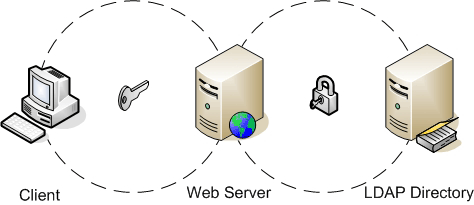 *Figure 1. The authentication process*
The user that is running the inventory tool must authenticate first. This is important, as we need to track who has or has not reported their results based on the initial manual inventory information. We use Net::LDAP to perform the authentication against our LDAP server. The application prompts users for their intranet IDs and passwords, and the client passes this information to the server application so that it can issue a bind against the LDAP server. If the information provided by the user does not yield a successful bind, then the client requests that the user reenter his or her login information. Figure 1 depicts this authentication process.
To authenticate a user via LDAP using Net::LDAP, the server uses the user’s intranet ID to prepare the distinguished name (DN). The DN is the unique identifier for the user’s record in the LDAP directory. In order to perform the initial lookup, the server issues an anonymous bind against the LDAP directory and performs a search using the intranet ID provided. The search returns only the uid, which is the unique record identifier in our implementation of the corporate directory. After the server obtains this, it forms a DN string and issues another bind again using the password provided. If the bind is successful, the return code is undefined and the client proceeds to inventory the system.
Most software applications leave some type of signature in the system registry on a client system, and the BI tool suite deployed at Hitachi GST is no exception. I knew that the software leaves specific signatures when installed on a client system. This information is in the system registry under both the HKEY_LOCAL_MACHINE and HKEY_CURRENT_USER registry entries. We use Win32::TieRegistry to retrieve registry values for determining the type of client that is installed, as well as the binary install location and install key used. Win32::TieRegistry makes it extremely easy to access and modify registry values.
The exact version of the BI client deployed is not accurate in the system registry as we also want to determine the specific point release deployed on the client systems. To achieve this, we use Win32::File::VersionInfo to extract the ProductVersion information from the binary files. Looking at the properties for the file in Windows Explorer for the BI web client binary, we can clearly see that the FileVersion information in the executable is incorrect. We settled on using ProductVersion instead.
In addition to checking the various client versions that may be installed, the tool must also log the client machine serial number. We achieved this by using Win32::OLE and querying information from the Win32_BIOS WMI class. Because some users may have multiple workstations or laptops, we use the machine serial to differentiate multiple entries logged by a single user. The WMI classes yield a wealth of information. Extending the features of this tool simply requires querying additional WMI classes to obtain additional hardware information, such as hard disk, CPU, and memory.
Deploying the Client
Once we developed and tested the client code, we had to package the script itself. Not every client machine has Perl installed. Even if they did have Perl installed, there is no guarantee that the appropriate modules needed by the application are available on the target systems. To package the final script into a single executable file, we used PerlApp from ActiveState’s PDK to compile the script and the associated modules. This allowed us to neatly package and deploy the client as a single executable that users can run from their client system without performing any type of installation or setup.
When all of the requisite information is collected on the client machine, it passes back to the server which records it on the server’s local file system first. This initial logging allows us to capture the client inventory results even if the database server is down. The logged results are easy to import into the database, should there be an unexpected database outage. The CGI module handles the information passed from the client to the server, and DBI and DBD::DB2 handle the database connection. DB2 is the RDBMS of choice in our environment, and we were able to leverage an existing DB2 database environment, which further reduced the time to deployment.
Learning from the Process
All of this information that we collect is of little use if it is not easily accessible for analysis. We also wrote a script to retrieve and format information from the database and present it via the Web. This allowed users and application owners to see the current inventory status of their users, and also help them to determine which users still need to run the client inventory tool to complete their assessment. The script provides summary, detail, and exception views. With reports available through the Web, users can access it from any web browser, regardless of the user’s geographic location. This empowers everyone involved to see the results in near real time.
Upon deployment of the tool, we then recorded and summarized user inventory information automatically. Some interesting results came to light. It became apparent that up to $163,000 worth of additional license purchases were unnecessary, as the existing pool of licenses had not been depleted (as we believed earlier), based on the manual inventory results submitted. Also, with the client inventory tool being an internally developed tool, there were no licensing costs for distributing it at various sites.
The client- and server-side components took two weeks to develop. We formed test cases before writing the code in order to minimize functional issues during final testing in the field, as well as to ensure that we did not overlook critical features and integration issues during the development process. Ultimately, as illustrated in Figure 2, the client and the various server components must work together as an integrated system.
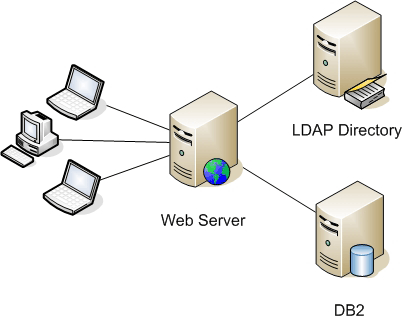 *Figure 2. The client and server working together*
The use of virtual machine software was also instrumental for testing and reduced overall development time. It allowed me to simulate client environments and test client code without having to use a physical machine for each version of the BI application. Using undo disks, I was able to return the VMs to a prior state very quickly without manually uninstalling the various BI tools from the VM. We initially tested the inventory tool in Singapore, Japan, and the U.S., and this testing confirmed that the tool was able to perform well even though users were spread across remote geographic locations.
Although we developed this tool for a one-time inventory of the number of BI clients deployed in the field, it also has a role going forward in helping to maintain an accurate picture of the licenses deployed. Possible enhancements include converting the tool so that we can install it as a service to run without user intervention for periodic updates of client inventory data from identified clients, auto-conversion of licensing from one client class to another, and automatic uninstall of clients, should the user decide that he or she no longer needs it. In staying with the near-zero client management paradigm, we can extend the client to contain auto-update features by checking the local version and verifying it against the latest published version on a central server.
Tags
Feedback
Something wrong with this article? Help us out by opening an issue or pull request on GitHub





