


Making Menus with wxPerl
In a previous article about wxPerl published on Perl.com, Jouke Visser taught the very basics of wxPerl programming. In this article, I will continue with Jouke’s work, explaining how to add menus in our wxPerl applications. I will cover the creation, editing, and erasure of menus with the Wx::Menu and Wx::MenuBar modules, and also will show examples of their use.
Conventions
I assume that you understand the wxPerl approach to GUI programming, so I won’t explain it here. The following code is the base for the examples in this article:
use strict;
use Wx;

package WxPerlComExample;

use base qw(Wx::App);

sub OnInit {
    my $self  = shift;
    my $frame = WxPerlComExampleFrame->new(undef, -1, "WxPerl Example");

    $frame->Show(1);
    $self->SetTopWindow($frame);

    return 1;
}

package WxPerlComExampleFrame;

use base qw(Wx::Frame);

use Wx qw(
    wxDefaultPosition wxDefaultSize wxDefaultPosition wxDefaultSize wxID_EXIT
);

use Wx::Event qw(EVT_MENU);

our @id = (0 .. 100); # IDs array

sub new {
    my $class = shift;
    my $self  = $class->SUPER::new( @_ );

    ### CODE GOES HERE ###

    return $self;
}

### PUT SUBROUTINES HERE ###

package main;

my($app) = WxPerlComExample->new();

$app->MainLoop();
@id is an array of integer numbers to use as unique identifier numbers. In addition, the following definitions are important:
- Menu bar: The bar located at the top of the window where menus will appear. This is a particular instance of Wx::MenuBar.
- Menu: A particular instance of Wx::Menu.
- Item: An option inside of a (sub)menu.
A Quick Example
Instead of wading through several pages of explanation before the first example, here is a short example that serves as a summary of this article. Note that I have divided it in two parts. Add this code to the base code in the WxPerlComExampleFrame constructor:
# Create menus
my $firstmenu = Wx::Menu->new();
$firstmenu->Append($id[0], "Normal Item");
$firstmenu->AppendCheckItem($id[1], "Check Item");
$firstmenu->AppendSeparator();
$firstmenu->AppendRadioItem($id[2], "Radio Item");

my $secmenu   = Wx::Menu->new();
$secmenu->Append(wxID_EXIT, "Exit\tCtrl+X");

# Create menu bar
my $menubar   = Wx::MenuBar->new();
$menubar->Append($firstmenu, "First Menu");
$menubar->Append($secmenu, "Exit Menu");

# Attach menubar to the window
$self->SetMenuBar($menubar);
$self->SetAutoLayout(1);

# Handle events only for Exit and Normal item
EVT_MENU( $self, $id[0], \&ShowDialog );
EVT_MENU( $self, wxID_EXIT, sub {$_[0]->Close(1)} );
Insert the following code into the base code at the line ### PUT SUBROUTINES HERE ###.
use Wx qw(wxOK wxCENTRE);

# The following subroutine will be called when you click in the normal item

sub ShowDialog {
  my($self, $event) = @_;
  Wx::MessageBox( "This is a dialog",
                  "Wx::MessageBox example",
                   wxOK|wxCENTRE,
                   $self
               );
}
Run this example to see something like Figures 1 and 2.
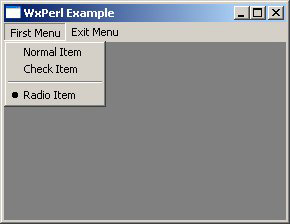 *Figure 1. A menu with complex sub-items*
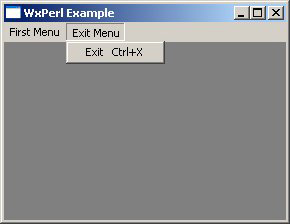 *Figure 2. A menu with a single sub-item*
Programming Menus
To add a menu to your wxPerl application, you must know how to use two Perl modules that come with WxPerl: Wx::MenuBar and Wx::Menu. Wx::MenuBar creates and manages the bar that contains menus created with Wx::Menu. There is also a third module involved: Wx::MenuItem. This module, as its name implies, creates and manages menu items. You usually don’t need to use it, because almost all of the operations you need for a menu item are available through Wx::Menu methods.
Using Wx::Menu
Creating a menu with Wx::Menu is as easy as:
my $menu = Wx::Menu->new();
Now $menu is a Wx::Menu object. WxPerl has five types of items. The first is the normal item, upon which you can click to get a response (a dialog or something else). The second is the check item, which has the Boolean property of being checked or not (independent of another check items). The third item is the radio item, which is an “exclusive check item;” if you check a particular radio item, other radio items in its radio group get unchecked instantly. The fourth type of item is the separator, which is just a straight line that acts as a barrier that separates groups of similar items inside of a menu. The fifth type is the submenu, an item that expands another menu when the mouse cursor is over it.
Setting Up Menu Items
To create a normal item for your menu, write:
$menu->Append($id, $label, $helpstr);
where $id is an unique integer that identifies this item, $label is the text to display on the menu, and $helpstr is a string to display in the status bar. (This last argument is optional.) Note that every menu item must have an unique identifier number in order to be able to operate with this item during the rest of the program. (From now on, $id will denote the unique identifier number of a menu item.)
To create a check or radio item, the methods are analogous to Append–AppendCheckItem and AppendRadioItem, respectively. Add a separator with the AppendSeparator method; it does not expect arguments. Create a submenu with the AppendSubMenu method:
$menu->AppendSubMenu($id, $label, $submenu, $helpstr);
where $submenu is an instance to another Wx::Menu object. (Don’t try to make that a submenu be a submenu of itself, because the Universe will crash or, in the best case, your program won’t execute at all.)
While append methods add menu items in the last position of your menus, Wx::Menu gives you methods to add menu items at any position you want. For instance, to add a normal item at some position in a menu:
$menu->Insert($pos, $id, $label, $helpstr);
where $pos is the position of the item, starting at 0. To add a radio item, check item, or separator, use the InsertRadioItem, InsertCheckItem, or InsertSeparator methods. As usual, the latter takes no arguments. To insert a submenu, use the InsertSubMenu method:
$menu->InsertSubMenu($pos, $id, $label, $submenu, $helpstr);
You can also insert an item at the first position by using the Prepend method:
$menu->Prepend($id, $label, $helpstr);
PrependRadioItem, PrependCheckItem, and PrependSeparator methods are also available. As you might expect, there’s a PrependSubMenu method that works like this:
$menu->PrependSubMenu($id, $label, $submenu, $helpstr);
Sometimes, a menu grows to include too many menu items, and then it’s impractical to show them all. For this problem, Wx::Menu has the Break method. When called, it causes Wx to place subsequently appended items into another column. Call this method like so:
$menu->Break();
Menu Item Methods
Once you have created your items, you need some way to operate on them, such as finding information about them through their identifier numbers, getting or setting their labels or help strings, enabling or disabling them, checking or unchecking them, or removing them. For example, you may want to retrieve some specific menu item in some point of your program. To do this, use the FindItem method in either of two ways:
my $menuitem_with_the_given_id = $menu->FindItem($id);
my ($menuitem, $submenu)        = $menu->FindItem($id);
where $menuitem is the corresponding Wx::MenuItem object with the identifier $id, and $submenu is the (sub)menu to which $menuitem belongs. You can also retrieve a menu item through the FindItemByPosition method (but remember that positions start at 0):
my $menuitem = $menu->FindItemByPosition($pos);
Wx::Menu provides methods to get or set properties of menu items. To set a property, there are two methods: SetLabel and SetHelpString. A SetLabel call might be:
$menu->SetLabel($id, $newlabel);
SetHelpString works similarly:
$menu->SetHelpString($id, $newhelpstr);
To retrieve the label or help string of a particular item, use the GetLabel and GetHelpString methods. Both methods expect the menu item identifier number as the sole argument.
Every menu item has an enabled property that makes an item available or unavailable. By default, all items are enabled. To enable or disable a particular menu item, use the Enable method:
$menu->Enable($id, $boolean);
where $boolean is 0 or 1, depending if you want to disable or enable it, respectively. Maybe your next question is how to check if a menu item is enabled; use the IsEnabled method:
$menu->IsEnabled($id);
This returns TRUE or FALSE, depending on the status of the menu item.
Radio items and check items have the checked property that indicates the selection status of the item. By default, no check item is checked at the start of the execution of your program. For radio items, the first one created is checked at the start of execution. Use the Check method to check or uncheck a radio or check item:
$menu->Check($id, $boolean);
To determine if a menu item is checked, use IsChecked:
$menu->IsChecked($id);
This method, as does IsEnabled, returns TRUE or FALSE.
It’s also possible to get the number of menu items your menu has. For this, use the GetMenuItemCount method:
$menu->GetMenuItemCount();
note that if @args is the argument’s array, then $menu->Append(@args) and $menu->Insert($menu->GetMenuItemCount(), @args) are the same.
Finally, it’s important to know that there are three ways to remove an item from a menu (honoring Larry Wall’s phrase: “There’s more than one way to do it”). The first is the Delete method, which just kills the menu item without compassion:
$menu->Delete($id);
This method returns nothing. Be careful–WxWidgets documentation says that the Delete method doesn’t delete a menu item that’s a submenu. Instead, the documentation recommends that you use the Destroy method to delete a submenu. In wxPerl, this isn’t true. Delete is certainly capable of deleting a submenu, and is here equivalent to the Destroy method. I don’t know the reason for this strange behavior.
The Destroy method looks like this:
$menu->Destroy($id);
If you want to remove an item but not destroy it, then the Remove method is for you. It allows you to store the menu item that you want to delete in a variable for later use, and at the same time delete it from its original menu. Use it like so:
my $removed_item = $menu->Remove($id);
Now you have your menu item with the identifier $id in the $removed_item variable (it now contains a Wx::MenuItem object). You can now use this variable to relocate the removed item into another menu with the append methods. For example:
$other_menu->Append($removed_item);
does the same thing as:
$other_menu->Append($id_removed_item, $title_removed_item,
    $helpstr_removed_item);
but in a shorter way.
Finally, it’s useful to be able to remove a submenu’s menu item. You can’t use the Destroy, Delete, or Remove methods, because they don’t work. Instead, you need to do something like this:
my ($mitem, $submenu) = $menu->FindItem($mitem_id);
where $mitem_id is the identifier number of the submenu’s menu item you’re looking for. $submenu is a Wx::Menu object, just as $menu is, and hence you can use all the methods mentioned here, so the only thing you have to do to remove $mitem from $submenu is:
$submenu->Delete($mitem_id);
As the good reader that I am sure you are, you already have realized that this isn’t the only thing you can do with the $submenu object. In fact, you can now add new menu items to your submenu, delete another menu item, and in general do everything mentioned already.
Using Wx::MenuBar
You have created your menus and obviously want to use them. The last step to get the job done is to create the menu bar that will handle your menus. When you want to create a menu bar, the first step is to enable your code to handle menu events. This is the job of the Wx::Event module:
use Wx::Event qw(EVT_MENU)
Now create a Wx::MenuBar object:
my $menubar = Wx::MenuBar->new();
This object will contain all of the menus that you want to show on your window. To associate a menu bar with a frame, call the SetMenuBar method from Wx::Frame:
$self->SetMenuBar($menubar);
where $self is the Wx::Frame object inherited in WxPerlComExampleFrame’s constructor. Note that if your application has MDI characteristics, or has many windows, then you have to take in account that Wx first sends menu events to the focused window. (I won’t cover this issue in this article, so for more information, review the WxWidgets documentation.) Finally, be sure to call the EVT_MENU subroutine as many times as you have menu items that execute some action when clicked:
EVT_MENU($self, $menu_item_id, \&subroutine);
where $self is the object of your package’s new method, $menu_item_id is the unique identifier of the menu item involved, and subroutine is the name of the subroutine that will handle the click event you want to catch.
Setting Up Menus
The first thing to do once you have created your menu bar is to attach your menus to the menu bar. There are two methods for this: Append and Insert. Append, as you might expect, attaches a menu in the last position:
$menubar->Append($menu, $label);
where $menu is the menu created in the previous section and $label is the name to display for this menu in the menu bar. To insert a menu in an arbitrary position, use the Insert method:
$menubar->Insert($pos, $menu, $label);
where $pos is the position of your menu, starting at 0.
Menu Methods
Wx::MenuBar provides some methods that are also present in Wx::Menu and work in the same way. This methods are Check, Enable, FindItem, GetLabel, GetHelpString, SetLabel, SetHelpString, IsChecked, and IsEnabled. Besides these methods, Wx::MenuBar has its own set of methods to manage the properties of the menu bar. For example, as a menu item, a menu has its own enabled property, which you toggle with the EnableTop method:
$menubar->EnableTop($pos, $boolean);
where $pos is the position of your menu (starting at 0) and $boolean is TRUE or FALSE, depending on whether you want that menu enabled. Note that you can use this method only after you attach your menu bar to the window through the SetMenuBar method.
Wx::MenuBar has methods to retrieve an entire menu or menu item given its title or (menu title, menu item label) pair, respectively. In the first case, use the code:
$menu_with_the_given_title = $menubar->FindMenu($title);
In the second case:
$menu_item = $menubar->FindMenuItem($menu_title, $menu_item_label);
In both cases, the returned variables are Wx::Menu objects. You can also retrieve a menu if you provide its position (starting at 0):
$menu_with_the_given_pos = $menubar->GetMenu($pos);
As in the Wx::Menu case, Wx::MenuBar provides methods to set or get the label of a specific menu and to retrieve the number of menus in a menu bar. Those methods are SetLabelTop, GetLabelTop, and GetMenuCount respectively. Use them like this:
$menu->SetLabelTop($pos, $label);
my $menu_label = $menu->GetLabelTop($pos);
my $num_menu   = $menu->GetMenuCount();
where $pos is the position of the menu and $label is the new label that you want to put on your menu. Note that GetLabelTop’s result doesn’t include accelerator characters inside the returned string.
Finally, Wx::MenuBar gives two more choices to remove a menu. The first method is Replace, which replaces it with another menu:
$menubar->Replace($pos, $new_menu, $label);
where $pos is the position of the menu to remove, $new_menu is the new menu that will be in the $pos position, and $label is the label to display on the menu bar for $new_menu. The second choice is to remove a menu, just by removing it with the Remove method:
my $removed_menu = $menubar->Remove($pos);
Remove returns the $removed_menu object, so if you need it in the future, it’ll be still there waiting for you.
Example
With all of that explained, I can show a full, working example. As before, add this code to the base code in the blank spot in the WxPerlComExampleFrame constructor.
# Create menus
# Action's sub menu
my $submenu = Wx::Menu->new();
$submenu->Append($id[2], "New normal item");
$submenu->Append($id[3], "Delete normal item");
$submenu->AppendSeparator();
$submenu->Append($id[4], "New check item");
$submenu->Append($id[5], "Delete check item");
$submenu->AppendSeparator();
$submenu->Append($id[6], "New radio item");
$submenu->Append($id[7], "Delete radio item");

# Disable items for this submenu
for(2..7) {
    $submenu->Enable($id[$_], 0);
}

# Actions menu
my $actionmenu = Wx::Menu->new();
$actionmenu->Append($id[0], "Create Menu"); # Create new menu
$actionmenu->Append($id[1], "Delete Menu"); # Delete New Menu
$actionmenu->AppendSeparator();
$actionmenu->AppendSubMenu($id[100], "New Item", $submenu); # Create item submenu
$actionmenu->AppendSeparator();
$actionmenu->Append(wxID_EXIT, "Exit\tCtrl+X"); # Exit

# At first, disable the Delete Menu option
$actionmenu->Enable($id[1], 0);

# Create menu bar
$self->{MENU} = Wx::MenuBar->new();
$self->{MENU}->Append($actionmenu, "Actions");

# Attach menubar to the window
$self->SetMenuBar($self->{MENU});
$self->SetAutoLayout(1);

# Handle events
EVT_MENU($self, $id[0], \&MakeActionMenu);
EVT_MENU($self, $id[1], \&MakeActionMenu);
EVT_MENU($self, $id[2], \&MakeActionNormal);
EVT_MENU($self, $id[3], \&MakeActionNormal);
EVT_MENU($self, $id[4], \&MakeActionCheck);
EVT_MENU($self, $id[5], \&MakeActionCheck);
EVT_MENU($self, $id[6], \&MakeActionRadio);
EVT_MENU($self, $id[7], \&MakeActionRadio);

EVT_MENU($self, wxID_EXIT, sub {$_[0]->Close(1)});
This code creates a menu called Actions with the following options inside:
- Create Menu: When a user clicks this option, the program creates a new menu called New Menu at the right side of the Actions menu. The Create Menu option is enabled by default, but creating the menu disables this option.
- Delete Menu: Deletes the menu created with Create Menu. This option is disabled by default and is enabled when New Menu exists.
- New normal item: This option creates the Normal item option on New Menu when it exists. It is disabled by default.
- Delete normal item: Deletes Normal item when it exists. It is disabled by default.
- New check item: Creates the Check item option on New Menu when it exists. It is disabled by default. Check item is unchecked by default.
- Delete check item: Deletes Check item when it exists. It is disabled by default.
- New radio item: Creates the Radio item option on New Menu when it exists. It is disabled by default. Radio item is checked by default.
- Delete radio item: Deletes Radio item when it exists. It is disabled by default.
- Exit: Exits the program.
Once the code has created the menu, it attaches the menu to the menu bar saved on $self->{MENU}, then calls the EVT_MENU subroutine eight times to handle all of the menu events from Action’s menu items. Add the following code to the base code where it says ### PUT SUBROUTINES HERE ###:
# Subroutine that handles menu creation/erasure
sub MakeActionMenu {
    my($self, $event) = @_;

    # Get Actions menu
    my $actionmenu    = $self->{MENU}->GetMenu(0);

    # Now check if we have to create or delete the New Menu
    if ($self->{MENU}->GetMenuCount() == 1) {
        # New Menu doesn't exist

        # Create menu
        my $newmenu = Wx::Menu->new();
        $self->{MENU}->Append($newmenu, "New Menu");

        # Disable and Enable options
        $actionmenu->Enable($id[0], 0); # New menu
        $actionmenu->Enable($id[1], 1); # Delete menu
        $actionmenu->Enable($id[2], 1); # New normal item
        $actionmenu->Enable($id[3], 0); # Delete normal item
        $actionmenu->Enable($id[4], 1); # New check item
        $actionmenu->Enable($id[5], 0); # Delete check item
        $actionmenu->Enable($id[6], 1); # New radio item
        $actionmenu->Enable($id[7], 0); # Delete radio item
    } else {
        # New Menu exists

        # Remove menu
       $self->{MENU}->Remove(1);

        # Enable and disable options
        $actionmenu->Enable($id[0], 1);

        for(1..7) {
               $actionmenu->Enable($id[$_], 0);
        }
    }

    return 1;
}

# Subroutine that handles normal item creation/erasure
sub MakeActionNormal {
    my($self, $event) = @_;
    # Check if New Menu exists
    if($self->{MENU}->GetMenuCount() == 2) {
        # New menu exists

        # Get Action menu
        my $actionmenu = $self->{MENU}->GetMenu(0);
        my $newmenu    = $self->{MENU}->GetMenu(1);

        # Check if we have to create or delete a menu item
        if($actionmenu->IsEnabled($id[2])) {
            # Create normal menu item
            $newmenu->Append($id[50], "Normal item");

            # Disable and Enable options
            $actionmenu->Enable($id[2], 0);
            $actionmenu->Enable($id[3], 1);
        } else {
            # Delete menu item
               $newmenu->Delete($id[50]);

            # Enable and disable options
            $actionmenu->Enable($id[2], 1);
            $actionmenu->Enable($id[3], 0);
        }
    }

    return 1;
}

# Subroutine that handles check item creation/erasure
sub MakeActionCheck {
    my($self, $event) = @_;

    # Check if New Menu exists
    if($self->{MENU}->GetMenuCount() == 2) {
        # New menu exists

        # Get Action menu
        my $actionmenu = $self->{MENU}->GetMenu(0);
        my $newmenu    = $self->{MENU}->GetMenu(1);

        # Check if we have to create or delete a menu item
        if($actionmenu->IsEnabled($id[4])) {
            # Create check item
               $newmenu->AppendCheckItem($id[51], "Check item");

           # Disable and Enable options
           $actionmenu->Enable($id[4], 0);
           $actionmenu->Enable($id[5], 1);
        } else {
           # Delete menu item
           $newmenu->Delete($id[51]);

              # Enable and disable options
              $actionmenu->Enable($id[4], 1);
              $actionmenu->Enable($id[5], 0);
        }
    }

    return 1;
}

# Subroutine that handles radio item creation/erasure

sub MakeActionRadio {
    my($self, $event) = @_;

    # Check if New Menu exists
    if($self->{MENU}->GetMenuCount() == 2) {
        # New menu exists

        # Get Action menu
        my $actionmenu = $self->{MENU}->GetMenu(0);
        my $newmenu    = $self->{MENU}->GetMenu(1);

        # Check if we have to create or delete a menu item
        if ($actionmenu->IsEnabled($id[6])) {
               # Create radio item
              $newmenu->AppendRadioItem($id[52], "Radio item");

              # Disable and Enable options
              $actionmenu->Enable($id[6], 0);
              $actionmenu->Enable($id[7], 1);
        } else {
              # Delete menu item
              $newmenu->Delete($id[52]);

              # Enable and disable options
              $actionmenu->Enable($id[6], 1);
              $actionmenu->Enable($id[7], 0);
        }
    }

    return 1;
}
The MakeActionMenu subroutine handles events for the New Menu and Delete Menu items. It first gets the Actions menu and checks whether the New Menu exists by retrieving the number of menus attached to the $self->{MENU} menu bar. If the new menu doesn’t exist, the number of menus in the menu bar is equal to 1, and the subroutine then creates New Menu. If it exists, the subroutine deletes New Menu.
The MakeActionNormal, MakeActionCheck, and MakeActionRadio subroutines are almost identical. They differ only in the involved identifier numbers. These subroutines handle events for New normal item, Delete normal item, New check item, Delete check item, New radio item, and Delete radio item, respectively. They first check if New Menu exists (the number of menus attached to the menu bar is equal to 2). If so, they check if the options to create normal, check, or radio items are enabled, respectively. If the corresponding option is enabled, then the corresponding item doesn’t exist on New Menu, and the subroutine creates it. If the option to create an item is disabled, then that item exists on New Menu and hence it must be deleted. If New Menu doesn’t exist, the subroutines do nothing. Figure 3 shows how there are no options available if New Menu does not exist, and Figure 4 shows New Menu with two options added.
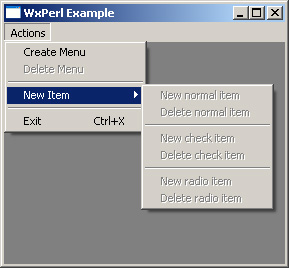 *Figure 3. No available options without New Menu*
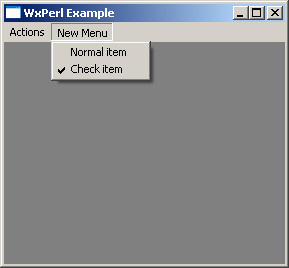 *Figure 4. New Menu has menu options*
Conclusion
As this article has shown, menu programming with wxPerl is an extremely simple task. Wx::MenuBar and Wx::Menu’s methods are very easy to use and remember. If you understood this article, you can do anything possible with menus in your wxPerl programs.
I have covered almost all of the available methods in Wx::Menu and Wx::MenuBar. I left out some methods related to pop-up menus, but I hope to cover these topics in future articles. WxPerl is a really great module, but its lack of adoption is due to its severe lack of documentation. This situation must be reversed, and this article is a small contribution to that cause.
See Also
- WxMenu tutorial and WxMenuBar tutorial by Julian Smart, Robert Roebling, Vadim Zeitlin, Robin Dunn, et al.
- “Adding a Menu Bar,” by David Beech.
- “wxPerl: Another GUI for Perl,” by Jouke Visser.
Tags
Feedback
Something wrong with this article? Help us out by opening an issue or pull request on GitHub






