


Perl Needs Better Tools
Perl is in danger of becoming a fading language–new programmers are learning Java and Python in college, and companies like Google hardly use Perl at all. If you are afraid that Perl may be in danger of becoming irrelevant for medium-to-large projects, then read on.
The Scary Part
I have discussed the future of Perl with managers from companies that currently use it and find that they worry about the future of Perl. One company I spoke with here in San Francisco is rewriting their core application in Java. Another company worries they will not be able to find new Perl programmers down the road. Yet another uses Perl for major projects, but suffers from difficulty in refactoring their extensive code base.
There are many reasons why companies care about the future of Perl. I offer a part of a solution: better tools for Perl can be a major part of keeping Perl relevant and effective as the primary language for medium and large projects.
When measuring the effectiveness of a development environment (people, language, tools, processes, etc.), a key measure is how expensive and painful it is to make changes to existing code. Once a project or system has grown to thousands of lines of code in dozens (or hundreds) of modules, the cost of making changes can escalate to the point where the team is afraid to make any significant change. Excellent tools are one of the ways to avoid this unhappy situation, or at least reduce its impact. Other factors are excellent processes and, of course, excellent people.
21st-Century Integrated Development Environments for Perl
I propose that more, high-quality development tools will help keep Perl relevant and alive in medium and large project environments. My focus in this article is on IDEs, or Integrated Development Environments, and primarily those with a graphical interface.
An IDE is an integrated set of tools for programming, combining a source code editor with a variety of other tools into a single package. Common features of modern IDEs include refactoring support, version control, real-time syntax checking, and auto-completion of code while typing.
I want to make it clear right at the outset that a team of highly skilled Perl programmers, using only tools that have been around for years (such as emacs, vi, cvs, and make) can and do build large, sophisticated, and successful projects. I am not worried about those programmers. I am worried about the larger population of programmers with one to five years of experience, and those who have not yet begun to program: the next generation of Perl programmers.
Great tools will not make a bad programmer into a good programmer, but they will certainly make a good programmer better. Unfortunately, the tools for Perl are years behind what is available for other languages, particularly Java.
One powerful example is the lack of graphical IDEs for Perl with excellent support for refactoring. Several IDEs for Java have extensive refactoring support. Only one for Perl, the EPIC plugin for Eclipse, supports even a single refactoring action.
For an example of how good IDEs have inspired at least one Perl developer, see Adam Kennedy’s Perl.com article on his new PPI module and Scott Sotka’s Devel::Refactor module (used in EPIC).
I acknowledge that a graphical IDE is not the be-all of good tools. Just as some writers reject word processors in favor of typewriters or hand-written manuscripts, some programmers reject graphical IDEs and would refuse a job that required them to use one. Not everyone has (nor should have) the same tool set, and there are things a pencil can do that vi and emacs will never do. That said, IDEs have wide use in businesses doing larger projects, and for many programmers and teams they provide major increases in productivity.
Another important point is that while this article discusses over a dozen specific tools or features, having all the tools in a single package produces the biggest value. An IDE that provides all of these features in a single package that people can easily install, easily extend, and easily maintain across an entire development team has far more value than the sum of its parts.
There is a big win when the features provided by an IDE immediately upon installation include all or almost all of the tools and features discussed here and where the features “know” about each other. For example, it is good if you enter the name of a non-existent subroutine and the real-time syntax checker catches this. It is much better if the code-assist feature then pops up a context menu offering to create a stub for the subroutine or to correct the name to that of an existing similar subroutine or method from another class that is available to the current file. (This is standard behavior for some Java IDEs.)
What Would a 21st-Century Perl Tool Set Contain?
Perl needs a few great IDEs–not just one, but more than one so that people have a diverse set to choose from. Perl deserves and needs a few great IDEs that lead the pack and set the standard for IDEs in other languages.
I am well aware that the dynamic nature of Perl makes it harder to have a program that can read and understand a Perl program, especially a large and complex one, but the difficulty in comprehending a Perl program makes the value of such a tool all the greater, and I have faith that the Perl community can overcome some of the built-in challenges of Perl. Indeed, it is among the greatest strengths of Perl that Perl users can adapt the language to their needs.
A great Perl IDE will contain at least the following, plus other features I haven’t thought of. (And, of course, there must be many of those!)
- A syntax-coloring text editor.
- Real-time syntax-checking to catch and display syntax errors as you type.
- Version control integration to check out and compare code using CVS, Subversion, etc.
- A code-assist editor, to provide a list of methods when you type in an object reference, for example.
- Excellent refactoring support.
- A tree view of source files and resources.
- Support for creating and running unit tests.
- Language-specific help.
- Real-time display of debugging results.
- Automatic code reformatting.
- Seamless handling of multiple languages (such as Perl and C, Perl and Java, Perl and PHP, or Perl and Python).
- Automated build and test support.
Most of the screen shot examples in this article use the EPIC Perl IDE. At present, it has the largest amount of the features on my list (although it certainly doesn’t have all of them).
Syntax-Coloring Text Editor
Most of you have probably seen this. It is available under vim, emacs, BBEdit, and TextPad. Just about every decent text editor will colorize source code so that keywords, operators, variables, etc., each have their own color, making it easier to spot syntax errors such as forgetting to close a quote pair.
Real-Time Syntax Checking
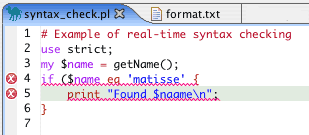 *Figure 1. Real-time syntax checking*
The IDE in Figure 1 shows that line 4 has an error because of the missing ) and that line 5 has an error because there is no declaration of $naame (and use strict is in effect).
A key point here is that the IDE shows these errors right away, before you save and compile the code. (In this example, the EPIC IDE lets you specify how often to run the syntax check, from 0.01 to 10.00 seconds of idle time, or only on demand.)
As nice as this is, it would be even better if the IDE also offered ways to fix the problem, for example, offering to change $naame to $name. Figure 2 shows an IDE that does exactly that; unfortunately, for Java, not Perl.
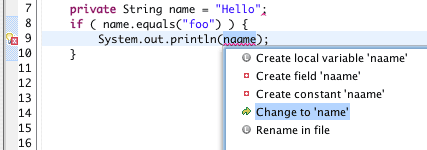 *Figure 2. Syntax help from the IDE*
It would be great if Perl IDEs offered this kind of help.
Version Control Integration
All non-insane large projects use version control software. The most common version control software systems are probably CVS, Perforce, Subversion, and Visual SourceSafe. Figure 3 shows an IDE comparing the local version of a file to an older version from the CVS repository.
|
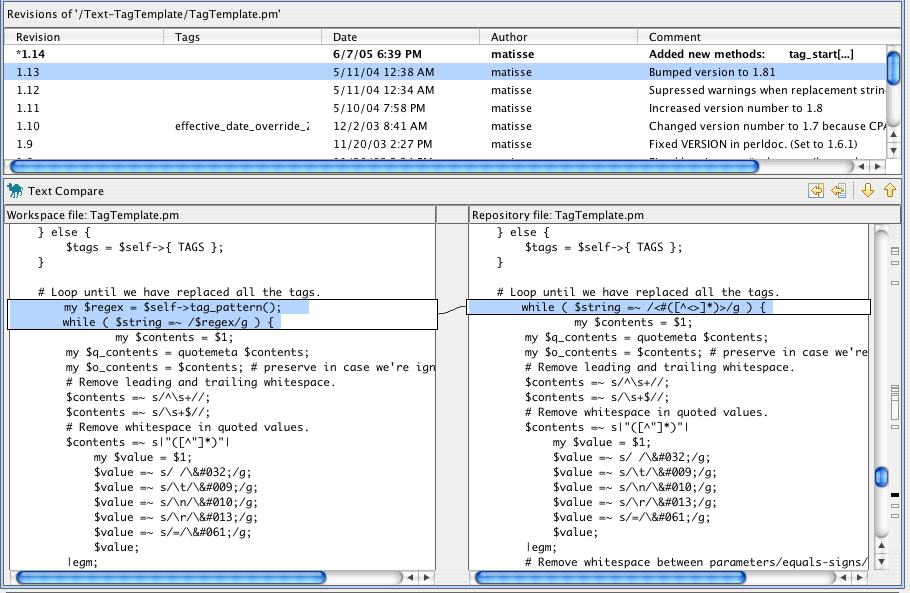
CVS integration is available in many modern code editors, including emacs, vim, and BBEdit, as well as graphical IDEs such as Eclipse and Komodo Pro. Subversion integration is available as a plugin for Eclipse; Komodo Pro supports Perforce and Subversion.
A Code-Assist Editor
Suppose that you have just typed in an object reference and want to call a method on the object, but you are not sure what the method name is. Wouldn’t it be nice if the editor popped up a menu listing all of the methods available for that object? It might look something like Figure 4.
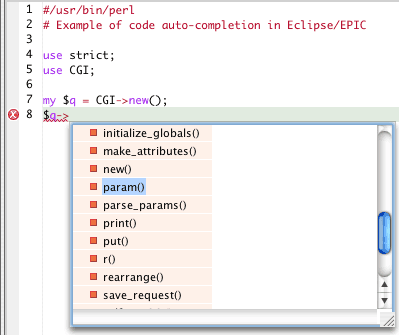 *Figure 4. Automatic code completion*
In this example, the IDE is able to figure out which class the object $q is an instance of and lists the names of the available methods. If you type a p, then the list shows only the method names beginning with p. If you type pa, then the list shows only the param() and parse_params() methods.
Excellent Refactoring Support
The easier it is to do refactoring, the more often people will do it. The following list contains the most common refactorings. Your personal list will probably be a little different. All of these are things you can do “manually,” but the idea is to make them into one or two-click operations so that you will do them much more often. (For a extensive list of refactoring operations, see Martin Fowler’s alphabetical list of refactorings.)
Extract Subroutine/Method
The IDE should create a new subroutine using the selected code and replace the selected code with a call to the new subroutine, with the proper parameters. Here’s an example of using the Extract Subroutine refactoring from Eclipse/EPIC (which uses the Devel::Refactor module).
First, you select a chunk of code to turn into a new subroutine, and then select Extract Subroutine from a context menu. You then get the a dialog box asking for the name of the new subroutine (shown in Figure 5).
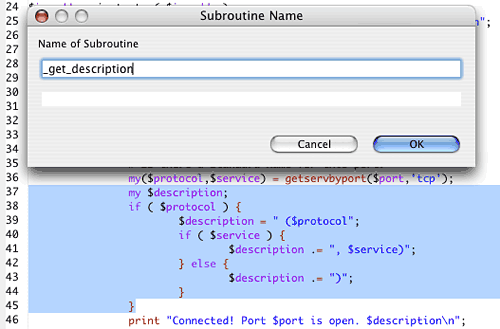 *Figure 5. Code before Extract Subroutine refactoring*
The IDE replaces the selected code with a call to the new subroutine, making reasonable guesses about the parameters and return values (Figure 6). You may need to clean up the result manually.
 *Figure 6. Code after Extract Subroutine*
Figure 7 shows the new subroutine created by the IDE. In this case, it needs no changes, but sometimes you will need to adjust the parameters and/or return value(s).
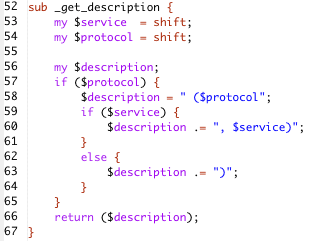 *Figure 7. The new subroutine created by Extract Subroutine*
Ideally, the editor should prompt you to replace similar chunks of code with calls to the new subroutine.
Rename Subroutine/Method
The IDE should find all the calls to the subroutine throughout your project and offer to change them for you. You should be able to see a preview of all of the places a change could occur, and to accept or reject each one on a case-by-case basis. The action should be undoable.
Rename Variable
Like Rename Subroutine, this feature should find all occurrences throughout the project and offer to make the changes for you.
Change Subroutine/Method Signature
The IDE should be able to make reasonable guesses about whether each subroutine or method call is supplying the proper parameters. Partly this is to enable the real-time syntax checking mentioned above, and partly this is to enable you to select a subroutine declaration and tell the IDE you want to refactor it by adding or removing a parameter. The IDE should then prompt you for the change(s) you want to make, do its best to find all of the existing calls to the subroutine, and offer to correct the subroutine calls to supply the new parameters.
Obviously, this is an especially tricky thing to do in Perl, where subroutines fish their parameters out of @_. So the IDE would have to look carefully at how the code uses shift, @_, and $_[] in order to have a reasonable guess about the parameters the subroutine is expecting. In many common cases, though, a Perl IDE could make a reasonable guess about the parameters, such as in the following two examples, so that if you added or removed one, it could immediately prompt you about making corrections throughout the project:
sub doSomething {
    my $gender = shift;
    my $age    = shift;
    # Not too terribly hard to guess that $gender and $age are params
}

sub anotherThing {
    my ($speed,$direction) = @_;
    # No magic needed to guess $speed and $direction are params.
}
Move Subroutine/Method
This refactoring operation should give you a list or dialog box to choose the destination file in your project. The IDE should allow you to preview all of the changes that it would make to accomplish the move, which will include updating a call to the subroutine/method to use the proper class. At a minimum, the IDE should show you or list all of the calls to the subroutine so you can make the appropriate changes yourself. Ideally, the IDE should make a guess about possible destinations; for example, if $self is a parameter to the method being moved, then the IDE might try assuming the method is an object (instance) method and initially only list destination classes that inherit from the source class, or from which the source class inherits.
Change a Package Name
As with Rename Subroutine and Rename Variable, when changing a package name, the IDE should offer to update all existing references throughout your project.
Tree View and Navigation of Source Files and Resources
Another useful feature of good IDEs is being able to view all of the code for a project, or multiple projects, in a tree format, where you can “fold” and “unfold” the contents of folders. All of the modern graphical IDEs support this, even with multiple projects in different languages.
Being able to view your project in this manner gives you both a high-level overview and the ability to drill down into specific files, and to mix levels of detail by having some folders show their contents and some not.
For example, Figure 8 shows a partial screen shot from ActiveState’s Komodo IDE.
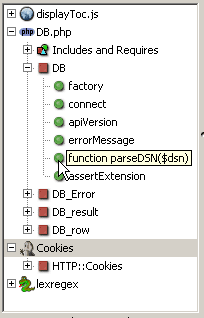 *Figure 8. Tree view of code in Komodo*
Support for Creating and Running Unit Tests
Anyone who has installed Perl modules from CPAN has seen unit tests–these are the various, often copious, tests that run when you execute the make test part of the installation process. The vast majority of CPAN modules include a suite of tests, often using the Test::Harness and/or Test::More modules. A good IDE will make it very easy to both create and run unit tests as you develop your project.
The most basic form of support for unit tests in an IDE is simply to make it easy to execute arbitrary scripts from within the IDE. Create a test.pl for your project and keep adding tests to it or to a t/ subdirectory as you develop, and keep running the script as you make changes. All modern IDEs provide at least this minimal capability.
A more sophisticated level of support for unit tests might resemble the Java IDE feature for tests written in JUnit, where you can select an existing class file (a .pm file in Perl) and ask the IDE to create a set of stub tests for every subroutine in the file. (See JUnit and the Perl module Test::Unit for more on unit tests.) Furthermore, the IDE should support running a set of tests and giving simple visual feedback on what passed/failed. The standard approach in the JUnit world is to show either a “green bar” (all passed) or “red bar” (something failed) and then allow you to see details on failures. Other nice-to-have features include calculating code-coverage, providing statistical summaries of tests, etc.
Figure 9 shows a successful run of a Java test suite with Eclipse.
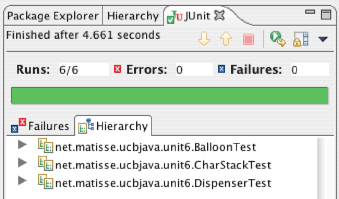 *Figure 9. A successful JUnit test run*
Figure 10 shows the same test run, this time with a failure.
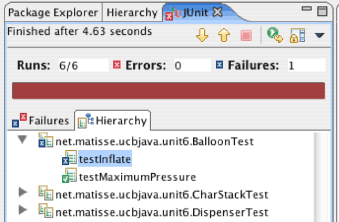 *Figure 10. A JUnit test run with a failure*
A stack trace of the failure message appears in another part of the window (cropped out here to save space). If you double-click on the test that failed (testInflate), the IDE will open the file (BalloonTest, in this case) and navigate to the test function.
The central idea is that the IDE should make it as painless as possible to add and modify and run tests, so you will do more of it during development.
Language-Specific Help
This is a fairly straightforward idea–the IDE should be able to find and display the appropriate documentation for any keyword in your code, so if you highlight push and ask for help, you should see the push entry from the Perl documentation. If you highlight a method or subroutine or other symbol name from an imported module, the IDE should display the module’s documentation for the selected item. Of course, this requires that the documentation be available in a consistent, machine-readable form, which is only sometimes true.
Debugger with Real-Time Display of Results
All modern IDEs offer support for running your code under a debugger, usually with visual display of what’s going on, including the state of variables. The Komodo IDE supports debugging Perl that is running either locally or remotely.
Typical support for debugging in an IDE includes the ability to set breakpoints, monitor the state of variables, etc. Basically, the IDE should provide support for all of the features of the debugger itself. Graphical IDEs should provide a visual display of what is going on.
Automatic Code Reformatting
This means automatically or on-demand re-indenting and other reformatting of code. For example, when you cut and paste a chunk of code, the IDE should support reformatting the chunk to match the indentation of its new location. If you change the number of spaces or tabs for each level of indentation, or your convention for the placement of curly braces, then the IDE should support adjusting an entire file or all files in your project.
Seamless Handling of Multiple Languages
Many large software projects involve multiple languages. This is almost universally true in the case of web applications, where the user interface typically uses HTML, CSS, and JavaScript, and the back end uses one or more of Perl, PHP, Java, Python, Ruby, etc. It is very helpful to have development tools that seamlessly integrate work done in all of the languages. This is becoming quite common. For example, both Komodo and Eclipse support multiple languages.
Automated Building and Testing
This feature can be very basic by making it easy to run an arbitrary script from within the IDE and to see its output. This could be as simple as having the IDE configured to have a one-click way of running the traditional Perl module build-and-test commands:
$ perl Makefile.PL
$ make
$ make test
A more advanced version of this feature might involve having the IDE create stub code to test all of the subroutines in an existing file, or to run all of the scripts in a specified directory under Test::Harness, or to run a set of tests using Test::Unit::TestRunner or Test::Unit::TkTestRunner. (The latter provides a GUI testing framework.)
Conclusion and Recommendations
While there are many tools for helping Perl development, the current state of the Perl toolbox is still years behind those of other languages–perhaps three to five years behind, when compared to Java tools. While there are several tools for Java that have all the features described above, virtually none for Perl have all of them. On the other hand, things are looking up; they are better now than a year ago. It’s possible to close that gap in a year or two.
A couple of obvious areas where improvements could be somewhat easy are adding more features to EPIC and Komodo. EPIC is open source, so there is potentially a wider pool of talent that could contribute. On the other hand, Komodo has a company with money behind it, so people actually get paid to improve it. Hopefully both tools will get better with time.
Another interesting possibility is the development of new IDEs or adding to existing ones by using Adam Kennedy’s PPI module, which provides the ability to parse Perl documents into a reasonable abstract syntax tree and to manipulate the elements and re-compose the document. There is a new Perl editor project, VIP, that is in the design stages and is intended to be “pluggable” and to have special features to support pair programming.
Finally, I’ve gathered a couple of lists of links for related material. The first list below consist of IDEs and graphical editors for Perl, and the second list consists of various related articles and websites. I hope this is all inspirational and helpful.
Current IDEs for Perl
The listed IDEs support Perl. The list is undoubtedly incomplete, but should form a good starting point for anyone wishing to look into this further.
-
Perl only, Mac OS X only. Closed source (and hence not extensible by users). Primarily designed for CGI and standalone scripts. Free demo available. $99 to purchase. (See the Perl.com review of Affrus to learn more.)
-
EPIC is a plugin for the Eclipse platform. Eclipse is open-source and cross platform (Windows/Mac/Linux/Solaris, etc.). Once you have Eclipse installed, install the EPIC plugin from within the Eclipse application using the EPIC update URL. Eclipse supports Java, and with plugins, C/C++, COBOL, Perl, PHP, UML2, Python, Ruby, XML, and more. There is a large and active community around Eclipse.
-
Emacs is the mother of all text-editor/development-environment/adventure-game/all-in-one tools. Expert programmers use it widely and there are numerous enhancements for working with particular languages, including, of course, Perl. Emacs, with CPerlMode, is a richly featured IDE for Perl, albeit a non-GUI IDE (which, for some people, makes it even better). A set of extensions for CPerlMode are available but you need to join the Yahoo Extreme Perl group to get to them.
-
This runs on Linux, Solaris, and Windows. Free demo; $29.95 for personal and student use, $295 for commercial use. It supports Perl, PHP, Python, Tcl, and XSLT.
-
PAGE runs only on Windows (9x/ME/NT/2000/XP). It is a Rapid Application Development tool for Perl and comes in three versions: Free, Standard ($10), and Enterprise ($50). PAGE provides a several “wizards” for creating scripts, modules (packages), web forms, and even database applications.
-
This closed source program runs only on Windows (9x/NT/2000/XP). It has a GUI code profiler, and the Pro version has a regular expression tester and built-in web server (for CGI testing, etc.). Perl Editor claims to have the best debugger on the market. It also comes with GUI tools for managing MySQL databases. $69.95 to purchase.
-
The well-known descendent of
viis a powerful and flexible text editor with many plugins and extensions. Have a look at thevimscripts; for example, Perl-Support and ExecPerl. -
This is a closed source application that runs on Win9x/NT/2000. It handles Perl and HTML and has code templates, being designed for website building. visiPerl includes a built-in web server for testing and an FTP client for code deployment. There is a free demo, or you can purchase it for $59.
Related Topics
- A conversation about Test-Driven Development
- “Automated Testing With Perl,” Andy Lester’s presentation on doing automated testing in Perl
- Extreme Perl book
- Extreme Perl mailing list
- eXtreme Programming FAQ
- Manifesto for Agile Software Development
- “Parse Perl Independently,” an article about Adam Kennedy’s PPI module
- testdriven.com
- JUnit
- Jon Udell’s article on “Tools for Dynamic Languages”
- Refactoring home page
- XProgramming.com: Resources for and about Agile Software Development
Tags
Feedback
Something wrong with this article? Help us out by opening an issue or pull request on GitHub





