


Parsing iCal Data
One of the attributes of a killer application is that it does something cool: it allows you to view or organize information in new and interesting ways, saves you time, or helps you win that auction bid. Yet one of the fundamental aggravations of applications in general is that they don’t always work well together; typically, you cannot send your data to mixed-and-matched applications unless they were explicitly designed to allow this. One of the great strengths of a language such as Perl is its ability to overcome these differences and act as “glue.” As long as you can figure out what the incoming data looks like, and how the outgoing data should look, it is very simple to share data between previously incompatible applications. By simply building a parser between the applications and creating input files for the target application from the former’s data, you extend the usefulness of your tools. In a sense, you can create killer applications out of various mundane tools on your system.
A somewhat trivial example of this sort of creation is an application that converts iCalendar data into a directed graph, readable by an application such as GraphViz. This example seems so trivial that you might ask yourself why you would wish to do such a thing. The answer is perhaps equally trivial: aside from the challenge factor, the ability to convert data could provide an alternative (or complement) to Gantt charts in project documentation, map relationships between events, etc. Moreover, by providing a simple way to allow disparate applications to interoperate, you can cumulatively build suites of applications, hopefully allowing for unforeseen advantages in the future.
Returning to the example, say you would like to take an iCal calendar (Figure 1) and turn it into an interesting visualization (Figure 2). How would you do this? Such an ability to convert formats is one step in constructing that killer application.
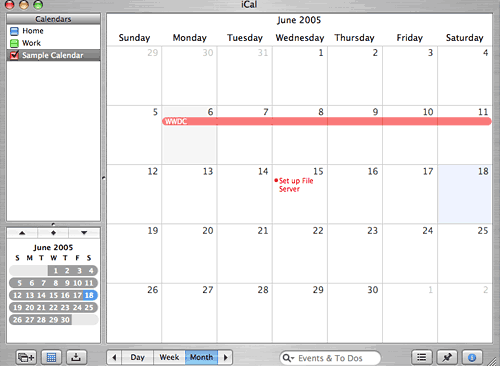 *Figure 1. An iCal calendar*
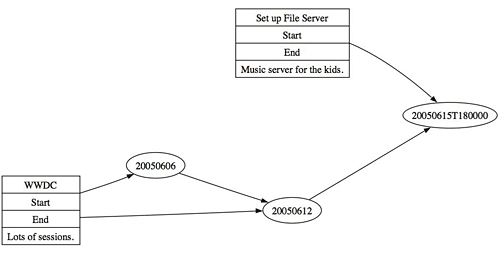 *Figure 2. An alternate visualization of the calendar data*
Reading the iCalendar Format
RFC 2446 defines the iCalendar format, which Apple’s iCal application uses. Each iCalendar file represents an individual calendar and contains at least one block of event data in key:value tuples, starting with a BEGIN:VEVENT tuple and ending with END:VEVENT. Here is an example (with indentation added for readability) of a small iCalendar file containing two events:
BEGIN:VCALENDAR
        CALSCALE:GREGORIAN
        PRODID:-//Apple Computer\, Inc//iCal 2.0//EN
        VERSION:2.0
        BEGIN:VEVENT
                LOCATION:San Francisco
                DTSTAMP:20050618T151130Z
                UID:BDF17182-CA21-4752-8D4F-40A4FE47C90D
                SEQUENCE:8
                URL;VALUE=URI:http://developer.apple.com/wwdc/
                DTSTART;VALUE=DATE:20050606
                SUMMARY:Apple WWDC
                DTEND;VALUE=DATE:20050612
                DESCRIPTION:Lots of sessions.
        END:VEVENT
        BEGIN:VEVENT
                DURATION:PT1H
                LOCATION:Home
                DTSTAMP:20050618T151543Z
                UID:5F88A0EC-AD21-428E-AAAD-005F1B1AB72E
                SEQUENCE:6
                DTSTART;TZID=America/Chicago:20050615T180000
                SUMMARY:Set up File Server
                DESCRIPTION:Music server for the kids.
        END:VEVENT
END:VCALENDAR
There are several possible approaches to parsing the above data in Perl, but perhaps the easiest one is to create a hash of events, modeled after the iCalendar structure. With this approach, a single calendar becomes a hash of hashes with a key:value pair for each event, where the key is the event ID and the value is a hash containing the event data. While it would be just as easy to store the data as an array of hashes, the ability to pull an event by its ID allows greater flexibility and power to manipulate the data. The data for a single event might look like this:
Calendar->EventUID = { 'UID'         => EventUID,
                       'LOCATION'    => EventLocation,
                       'START'       => EventStart,
                       'END'         => EventEnd,
                       'DURATION'    => EventDuration,
                       'DTSTAMP'     => EventDatestamp,
                       'SEQUENCE'    => EventSequence,
                       'SUMMARY'     => EventSummary,
                       'DESCRIPTION' => EventDescription,
                       'URL'         => EventURL };
Note that these keys represent only a subset of all possibilities as defined in RFC 2246. Each event may not contain all of the above keys. For example, the first event in my example does not contain DURATION. Further, certain keys (such as SEQUENCE) may be irrelevant for your purposes.
With the data structure designed, what’s the right way to convert iCalendar data into such a structure? Realizing the mantra of Perl, that there is more than one way to do things, perhaps the easiest approach is to match key names, starting a new event block when the parser sees BEGIN:VEVENT and ending it when END:VEVENT appears. Given the large number of possible keys, it may be easiest to use switch-like behavior. Here is an example of how to do this, splitting a key:value on the colon character (as the semicolon precedes any modifiers to the data):
SWITCH: {
        if ( $_ =~ /BEGIN:VEVENT/ ) {
                ##-----------------------------------------
                ## We have a new event, so start fresh.
                ##-----------------------------------------
                $eventHash = {};
                last SWITCH; }


        if ( $_ =~ /END:VEVENT/ ) {
                ##-----------------------------------------
                ## We hit the event end, so store it.
                ##-----------------------------------------
                $calHash->{$eventHash->{'UID'}} =
                {
                     'UID'         => $eventHash->{'UID'},
                     'LOCATION'    => $eventHash->{'LOCATION'},
                      #...The rest of our keys...
                     'URL'         => $eventHash->{'URL'}
                };
                last SWITCH; }


          ## we will split the key:value pair into an array
             and grab the value (1st element)
        if ( $_ =~ /^UID/ ) {
                $eventHash->{'UID'} = ( split ( /:/, $_ ) )[1];
                last SWITCH; }


        if ( $_ =~ /^LOCATION/ ) {
                $eventHash->{'LOCATION'} = ( split ( /:/, $_ ) )[1];
                last SWITCH; }

...The rest of our key matches...

        if ( $_ =~ /^URL/ ) {
                $eventHash->{'DESCRIPTION'} = ( split ( /:/, $_ ) )[1];
                last SWITCH; }

} # end switch
While this example does a good job of showing how to fill the data structure, it does a poor job of leveraging the power of Perl. More extensive use of regular expressions, the use of one of the Parse modules in CPAN, or even a bit of recursive programming could make this code more elegant and perhaps even a bit faster. However, these tactics may also make the code a bit harder to read–which is not always bad, unless you are attempting to explain concepts in an article. For further ideas, Toedor Zlatanov has written an article on using Perl parsing modules as well as a real mind-bender on using a functional programming approach in Perl.
The Dot Specification
Dot (PDF) is a diagramming, or directed, graph language created by Emden Gansner, Eleftherios Koutsofios, and Stephen North at Bell Labs. There are several implementations of Dot, including GraphViz, WebDot, and Grappa. Interestingly, OmniGraffle, a powerful diagramming tool for Macintosh computers, can read simple Dot files.
Creating Dot Files
The basic syntax of Dot is that there are objects or things that you describe by adding data within digraph {} braces. You denote relationships between objects with the -> combination of characters. With this code:
digraph my_first_graph {
  object1 -> object2;
}
your Dot-driven application (such as GraphViz) will display an image something like Figure 3.
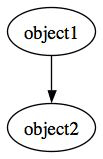 *Figure 3. A simple graph*
The specification describes additional complexity in terms of sub-objects/structures, alternate shapes (the default is an oval), ranking, and more. One additional item worth noting is that Dot recognizes comments in C- and Java-style formats (// and /*). To help troubleshoot problems (and for good coding practice), I suggest that your parser insert comments into the Dot input file.
Consider how you might create a Dot file from the data parsed earlier. If you pass to the function that handles the writing of the Dot file the reference to the filehandle of your Dot input file (the output of your conversion) along with the reference to your parsed data structure, then you might generate your Dot file along these lines:
##------------------------------
  ## Name our Dot graph
  ##------------------------------
  if ( $raw->{'CALNAME'} ) {
      print { $$file } 'digraph "'. $raw->{'CALNAME'} ."\" {\n\n";
   } elsif ( $$raw{'CALID'} ) {
      print { $$file } 'digraph "'. $raw->{'CALID'} ."\" {\n\n";
   } else {
      print { $$file } "digraph unnamed {\n\n";
   }


   ##-----------------------------------------
   ## Some optional rendering info
   ##-----------------------------------------
   print { $$file } '   size     = "10,7";'. "\n".
                    '   compound = true;'  . "\n".
                    '   ratio    = fill;'  . "\n".
                    '   rankdir  = LR;'    . "\n\n";


   ##-----------------------------------------
   ## Generate our Dot data
   ##   we will wrap most data in double-quotes
   ##   since most Dot interpreters don't like spaces,
   ##   something allowed in iCal data
   ##-----------------------------------------
   foreach $key ( keys %$raw ) {
      if ( ref( $raw->{$key} ) eq 'HASH' ) {
         my $block = $raw->{$key};

           ##------------------------------
           ## graphViz doesn't like - in names
           ##------------------------------
         $block->{'UID'} =~ s/-/_/g;

           ##------------------------------
           ## produce list of all unique tasks
           ##------------------------------
         push( @{ $tasks->{$block->{'SUMMARY'}} }, '"'. $block->{'UID'} .'"' );

           ##------------------------------
           ## build record
           ##------------------------------
         my $eventBlock = '"'. $block->{'UID'} .
                          '" [ shape = record, label = "'. $block->{'SUMMARY'} .
                           ' | <START> Start | <END> End ';

         if ( $block->{'DESCRIPTION'} ) {
            $eventBlock .= ' | '. $block->{'DESCRIPTION'};
         }
         $eventBlock .= '"];';

         print { $$file } '   '. $eventBlock ."\n\n";


            ##------------------------------
            ## build relations based upon time
            ##------------------------------
         push( @timeLine,    '"'. $block->{'START'} .'"' );
         print { $$file } '   "'. $block->{'UID'} .'":START
            -> "'. $block->{'START'} ."\"\;\n\n";

         if ( $$block{'END'} ) {
            push( @timeLine,    '"'. $block->{'END'} .'"' );
            print { $$file } '   "'. $block->{'UID'} .'":END
               -> "'. $block->{'END'} ."\"\;\n\n";
         }

         print { $$file } "\n\n";

}

      ##------------------------------
      ## tie non-unique tasks
      ##------------------------------
    print { $$file } '   // Create tasks relationships'. "\n\n";
    foreach ( keys %$tasks ) {
       if ( @{ $tasks->{$_} } > 1 ) {
          print { $$file } '   '. join( ' -> ', @{ $tasks->{$_} } ) ."\;\n\n";
       }
    }
    print { $$file } "\n\n";


      ##------------------------------
      ## Render our timeline
      ##------------------------------
    print { $$file } '   // Create timeline relationships'. "\n\n";
    print { $$file } '   '. join( ' -> ', sort( @timeLine )) ."\;\n\n";


      ##------------------------------
      ## Close off dot file
      ##------------------------------
    print { $$file } "}\n";
This code will produce the following Dot file:
digraph unnamed {
   size     = "10,7";
   compound = true;
   ratio    = fill;
   rankdir  = LR;

   "5F88A0EC_AD21_428E_AAAD_005F1B1AB72E" [ shape = record,
      label = "Set up File Server | <START> Start |
      <END> End  | Music server for the kids."];

   "5F88A0EC_AD21_428E_AAAD_005F1B1AB72E":START  -> "20050615T180000";

   "BDF17182_CA21_4752_8D4F_40A4FE47C90D" [ shape = record, label = "WWDC |
      <START> Start | <END> End  | Lots of sessions."];

   "BDF17182_CA21_4752_8D4F_40A4FE47C90D":START  -> "20050606";

   "BDF17182_CA21_4752_8D4F_40A4FE47C90D":END    -> "20050612";

   // Create tasks relationships

   // Create timeline relationships

   "20050606" -> "20050612" -> "20050615T180000";
}
Note that this code uses the record shape, holding individual segments within the larger object. This is slightly more complicated than the default oval that Dot uses.
Where to Go from Here
If you are using Apple’s iCal application, note that the location and naming scheme of iCalendar files changed between the 1.x and 2.x releases. Previously, iCalendar files went in the ~/Library/Calendars/ directory and had names of the form <calendar name>.ics. Thus, a calendar named Work would have a file Work.ics. However, the 2.x release keeps iCalendar information in the ~/Library/Application Support/iCal/Sources/<calendar name>/ directory as sources.ics.
Other applications that implement the iCalendar specification, such as Mozilla’s Calendar extension for Mozilla/Firefox/Thunderbird, may follow a different convention. On a Mac, Firefox stores .ics files in the ~/Library/Application Support/FireFox/Profiles/<profile>/Calendar/ directory, where <profile> is the profile specified in the Firefox profile.ini file. Again, other systems will likely store this information in different locations.
While on the topic of different implementations, bear in mind that, while the key:value specifications are consistent (as long as the application conforms to RFC 2246), the actual .ics file may look slightly different. For example, Firefox lays out that first event from the previous example as:
BEGIN:VEVENT
UID
 :b9794c88-1dd1-11b2-bb51-8a92011a78e8
SUMMARY
 :Apple WWDC
DESCRIPTION
 :Lots of sessions
LOCATION
 :San Francisco
URL
 :http://developer.apple.com/wwdc
STATUS
 :TENTATIVE
CLASS
 :PRIVATE
DTSTART
 ;VALUE=DATE
 :20050606
DTEND
 ;VALUE=DATE
 :20050612
DTSTAMP
 :20050618T191731Z
END:VEVENT
Here, the key:value tuples (plus any data modifiers such as VALUE=DATE) almost always split up across lines. In this case, it would be best to handle this difference when reading in the .ics file, so that the rest of the script can expect data in a generic format. One way to do this is to copy the array representing the .ics file using a finite-state machine. Another method would be to walk the array and join array elements under certain conditions, such as if the first non-white-space character of the current element begins with a colon or semicolon character, or is simply non-alphabetic.
Hopefully, this article will spur you to create a bridge between two of your favorite applications. Good luck, and please remember to share your contributions with the community.
Tags
Feedback
Something wrong with this article? Help us out by opening an issue or pull request on GitHub





