


Content Management with Bricolage
If you’ve ever had to manage a web site with tens of thousands of pages of content where many people need to be able to update that content, you’ve no doubt recognized the need for a content management system (CMS). Once you start to manage several such sites, the problem becomes even worse. Since you’re reading this article on Perl.com, I’m going to go out on a limb and guess that you’re actually interested in Perl-based content management systems.
Well, you’re in luck.
This article is the first in a series on Perl.com introducing Bricolage, a Perl-powered, open-source, enterprise-class CMS currently in production for some of the most actively updated sites on the Internet today, including MacCentral, ETonline, and the World Health Organization. I start with a high-level overview (think executive summary) of the concept of content management, the nature of the content management ecosystem, and how Bricolage competes with other solutions in that ecosystem. Future articles will cover installation, document modeling, templating, and the Bricolage SOAP interface, among other topics. But first, the basics.
What is Content Management?
So much is made of the importance of web content management these days that the term, unfortunately, has been used to apply to just about any piece of software that somehow relates to the Web or to HTML. This trend has naturally eroded the meaning of the term content management. So I’m just going to punt on providing yet another definition, and focus instead on contrasting some of the categories of site-management software. In the process, I highlight where and how Bricolage fits into the CM ecosystem, and you get the benefit of determining what category of solution best fits your own content management needs.
Content Management vs. Community Building
First, there is the difference between content management systems and what I call community-building solutions, such as Slash and the various Nuke engines (PHP-Nuke, PostNuke, and CPG Nuke). These applications are ideal for setting up community-building and discussion sites, such as Slashdot, MacRumors.com, or (my favorite) use Perl (since shut down). The idea behind these solutions is to allow site users to register with the site and post comments about articles, content on other sites, or each other’s comments.
True content management systems, on the other hand, are primarily designed to allow organizations to centrally manage and deliver content, such as articles, white papers, marketing materials, or what have you. The emphasis is not on discussion (and indeed, most content management systems – including Bricolage – don’t offer discussion interfaces), but on assuring the consistency of content structure and formatting. Good examples of such systems include Bricolage, Plone, Vignette, and Interwoven TeamSite.
Application Framework vs. Turnkey Application
Next, there’s the distinction between application frameworks and turnkey applications. Frameworks are not actual solutions, but provide the tools for you to create your own solutions. Anyone who has programmed in Java understands what a framework is; a content-management framework provides an array of tools and libraries that you can use (or pay high-priced consultants to use on your behalf) to create an application to meet your needs.
Many organizations have bought such frameworks, and in large, heterogeneous environments with six- and seven-figure budgets and years to implement a solution, it can make a lot of sense. Good examples of such frameworks are Vignette, TeamSite, and the Python-based Zope.
A turnkey application, on the other hand, is a complete application out of the box. It will still likely require a good deal of customization to implement a turnkey application-based solution in a complex environment, but we’re typically talking weeks or, at the most, a few months. The downside to such a solution is that you’re limited to the features that the developers of the application anticipated would be needed; only with open-source solutions do you have the possibility of adding your own. Fortunately, this category of content management is well represented in the open-source space, including such stalwarts as Bricolage, Plone (built on the Zope framework), and TYPO3.
Application Server vs. Document Management and Publishing
And finally, there is the difference between content management application servers and document management and publishing solutions. Application servers serve dual roles in life: they provide an interface for managing content, and they deliver that content to the final audience. This approach has advantages for some organizations, in that it requires only a single server, document updates are immediate, and you need deal with only one technology. Plone, Zope, and the various Wiki solutions ( WikiWiki, Twiki, and Kwiki) for ad-hoc content management are typical content-management application servers. Blogging software, such as Blosxom and Movable Type, tends to fall into this category, as well.
The downside to application servers is that, because they both manage and deliver content, your choice of delivery technology is limited to the technology choices of the software developers. With Plone, for example, you have to use Zope to serve content to the final audience. Furthermore, many of them provide templates for the output of content that limit how much you can customize the look and feel of your site. And finally, performance on a high-volume site can suffer, due to the overhead of the API and database, as well as the trickiness of distributing content across an array of application servers (think caching).
Document management and publishing systems, however, function entirely independent of delivery solutions. They focus on managing documents, moving them through workflow, ensuring the consistency of their structures, and publishing them to external systems for delivery to the end audience. Content is completely independent of presentation in these systems. Upon publication, they push content through templates to format it into one or more types of output (HTML, XML, RSS, Mason, PHP, etc.), and then distribute the resulting files to other servers (typically a web, file, or application server) for delivery to the final audience.
This separation allows the document management and publishing server to do what it does best, freeing up the delivery server to do what it does best: serve content. Bricolage is perhaps the best-known solution in this category. Another one is the recently introduced Krang, which is itself heavily based on Bricolage.
The downside to the document management and publishing systems is that, while you are free to use whatever delivery technology you wish (plain HTML, PHP, JSP, ASP, TT3, SSI, etc.), for security and scalability reasons the publishing server generally must run on its own hardware, independent of the delivery server. Furthermore, these solutions tend to have a broader set of features than their application-server cousins. Since they don’t worry about serving content, they can provide other essentials such as document modeling, workflow, multi-site management, multiple output channels, etc. While such functionality increases the flexibility of the software, it can also increase the complexity of an implementation. The upshot is that the implementation of such a solution requires a good deal of forethought and planning.
Why Bricolage?
Now that you have a feel for where Bricolage fits into the content-management universe (see how it’s grown beyond an “ecosystem” in the space of a few paragraphs?), let’s take a look at why Bricolage is a good solution for the complex content-management needs of organizations with large volumes of content, many content contributors and editors, and/or multiple sites to manage. Essentially, this boils down to a brief overview of some of the more important features of Bricolage. Once you’ve read this section, you should have a good idea of whether Bricolage is right for your organization.
Browser-based Editing and Administration
Bricolage provides a complete browser-based interface. Designed to work with any standards-compliant graphical browser, you can handle nearly all configuration and administration tasks via the browser. All document editing can be carried out in the browser, as well. Content authors can create and edit content using up to four different interfaces, including separate fields for each block-level piece of content (paragraphs, headers, blockquotes, etc.), bulk editing of multiple fields at once, or WYSIWYG-style editing with htmlArea in Internet Explorer and Gecko-based browsers such as Mozilla and Firefox.
Document Modeling
The document-modeling features of Bricolage allow you to model the structure of your documents entirely via the browser-based interface. Once you’ve ascertained the different types of documents your organization needs to manage, and what their structures will be, you can model them in Bricolage. All documents created in Bricolage are based on such models, and as such, must adhere to the hierarchical definition of elements and fields that constitute their models. This approach assures the consistency of document structure.
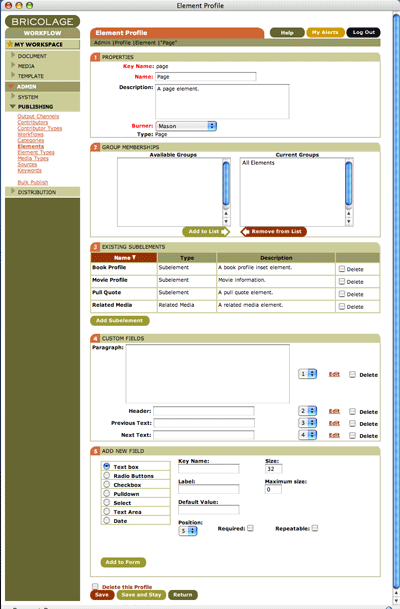 *Bricolage's element-administration interface makes it easy to create new elements, add sub-elements, and create content fields.*
Bricolage document models are built into a tree-like structure of elements and fields. Elements are the building blocks of content in Bricolage. They represent various parts of documents, such as pages; side bars; related media such as images, lists, related links; and the like. Every element can contain zero or more sub-elements, and together the hierarchy of elements make up the “branches” of the document model tree. Fields represent the “leaves”, and are the containers into which content can be entered. Any kind of HTML field can be defined for use in the Bricolage UI, including text input fields, textarea fields, and select lists. Typical fields include “paragraphs,” “headers,” “list items,” “teasers,” and “URLs.”
When an editor creates a document, it is based on a document model, and its structure must adhere to the model’s element structure. Documents consist of a tree structure of elements, corresponding to the element structure of the document model, and in this way ensure the consistency of structure across documents. For more on Bricolage document modeling and elements, watch for the third article in this series, “Bricolage Document Modeling.”
Separation of Content from Presentation
Since Bricolage document models are purely about structure, and a document’s content will be stored in Bricolage in the same structured fashion as its model defines, no presentation information is generally included in a document. In other words, the content of a document is pure content, with little or no reference to formatting. Instead, it is a simple structural object representing the tree-like configuration of content elements.
The upside to this architecture is that highly structured content enables a virtually unlimited array of output options. The templates that format content can take advantage of the well-defined composition of a document model to grab the elements they need for the format they understand. Thus, a single document can be used to output a structured XML file, a set of HTML pages, an RSS feed, a PDF file, or whatever you require.
Done right, you get the Holy Grail of one canonical document and unlimited representations of that document. This capability is especially important in the fast-moving environment of the Internet, where new formatting standards are regularly introduced, demanding the creation of new templates to output existing content to satisfy the new standards.
Content Categorization
All Bricolage documents can be organized into one or more categories. These categories are hierarchical, and the hierarchies are used in part to create document URLs. This design allows you to store your documents in sensible locations on your web site, and provides them with legible URLs that search engines just love. Furthermore, it’s easy to search for documents in a given category or set of categories using the Bricolage API, so that you can quickly create templates to generate category-specific directories of documents, such as RSS feeds.
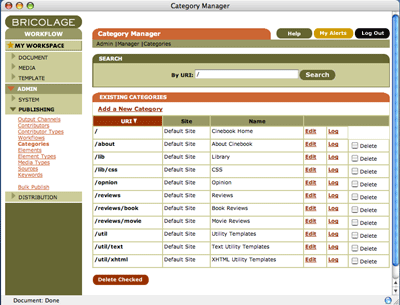 *Bricolage allows you to create an unlimited number of hierarchical categories in which to file documents.*
Meaningful URLs
In addition to categories, Bricolage document URLs can include the year, month, day of the month, and/or a slug — which is a short string describing the document, such as “bricolage-intro.” Combined, these pieces of metadata generate meaningful URLs, such as /features/perl/2004/17/26/bricolage-intro for a Perl feature introducing Bricolage and published on 26 July 2004. Such URLs are very search-engine friendly, too, so they should greatly enhance your Google rankings, for example.
Keywords
Bricolage documents can be associated with arbitrary keywords. These, too, can be queried via the Bricolage API, making keyword indexes a possibility. And of course, they’re available in templates for outputting <meta> tags, Dublin Core Metadata, and the like.
Workflow
Bricolage provides a workflow interface for managing your documents and templates. A workflow is a way to organize the process of creating a document. Typically, a document workflow defines areas of responsibility in the process of creating a document, such as writing, copy editing, legal review, and publishing. True to its original genesis among newspaper publishers, Bricolage workflows divide these responsibilities between desks. So one might have a workflow named “Document” for managing documents, with an “Edit Desk,” a “Copy Desk,” a “Legal Desk,” and a “Publish Desk.”
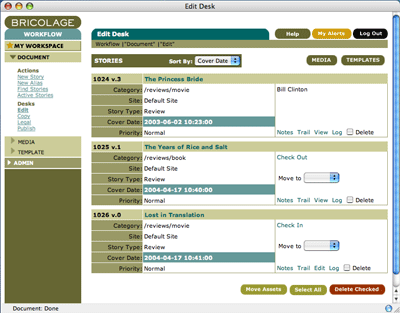 *Bricolage workflows can be configured to reflect your organization's standard editorial processes.*
You can create as many workflows as your organization requires, each with as many desks as you require. Desks can be shared across workflows — if you need certain parties to assume similar responsibilities in different workflows — and you can set up permissions such that certain users have access only to the documents in specific workflows and on specific desks. In short, you have a lot of flexibility to closely model the actual workflow in your organization, so that working with Bricolage is simply an extension of your users’ standard editorial processes.
Output Channels
Output channels are collections of templates that output content in particular formats. Typical Bricolage solutions in production today have output channels for XHTML, RSS, WML, etc. Furthermore, output channels can include templates from other output channels. When Bricolage looks for a template, it looks in the output channel being published to, and then any output channels it includes. The search for the template resembles how Perl searches through the @INC array for a module. The upshot is that Bricolage makes it easy for you to create libraries of templates that can be used across output channels.
Bricolage templates correspond to document categories and elements, so that one element template outputs the content of a single element, or wraps the output of document-element templates for all documents in a category. Because a single element definition can be associated with different document models, this approach ensures the formatting of the content in elements based on that definition will be consistent across all documents.
Perl Templating
The templates in Bricolage output channels can be implemented in one of three templating architectures: Mason, Template Toolkit, or HTML::Template.
Yes, that’s right, not only do you have three different choices for templating in Bricolage, but they’re all Perl-based! In addition to being able to provide a familiar templating environment to tens of thousands of Perl programmers worldwide, the templating solutions can leverage the full power of Perl to generate output for your documents. That power of course includes CPAN, where you’ll find modules to ease the generation of RSS (such as XML::RSS feeds, HTML, XML, PDFs, or even Excel files (Spreadsheet::WriteExcel)!
Furthermore, Bricolage has a sub-classable templating architecture, which means that, with a little bit of work, you can add your own templating architecture. Anyone care to add support for Embperl, Apache::ASP, or XSLT?
For more on Bricolage templating, watch for the fourth article in this series, “Mason Templating in Bricolage.”
Multi-site Management
More and more organizations are finding themselves managing more and more sites as part of their content-management responsibilities. As of version 1.8.0, Bricolage offers support for managing multiple sites from a single instance. Different sites can have their own categories, workflows (but share desks), output channels (but can include output channels from other sites), and distribution destinations. They can also share document models, so that different sites can manage the same types of documents but publish them with their own templates. This flexible multi-site management allows you to divide responsibilities appropriately while keeping all content centrally managed and accessible via a common interface.
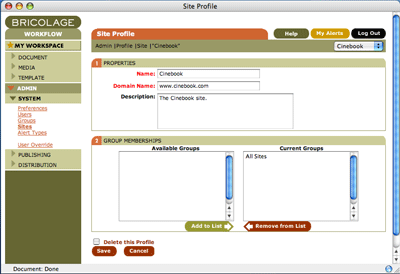 *You can manage any number of different sites in Bricolage, each with its own documents, categories, templates, and workflows.*
Document Aliasing
Once you have several departments in your organization managing their own sites, they might decide that they need to publish each other’s content. Fortunately, if these sites are using the same document models, they can. Users with READ access to another site can create aliases to documents on that site. They can edit the title, URL, and keywords of the alias for the benefit of their own site, but the content remains in read-only form, so that editorial control remains in the hands of the originating site. Document aliasing thus provides a simple approach for sites to publish each other’s content without violating one another’s editorial integrity.
SOAP Interface
Bricolage features a robust and full-featured SOAP interface. The included bric_soap command-line client makes it easy to import and export documents, templates, and administrative objects, as well as bulk publish or update content. The ability to import content is especially important for organizations that wish to migrate their existing documents into Bricolage for management and publishing going forward. Watch for an article later in this series that highlights the flexibility and power of the Bricolage SOAP server.
Scalability
Bricolage is designed to scale to the needs of the largest organizations. Its scalability manifests in three directions. Horizontal scalability is ensured by the ability to distribute the load between separate database, application, preview, and distribution servers. And remember, because Bricolage operates independent of the delivery of content to the final audience, your site’s front-end servers can scale independently of Bricolage.
The browser-based interface provides Geographical scalability by allowing users to securely use Bricolage from anywhere in the world. Whether content editors are down the hall, across the country, or on the other side of the globe, if they have a browser and access to the Bricolage server’s network, then they can be contributing content to your sites.
And finally, the Bricolage feature-set ensures organizational scalability, allowing for the centralized management of multiple sites, multiple types of documents, content categorization, and flexible templating across an organization and its sites. These features can be exercised as necessary as the needs of your organization evolve. In other words, Bricolage rapidly adapts to the changing requirements of your content-management environment.
Security
Bricolage provides comprehensive security via encryption, user permissions, and its independence from your delivery servers. All communications with Bricolage can be encrypted over SSH/TLS to ensure secure use of the server from anywhere in the world. The same applies to the SOAP server, of course. At the access level, Bricolage provides a comprehensive permissions system to ensure that users get access only to the content and administrative objects relevant to getting their work done. And because Bricolage does not serve content to your final audience — it generally runs as a back-office application and often behind a secure firewall — your content library remains safe in Bricolage even if the security of your front-end servers becomes compromised.
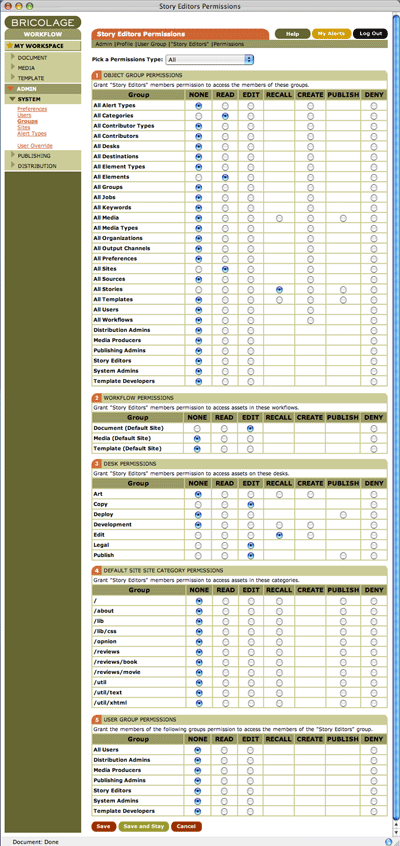 *Bricolage offers a comprehensive permissions system to ensure users get access to only the objects they need to get their jobs done.*
ROI
Bricolage’s open-source licensing helps to ensure that it is fully buzzword compliant, in that you can achieve a much higher return on investment (ROI) than with competitive commercial systems. Furthermore, Bricolage runs exclusively open-source software, including Apache/mod_perl and the PostgreSQL RDBMS, so there are no hidden licensing costs, either. And finally, even organizations that decide to use <plug>professional consulting services</plug> for their Bricolage implementations find that the expense tends to be around half what it costs for the rollout of a commercial content-management solution.
Who Uses Bricolage?
Despite its genesis in the online news niche, Bricolage has managed it to go into production in a variety of settings. This success is a function of its broad feature-set, as well as the regard it has gained from the press. So who uses it?
- Print Publishing
- Web Publishing
- Academia
- Research
- Broadcasting
- Financial Services
- Non-Profit
- Corporate
And there are many other organizations quietly using Bricolage without publicly making that fact known.
Right for You?
If Bricolage sounds like a good fit for your organization’s content-management needs, or if you’re interested in how Bricolage really works, stay tuned to Perl.com for my next article, “Bricolage Installation and Configuration,” and we’ll have you up and running in no time!
Acknowledgments
I’d like to thank Darren Duncan, James Duncan Davidson, and Rael Dornfest for providing valuable feedback on drafts of this article.
Tags
Feedback
Something wrong with this article? Help us out by opening an issue or pull request on GitHub





