


Rapid Web Application Deployment with Maypole
You have a database. You have a web server. You have a deadline.
Whether it’s bringing up an e-commerce storefront for a new venture, implementing a new front-end to HR’s employee database, or even providing a neat way to track citations for U.S. English slang terms, it’s always the same story – and the deadline is always yesterday.
For this month of April, I’m working on a Perl Foundation sponsorship to develop a project of mine called Maypole, which enables Perl programmers to get web front-ends to databases, as well as complex web-based applications, up and running quickly.
Extremely quickly, and with very little Perl coding required. I’ve used Maypole to set up an Intranet portal, a database and display system for choosing menus and recipes, song lyric and chord sheet projection software, an open-source social network site, and a web database of beer-tasting notes; and that just was in the past two weeks.
Maypole’s flexibility stems from three fundamentals:
To demonstrate these three principles, we’re going to look at a bread-and-butter web application – an online shop’s product catalogue – and see how quickly we can put it together with Maypole.
Separation of Concerns
Maypole was originally called Apache::MVC, reflecting its basis in the Model-View-Controller design pattern. (I had to change it firstly because Maypole isn’t tied to Apache, and secondly because Apache::MVC is a really dull name.) It’s the same design pattern that forms the foundation of similar projects in other languages, such as Java’s Struts framework.
This design pattern is found primarily in graphical applications; the idea is that you have a Model class that represents and manipulates your data, a View class that is responsible for displaying that data to the user, and a Controller class that controls the other classes in response to events triggered by the user. This analogy doesn’t correspond precisely to a web-based application, but we can take an important principle from it. As Andy Wardley explains:
What the MVC-for-the-web crowd is really trying to achieve is a clear separation of concerns. Put your database code in one place, your application code in another, your presentation code in a third place. That way, you can chop and change different elements at will, hopefully without affecting the other parts (depending on how well your concerns are separated, of course). This is common sense and good practice. MVC achieves this separation of concerns as a byproduct of clearly separating inputs (controls) and outputs (views).
This is what Maypole does. It has a number of database drivers, a number of front-end drivers, and a number of templating presentation drivers. In common cases, Maypole provides precisely what you need for all of these areas, and you get to concentrate on writing just the business logic of your application. This is one of the reasons why Maypole lets you develop so rapidly – because most of the time, you don’t need to do any development at all.
Let’s begin, then, by choosing what elements are going to make up our product database. We will actually be using what is by far the most common configuration of model, view, and controller classes: Maypole provides a model class based on Class::DBI, a view class based on Template::Toolkit, and a controller class based on Apache mod_perl. We’ll come to what all of this means in a second, but because this configuration is so common, it is the default; no code is required to set that up.
We will, however, need a database. Our client is going to be iSellIt, a fictitious supplier of computer components and software. We will have database tables for products, manufacturers, and categories of stuff, and subcategories of categories. Here’s what that database might look like.
    CREATE TABLE product (
        id int NOT NULL auto_increment primary key,
        category int,
        subcategory int,
        manufacturer int,
        part_number varchar(50),
        name varchar(50),
        cost decimal(6,2),
        description text
    );

    CREATE TABLE manufacturer (
        id int NOT NULL auto_increment primary key,
        name varchar(50),
        url varchar(255),
        notes text
    );

    CREATE TABLE category (
        id int NOT NULL auto_increment primary key,
        name varchar(50)
    );

    CREATE TABLE subcategory (
        id int NOT NULL auto_increment primary key,
        name varchar(50),
        category integer
    );
We’re going to assume that we’ve loaded some data into this database already, but we’re going to want the sales people to update it themselves over a web interface.
In order to use Maypole, we need what’s called a driver module. This is a very short Perl module that defines the application we’re working with. I say it’s a Perl module, and that may make you think this is about writing code, but to be honest, most of it is actually configuration in disguise. Here’s the driver module for our ISellIt application. (The client may be called iSellIt, but many years exposure to Perl module names makes me allergic to starting one with a lowercase letter.)
    package ISellIt;
    use base 'Apache::MVC';
    use Class::DBI::Loader::Relationship;

    ISellIt->setup("dbi:mysql:isellit");
    ISellIt->config->{uri_base} = "http://localhost/isellit";
    ISellIt->config->{rows_per_page} = 10;
    ISellIt->config->{loader}->relationship($_) for
        ("a manufacturer has products", "a category has products",
         "a subcategory has products", "a category has subcategories");

    1;
Ten lines of code; that’s the sort of size you should expect a Maypole application to be. Let’s take it apart, a line at a time:
package ISellIt;
This is the name of our application, and it’s what we’re going to tell Apache to use as the Perl handler for our web site.
use base 'Apache::MVC';
This says that we’re using the Apache front-end to Maypole, and so we’re writing a mod_perl application.
use Class::DBI::Loader::Relationship;
Now we use a Perl module that I wrote to help put together Maypole driver classes. It allows us to declare the relationships between our database tables in a straightforward way.
ISellIt->setup("dbi:mysql:isellit");
We tell ISellIt to go connect to the database and work out the tables and columns in our application. In addition, because we haven’t changed any class defaults, it’s assumed that we’re going to use Class::DBI and Template Toolkit. We could have said that we want to use Apache::MVC with DBIx::SearchBuilder and HTML::Mason, but we don’t.
Maypole’s Class::DBI-based class uses Class::DBI::Loader to investigate the structure of the database, and then map the product table onto a ISellIt::Product class, and so on. You can read more about how Class::DBI’s table-class mapping works in Tony’s article about it.
ISellIt->config->{uri_base} = "http://localhost/isellit";
ISellIt sometimes needs to know where it lives, so that it can properly produce links to other pages inside the application.
ISellIt->config->{rows_per_page} = 10;
This says that we don’t want to display the whole product list on one page; there’ll be a maximum of 10 items on a page, before we get a page-view of the list.
    ISellIt->config->{loader}->relationship($_) for
        ("a manufacturer has products", "a category has products",
         "a subcategory has products", "a category has subcategories");
Now we define our relationship constraints, in reasonably natural syntax: a manufacturer has a number of products, and a category will delimit a collection of products, and so on.
Ten lines of code. What has it got us?
Sensible Defaults
The second foundation of Maypole is its use of sensible defaults. It has a system of generic templates that “do the right thing” for viewing and editing data in a database. In many cases, web application programmers won’t need to change the default behavior at all; in the majority of cases, they only need to change a few of the templates, and in the best cases, they can declare that the templating is the web design group’s problem and not need to do any work at all.
So, if we install the application and the default templates, and go to our site, http://localhost/isellit; we should see this:
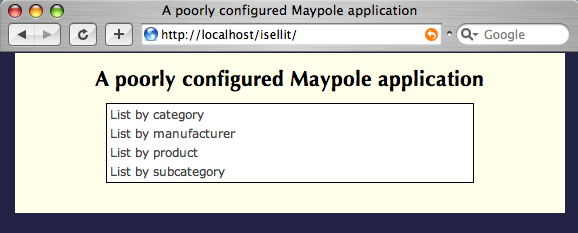 Which is only fair for 10 lines of code. But it gets better, because if we click on, say, the product listing, we get a screen like so:
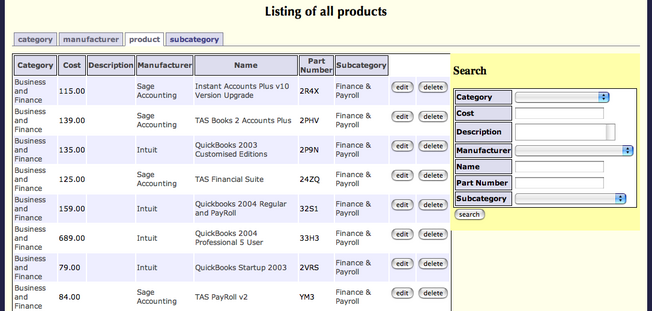 Now that’s something we could probably give to the sales team with no further alterations needed, and they could happily add, edit, and delete products.
Similarly, if we then click on a manufacturer in that products table, we see a handy page about the manufacturer, their products, and so on:
 Now I think we are getting some worth from our 10 lines. Next, we give the templates to the web designers. Maypole searches for templates in three different places: first, it looks for a template specific to a class; then it looks for a custom template for the whole application; finally, it looks in the factory directory to use the totally generic, do-the-right-thing template.
So, to make a better manufacturer view, we tell them to copy the factory/view template into manufacturer/view and customize it. We copy factory/list into product/list and customize it as a listing of products; we copy factory/header and factory/footer into the custom/ directory, and turn them into the boilerplate HTML surrounding every page, and so on.
Now, I am not very good at HTML design, which is why I like Maypole – it makes it someone else’s problem – but this means I’m not very good at showing you what sort of thing you can do with the templates. But here’s a mock-up; I created product/view with the following template:
[% INCLUDE header %]
[% PROCESS macros %]
<DIV class="nav"> You are in: [% maybe_link_view(product.category) %] >
[% maybe_link_view(product.subcategory) %] </DIV>
<h2> [% product.name %]</h2>
<DIV class="manufacturer"> By [% maybe_link_view(product.manufacturer) %]
</DIV>
<DIV class="description"> [% product.description %] </DIV>
<TABLE class="view">
<TR>
<TD class="field"> Price (ex. VAT) </TD>
<TD> £ [% product.cost %] </TD>
</TR>
<TR>
<TD class="field"> Part number </TD>
<TD> [% product.part_number %] </TD>
</TR>
</TABLE>
[% button(product, "order") %]
Producing the following screenshot. It may not look better, but at least it proves things can be made to look different.
 We’ve written a Template Toolkit template; the parts surrounded in
 [% ... %] are templating directives. If you’re not too familiar with the Template Toolkit, the Maypole manual’s view documentation has a good introduction to TT in the Maypole context.
Maypole provides a number of default Template macros, such as maybe_link_view, which links an object to a page viewing that object, although all of these can be overridden. It also passes in the object product, which it knows to be the one we’re talking about.
In fact, that’s what Maypole is really about: we’ve described it in terms of putting a web front-end onto a database, but fundamentally, it’s responsible for using the URL /product/view/210 to load up the product object with ID 210, call the view method on its class, and pass it to the view template. Similarly, /product/list calls the list method on the product class, which populates the template with a page full of products.
The interesting thing about this template is that very last line:
[% button(product, "order") %]
This produces a button which will produce a POST to the URL /product/order/210, which does the same as view except this time calls the order method. But Maypole doesn’t yet know how to order a product. This is OK, because we can tell it.
Ease of Extensibility
Maypole’s third principle is ease of extensibility. That is to say, Maypole makes it very easy to go from a simple database front-end to a full-fledged web application. Which is just as well; as has been simulated above, once the templates come back from the web designers, you find that what you thought was just going to be a product database has become an online shop. And you’ve still got a deadline.
But before we start extending our catalogue application to take on the new specifications (which we’ll do in the second article about this), let’s take a look at what we’ve achieved so far and what we need immediately.
We’ve got a way to list all the products, manufacturers, categories, and subcategories in our database; we have a way to add, edit and delete all of these things; we can search for products by manufacturer, price, and so on. What’s to stop us deploying this as a customer-facing web site, as well as for Intranet updates to the product catalogue?
The immediate problem is security. We can add, edit, and delete products – but so can anyone else. We want to allow those coming from the outside world only to view, list and search; for everything else, we require the user to be coming from an IP address in our internal range. (For now; we’ll add the concept of a user when we’re adding the shopping cart, and the idea of privileged user won’t be far off that.)
Unfortunately, now we want some user-defined behavior, we have to start writing code. Thankfully, we don’t have to write much of it. We add a few lines to our driver class, first to define our private IP address space as a NetAddr::IP object, since that provides a handy way of determining if an address is in a network:
    use constant INTERNAL_RANGE => "10.0.0.0/8";
    use NetAddr::IP;
    my $range = NetAddr::IP->new(INTERNAL_RANGE);
Now we write our authentication method; Maypole’s default authenticate allows everyone access to everything, so we need to override this.
    use Maypole::Constants;
    sub authenticate {
        my ($self, $r) = @_;

        # Everyone can view, search, list
        return OK if $r->action =~ /^(view|search|list)$/;

        # Else they have to be in the internal network
        my $ip = NetAddr->IP->new($r->{ar}->connection->remote_ip);
        return OK if $ip->within($range);
        return DECLINED;
    }
The authenticate class method gets passed a Maypole request object; this is like an Apache request object, but at a much, much higher level – it contains information about the web request, the class that’s going to be used to fulfill the request, the method we need to call on the class, the template that’s going to be processed, any objects, form parameters, and query parameters, and so on.
At this point, Maypole has already parsed the URI into its component database table, action, and additional arguments, so we first check to see if the action is one of the universally permitted ones.
If not, we extract the Apache::Request object stashed inside the Maypole object, and ask it for the remote IP address. If it’s in the private range, we can do everything. If not, we can do nothing. Simple enough.
It’s almost ready to go live, when the design guys tell you that they’d really love to put a picture alongside the description of a product. No problem.
There’s two ways to do this; the way that seems really easy uses the file system to store the pictures, and has you put something like this in the template:
<IMG SRC="/static/product_pictures/[% product.id %].png">
But while that’s very simple for viewing pictures, and makes a great mockup, it’s not that easy to upload pictures. So you decide to put the pictures in the database. You add a “picture” binary column to the product table, and then you consult the Maypole manual.
One of the great things about this Perl Foundation sponsorship is that it’s allowing me to put together a really great manual, which contains all sorts of tricks for dealing with Maypole; the Request chapter contains a couple of recipes for uploading and displaying photos.
What we need to do is create some new actions – one to upload a picture, and one to display it again. We’ll only show the one to display a picture, since you can get them both from the manual, and because looking at this turns out to be a handy way to understand how to extend Maypole more generally.
It’s useful to visualize what we’re going to end up with, and work backwards. We’ll have a URL like /product/view_picture/210 producing an image/png or similar page with the product’s image. This allows us to put in our templates:
<IMG SRC="/product/view_picture/[% product.id %]/">
And have the image displayed on our product view page. In fact, we’re more likely to want to say:
    [% IF product.picture %]
    <IMG SRC="/product/view_picture/[% product.id %]/">
    [% ELSE %]
    <IMG SRC="/static/no_picture.png">
    [% END %]
Now, we’ve explained that Maypole turns URLs into method calls, so we’re going to be putting a view_picture method in the product’s class; this class is ISellIt::Product, so we begin like this:
    package ISellIt::Product;
    sub view_picture {
        my ($self, $r) = @_;
        # ...
    }
This has a big problem. We don’t actually want people to be able to call any method on our class over the web; that would be unwise. Maypole will refuse to do this. So in order to tell Maypole that we’re allowed to call this method remotely, we decorate it with an attribute:
    sub view_picture :Exported {
        my ($self, $r) = @_;
    }
At this point, we can call view_picture over the Web; we now need to make it populate the Maypole request with the appropriate data:
    sub view_picture :Exported {
        my ($self, $r, $product) = @_;
        if ($product) {
            $r->{content_type} = "image/png";
            $r->{content} = $product->picture;
        }
    }
This is a slightly unusual Maypole method, because we’re bypassing the whole view class processing and templating stages, and generating content manually, but it serves to illustrate one thing: Maypole arranges for the appropriate object to be passed into the method; we’ve gone from URL to object without requiring any code of our own.
When we come to implementing ordering, in our next article, we’ll be adding more actions like this to place the product in a user’s shopping cart, check out, validate his credit card and so on. But this should be good enough for now: a templated, web-editable product database, with pictures, without stress, without too much code, and within the deadline. Well, almost.
Summary
Maypole is evolving rapidly, thanks primarily to the Perl Foundation who have enabled me to work on it for this month; it’s allowed me to write many thousands of words of articles, sample applications, and Maypole-related code, and this has helped Maypole to become an extremely useful framework for developing web applications.
Tags
Feedback
Something wrong with this article? Help us out by opening an issue or pull request on GitHub





