


Photo Galleries with Mason and Imager
Creating a photo gallery is usually considered a daunting task. Lots of people have tried it, not many have succeeded. One of the reasons for so many similar projects is that they don’t often integrate well into an existing web site. In this article we’re going to build a photo gallery using two important components, Mason and Imager. Writing our gallery in Mason will make it much easier to integrate into an existing web site.
Mason, also known as HTML::Mason, is a web application framework written in Perl. Mason can run in any environment, but is tuned to work best with mod_perl. We will be using a number of Mason features in this article. If you’re not familiar with Mason I suggest you get the book or browse before you buy. This article is not meant to be an introduction to Mason, so some experience will definitely help when reading this. Mason idioms will be briefly reviewed when they come up.
Imager is a Perl module for dealing with images. It has mechanisms to manipulate an image, and read and write various formats. It’s rather lightweight and has a clean interface in comparison to the alternative, Image::Magick.
Combining these two Perl modules, and adding a few others, allows us to write a feature-full photo gallery in just 200 lines. Let’s get started.
Apache Configuration
We’re going to use Mason from mod_perl for our gallery. This requires an Apache built with mod_perl, and bit of web server configuration.
First, Mason’s Apache handler must be pre-loaded.
PerlModule HTML::Mason::ApacheHandler
Next, we need to tell Apache to let Mason handle any requests that it gets for resources within our gallery.
  <Location /gallery>
    SetHandler perl-script
    PerlHandler HTML::Mason::ApacheHandler
  </Location>
We want to keep special Mason files secret from the general public. If they’re requested, Apache should always return a 404 HTTP status code, for Not Found.
  <LocationMatch "(dhandler|autohandler)$">
    SetHandler perl-script
    PerlInitHandler Apache::Constants::NOT_FOUND
  </LocationMatch>
At this point, every file inside the gallery will be considered a Mason component. If you enjoy paying for lots of bandwidth and you want the full-size images to be viewable by the public, one last configuration step must occur. The raw images are not Mason components so Apache should handle those in the default way.
  <Location /gallery/images>
    SetHandler default
  </Location>
Directory Structure
For this article we’ll use the following directory structure, in a directory called gallery, inside our site DocumentRoot.
  .
  |-- autohandler
  |-- dhandler
  |-- images
  |   `-- dhandler
  |-- index.html
  `-- pictures
      `-- [lots of images and sub-directories]
As you can see, all the actual photos will be uploaded to the gallery/pictures directory. Our code will recognize sub-galleries and allow for infinite nesting. We can keep our photos very neatly organized this way.
As for the rest, it’s all code. autohandler and dhandler are special Mason files, and index.html is just a wrapper around the top level dhandler.
The autohandler
For this example, our autohandler is extremely simple. I’m going to assume that you already have a Mason site running with your own autohandler wrappers in place. If you don’t, you can use this one.
  <%method .title>My Website</%method>

  <html>
    <head>
      <title><& SELF:.title &></title>
    </head>
    <body>
      <% $m->call_next %>
    </body>
  </html>
The first thing our autohandler does is define a subcomponent called .title. Mason subcomponents are wrapped in <%method> blocks. They are templates just like files; the only difference is they live inside the files. This is analogous to Perl files and subroutines.
Next we define the skeleton of the web page. The <title> tag’s content is dynamically generated by the output of the SELF:.title subcomponent. Any time you want to call a subcomponent, the call is wrapped in <& &> delimiters.
The body, or content, of our web page will be provided by whatever component is next in the call stack. Using the global variable to access Mason object, $m, the call_next() method is executed to do just that.
In our gallery the next component in the call stack will be one of two files. If we’re at the topmost level, http://example.com/gallery/, for example, index.html will be called. Everywhere else dhandler will be called. This is because no files exist for Mason to map to, and when that happens, Mason looks for a dhandler to execute.
The Invisible Index
dhandlers are default handlers for files inside a directory, and not that directory itself. Because of this we are required to provide an index.html file or Apache will attempt to display a directory listing, or possibly return a forbidden status code, if directory listings are not allowed. In reality, our index.html doesn’t do anything at all.
In its entirety, index.html simply states that it inherits from dhandler. Now dhandler will be executed for all non-image access to our photo gallery.
  <%flags>
    inherit => 'dhandler'
  </%flags>
This uncovers a portion of Mason’s object-like component inheritance. By default, all components inherit from autohandler. For index.html we’ve changed that. dhandler still inherits from autohandler, so anytime a request is sent to index.html, dhandler is first called, which calls autohandler first. Then autohandler does its thing and moves down the call stack to dhandler. dhandler, as we’ll see, is not configured to call down the stack to index.html, because it doesn’t need to. Thus ends the very high-level overview of Mason inheritance.
Displaying Gallery Pages
Moving on to the meat of our application, the top-level dhandler. This file has the bulk of our code, roughly 150 lines. The code is neatly organized into subcomponents, so we’ll start by discussing the high-level code. And from that we’ll work in order of execution.
Each page in our photo gallery has just one optional argument, a page number. By default we always start on page one (1).
  <%args>
    $page => 1
  </%args>
Next, the <%shared> block is executed. It does a lot, so we’ll look at it in great detail. We’re using a <%shared> block instead of an <%init> block because some of the variables defined here need to be used within multiple subcomponents. As the name suggests, <%shared> blocks allow just that.
  <%shared>
    use List::Group qw[group];
    use HTML::Table;
    use File::Spec::Functions qw[:ALL];
The first step is to load the Perl modules this component will be using. List::Group turns a flat list into a List-of-Lists (LoL) based on specific grouping options, HTML::Table turns such an LoL into an HTML table structure, and File::Spec::Functions provides a number of portable file and directory operations.
my $GALLERY_ROOT = $r->document_root . "/gallery/pictures";
Next, we define the first shared variable. $GALLERY_ROOT is the absolute path to the location of the gallery pictures on the file system.
(my $path_from_uri = $m->dhandler_arg) =~ s!(?:(?:/index)?\.html|/)$!!;
It’s time to determine the relative path to the resource being requested. Because we’re inside a dhandler, Mason provides the dhandler_arg() method, which is similar in purpose to Apache’s uri() method. It returns the portion of a URI that is relative to the directory containing the dhandler. If we request /gallery/Family/IMG_0001.JPG.html, $m->dhandler_arg() will return /Family/IMG_0001.JPG.html.
Because we’re looking for the path to an actual photo or gallery directory, there is some information to be removed from the end of our relative path. So our regex removes useless information such as index files, HTML extensions, and extra backslashes.
    my $file = catdir $GALLERY_ROOT, $path_from_uri;
    $m->clear_buffer and $m->abort(404) unless -e $file;
From these two variables we can construct the absolute path to the file we’re interested in using catdir(), from File::Spec::Functions. If this file doesn’t exist, we don’t want to go any further, so Mason’s output buffer is cleared and the request is aborted immediately with a 404 HTTP status code, meaning Not Found.
If a gallery is being requested, not a specific photo, we must get the contents of that gallery. If a photo is being requested, we must get the contents of the gallery that photo belongs to.
    my $dir = -d $file ? $file : (splitpath $file)[1];
    opendir DIR, $dir or die $!;
    my $dir_list = [ map "$dir/$_", grep { ! /^\./ } readdir DIR ];
    closedir DIR;
Using a file test operator, we can determine if the current request is for a file or a directory. If a directory we simply assign $file to $dir. If a file, we use splitpath() from File::Spec::Functions. splitpath() returns three elements, the volume, directory tree, and filename. We’re after the directory tree, or second element.
The $dir_list array reference is populated with a list of absolute paths to each file in $dir, excluding files that begin with a dot (.).
Now it’s time to move on to building the breadcrumbs for navigation. This method of navigating “up” the photo gallery is important because we can have infinite levels of sub-galleries.
my @bread_crumb = ('Gallery', splitdir $path_from_uri);
First we define our plain-text list of crumbs in @bread_crumb. The first element is the name of our photo gallery, which I imaginatively named Gallery. The rest of our breadcrumbs come from $path_from_uri by calling splitpath() to get the list of elements.
Our @bread_crumb list is great for the title of the page, but it doesn’t contain any links for use inside the page for navigation. A new list of breadcrumbs will be created with correct linking.
    my @bread_crumb_href;
    push @bread_crumb_href, sprintf '<a href="/gallery/%s">%s</a>',
      join('/',@bread_crumb[1..$_]), $bread_crumb[$_]
        for 0 .. $#bread_crumb - 1;
    push @bread_crumb_href, $bread_crumb[-1];
For each breadcrumb except the very last, we create an HTML link. The reference location for each link, from left to right, needs to cumulatively add directories from the links before it. That’s what join('/',@bread_crumb[1..$_]) does. Finally we tack on the last element of the breadcrumb, unlinked, because it is the currently requested resource.
To illustrate, if a request is made to /gallery/Backgrounds/Nature%20Backgrounds/ICmiddleFalls1280x1024.jpg.html, the following list is in @bread_crumb_href.
  (
   '<a href="/gallery/">Gallery</a>',
   '<a href="/gallery/Backgrounds">Backgrounds</a>',
   '<a href="/gallery/Backgrounds/Nature Backgrounds">Nature Backgrounds</a>',
   'ICmiddleFalls1280x1024.jpg'
  )
Finally, we construct two scalars to hold the contents of our breadcrumbs.
    my $bread_crumb      = join ' · ', @bread_crumb;
    my $bread_crumb_href = join ' · ', @bread_crumb_href;
  </%shared>
At this point we can define the .title subcomponent, using the $bread_crumb shared variable.
<%method .title><& PARENT:.title &> · <% $bread_crumb %></%method>
Notice that there is a subcomponent call to PARENT:.title. This is another illustration of Mason’s inheritance model. Because dhandler inherits from autohandler, the .title subcomponent in dhandler is overriding the .title method in autohandler. That is to say, dhandler is subclassing autohandler. For this reason, if we don’t want to clobber the .title subcomponent declared in autohandler we must be sure to call our parent. This is very similar to invoking a SUPER:: method in Perl.
Now we can move on to the actual gallery display.
  <h1>Photo Gallery</h1>
  <h2><% $bread_crumb_href %></h2>
Using another shared variable, $bread_crumb_href, we construct our backward navigation.
  <table>
    <tr>
      <td valign="top" width="15%">
        <& SELF:.sub_gal_list, dir_list => $dir_list &>
      </td>
      <td valign="top" width="35%">
        <& SELF:.photo_list, dir_list => $dir_list, page => $page &>
      </td>
      <td valign="top" width="50%">
  % if ( -f $file ) {
        <& SELF:.photo_view, file => $file &>
  % }
      </td>
    </tr>
  </table>
We have three columns of information to display at any one time – an HTML table is a good way to do that. (Some standards purists and XHTML masochists will disagree with me on this point. I’m interested in keeping the examples simple, not pure.) Each of the table cells calls a subcomponent with the appropriate arguments. Those subcomponents are discussed in detail later in this article. Notice that before we call SELF:.photo_view we check to see if the request is currently for a file. This can save us from calling that subcomponent if we currently don’t want to look at a photo.
The first subcomponent called is SELF:.sub_gal_list. As the name suggests, it will list sub-galleries.
  <%method .sub_gal_list>
    <%args>
      @dir_list
      $wrap => 1
    </%args>

    <h3>Sub <% @dir_list == 1 ? "Gallery" : "Galleries" %></h3>
    <% $table %>

    <%init>
      @dir_list = grep { -d $_ } @dir_list;
      return unless @dir_list;
      $_ = $m->scomp('SELF:.sub_gal_view',dir => $_) for @dir_list;
      my $table = HTML::Table->new(-data => [ group \@dir_list, cols => $wrap ]);
    </%init>
  </%method>
.sub_gal_list accepts a directory listing argument. It also optionally accepts an argument detailing after how many entries in the list should be in each row.
Jumping to the <%init> block (remember the order of execution?), we filter the directory listing to exclude any entries that are not directories themselves. If that produces an empty list, there’s no need to continue processing this subcomponent, so just return. Next, each of the entries are reformatted by passing them to the SELF:.sub_gal_view method. This is where it gets fun.
When a subcomponent is called, it’s really just syntactic sugar to call $m->comp().
<& SELF:.sub_gal_view, dir => $_ &>
The previous statement is exactly equivalent to the following:
% $m->comp( 'SELF:.sub_gal_view', dir => $_ );
Mason also defines the scomp() method, which compiles a subcomponent but returns its output as a string, just like Perl’s sprintf.
After reformatting the entries, we group the flat list into a List-of-Lists containing just one column. That list is used as the value of the -data parameter to HTML::Table-new()>, which returns a table object.
Now it’s time to process the template portion. First a heading is created. It’s only plural if we have more than one sub-gallery. After the heading the sub-gallery table is displayed. Because an HTML::Table object overloads stringify, there’s no need to call a method on it to get the HTML output.
Let’s quickly look at the .sub_gal_view subcomponent used to reformat each directory listing.
  <%method .sub_gal_view>
    <%args>
      $dir
    </%args>
    <a href="/gallery/<% $rel_dir %>"><% $label %></a>
    <%init>
      my $rel_dir = abs2rel $dir, $GALLERY_ROOT;
      my $label   = (splitpath $rel_dir)[-1];
    </%init>
  </%method>
This subcomponent is extremely straightforward. It accepts a directory. Inside <%init>, $rel_dir is set to the relative directory path in relation to the $GALLERY_ROOT, which will give us a proper URL for the link. Finding the label for the link is simple, it is the real directory name, which is the last element of the list returned by splitpath(), from File::Spec::Functions.
This subcomponent finally generates the proper link for navigating to sub-galleries.
The next subcomponent called by our top-level component is .photo_list, which generates the thumbnail view of our images.
  <%method .photo_list>
    <%args>
      @dir_list
      $wrap => 5
      $rows => 7
      $page => 1
    </%args>

    <h3><% @dir_list == 1 ? "Photo" : "Photos" %>
        <& SELF:.photo_pager, page => $page, pages => $pages &></h3>
    <% $table %>

    <%init>
      @dir_list = grep { -f $_ } @dir_list;
      return unless @dir_list;
      $_ = $m->scomp('SELF:.thumb_view',file => $_, page => $page)
        for @dir_list;
      my @files = group \@dir_list, cols => $wrap;

      my $pages  = int( @files / $rows );
         $pages += 1 if $pages < ( @files / $rows );
      @files = splice @files, $rows * ($page - 1), $rows;

      my $table = HTML::Table->new(-data => \@files);
    </%init>
  </%method>
Just like .sub_gal_list, the only required argument to this component is the directory listing. The other optional arguments correspond to how many images should be in each row ($wrap), how many rows to show on a page ($rows), and what page we’re currently on ($page).
Once again we jump to the <%init> block where the directory listing is filtered to only include files. If there are no files, there’s no reason to go any further, so just return from this subcomponent. Just as we did with sub-gallery listings, we reformat the remaining list of files by calling a subcomponent and storing its output. Next, we group the list of files into a List-of-Lists (LoL), each row containing $wrap entries.
Photo galleries may contain any number of photos, so it’s essential to support paging for thumbnails. First we need to determine how many pages this gallery will have in total. To do that we divide the total number of rows by the number of rows we want on each page. That could return a fractional number that will be cut off to the nearest decimal by int. If that’s the case then we want to increment the number of pages by one (1). Next we can extract the rows for our current page from all the rows currently in @files using a splice.
Finally, a new HTML::Table object is created, and populated with @files.
In the template portion a header is output, again only using the plural if we have more than one photo. Our header also contains paging information, provided by the .photo_pager subcomponent. Lastly, the HTML table full of thumbnails is displayed.
Speaking of thumbnails, it’s time to look at the code in the .thumb_view subcomponent.
  <%method .thumb_view>
    <%args>
      $file
      $page
    </%args>
      <a href="/gallery/<% $rel_img %>.html?page=<% $page %>">
        <img src="/gallery/images/<% $rel_img %>?xsize=50;ysize=40" border="0" />
      </a>
    <%init>
      my $rel_img = abs2rel $file, $GALLERY_ROOT;
    </%init>
  </%method>
This component takes two arguments. $file is the image to be turned into a thumbnail, and $page is the current page of this gallery. The <%init> block just finds the relative path of this image from the $GALLERY_ROOT. In the template the thumbnail is linked to the HTML file that this image would be displayed on, and includes the current page information as a means of saving that state.
The source of the image points to a file under /gallery/images, and includes query parameters for maximum width (xsize) and height (ysize). This is interesting because the pictures don’t live there at all. If you recall, the only thing inside the images directory was a dhandler. More on that later.
The other subcomponent that .photo_list called was .photo_pager.
<%method .photo_pager>
<%args>
$page
$pages
</%args>
(
% for ( 1 .. $pages ) {
% if ( $_ == $page ) {
<strong><% $page %></strong>
% } else {
<a href="?page=<% $_ %>"><% $_ %></a>
% }
<% $_ != $pages ? "·" : "" %>
% }
)
<%init>
return if $pages == 1;
</%init>
</%method>
This subcomponent takes two arguments, the current page and the total number of pages. Before anything is output, the <%init> block checks to make sure we have more than one page. If not, no sense in going on. Looping through all the page numbers, we link all the numbers except our current page. After every number except the last one, we output a stylish separator. This subcomponent is very simple, but big enough that it’s worth abstracting from the .photo_list subcomponent.
The final subcomponent in the top-level dhandler is .photo_view.
  <%method .photo_view>
    <%args>
      $file
    </%args>
    <h3>Photo</h3>
    <img src="/gallery/images/<% $rel_image %>?xsize=400x;ysize=300" />
    <%init>
      my $rel_image = abs2rel $file, $GALLERY_ROOT;
    </%init>
  </%method>
This component does things that we’ve already seen done in .thumb_view, so there’s no need to expound upon it here.
The Images dhandler
You’ve probably guessed by now that we intend to use Mason to process images. Mason is well suited to outputting many forms of data, not just text, and we’ll be exploiting that fact for our image gallery.
  <%args>
    $xsize => undef
    $ysize => undef
  </%args>
This component accepts two parameters that we’ve already described. $xsize is the maximum width an image can be, and $ysize is the maximum height an image can be.
  <%flags>
    inherit => undef
  </%flags>
This is the important part. Because components have inheritance, the dhandler would normally inherit from the autohandler. That’s bad news when the autohandler is tuned to sending out HTML and our dhandler is trying to send binary image data. Setting the inherit flag to undef tells Mason that the dhandler doesn’t inherit anything, that it’s responsible for its own output.
The only code remaining in this template resides in the <%init> block, so let’s step through that now.
  <%init>
    $m->clear_buffer;
The very first thing we do is clear Mason’s output buffer. This clears any headers that have already been built up in the buffer.
    use Imager;
    use File::Type;
Next we use the modules that will help scale the images, Imager and File::Type. Imager has already been discussed. File::Type uses magic to discover the type of files, and does so in a very memory-sensitive way.
    my $send_img = sub {
      $r->content_type( "image/$_[0]" );
      $r->send_http_header;
      $m->print($_[1]);
      $m->abort(200);
    };
This anonymous subroutine just encapsulates code being executed twice, as a means to remove duplication. It sets the HTTP Content-Type header to the image type passed as the first argument. Next it sends the HTTP header out. Then it sends the image data out, which is the second argument passed to this subroutine. Finally, it aborts execution with an HTTP 200 status code, everything is OK.
( my $file = $r->document_root . $r->uri ) =~ s/images/pictures/;
Discovering the proper file name for the image takes just a little work. After concatenating the document_root() with the uri(), we replace the images portion of the file path with pictures. Remember, none of the images are actually in the images directory.
    my ($image, $type) = split /\//, File::Type->checktype_filename($file);
    $type = 'png' if $type eq 'x-png';
With the knowledge of the proper file name, File::Type can figure out what type of file we have. This is more foolproof than attempting a guess based on filename extensions. As a minor oddity, File::Type returns a non-HTTP friendly $type for PNG images, so we need to fix that problem if it exists.
    my $key = "$file|$xsize|$ysize";
    if ( my $data = $m->cache->get( $key ) ) {
      $send_img->($type, $data);
    }
Generating scaled images from huge photos is a time-consuming function. It also has the potential to eat memory like a sieve. As a result, it’s imperative that we take advantage of Mason’s built-in caching functionality. The key for each entry in our cache must be unique for each file, and the dimensions we’re trying to scale it to. Those three pieces of data will make up our $key. If data is returned from the cache using the $key, then the image data is sent and the request is immediately aborted. This is a quick short-circuit that allows us to grab an image from the cache and return it at the earliest possible moment. Later in the article you’ll see how to set the data into the cache.
$m->abort(500) if $image ne 'image' || ! exists $Imager::formats{$type};
It’s possible that the file being requested isn’t an image. It’s also possible that our installation of Imager doesn’t support this type of image. If either of these conditions are true, we should abort immediately with a 500 HTTP status code, Internal Server Error.
    my $img  = Imager->new;
    if ( $img->open(file => $file, type => $type) ) {
        if ( $xsize ) {
          $img = $img->scale( xpixels => $xsize )
            unless $img->getwidth < $xsize;
        }
        if ( $ysize ) {
          $img = $img->scale( ypixels => $ysize )
            unless $img->getheight < $ysize;
        }

        my $img_data;
        $img->write(data => \$img_data, type => $type);
        $m->cache->set( $key => $img_data );
        $send_img->($type, $img_data);
    }
Now the heart and soul of image manipulation. The first step is to create a new Imager object. Next we try to open the image $file. If that succeeds, we can proceed to scaling the image.
When scaling, it’s more important (to me) that the height of the image is exactly how I want it, so width is scaled first. Before the image is scaled its size is tested against the size of the image to be created. No scaling should occur if the image is smaller than the preferred size.
Once scaling has finished the image data can be extracted from the Imager object. When calling write() on the object we can pass a data option to let Imager write to a scalar reference. After the image data has been retrieved it is placed in the cache using the same $key that we first used when attempting to get information out of the cache. Finally, the image is sent out and the request is aborted.
    warn "[$file] [$image/$type] " . $img->errstr;
    $m->abort(500);
  </%init>
In the event that Imager wasn’t able to open the $file, the request should be aborted with a 500 HTTP status code, Internal Server Error. Before abortion, however, it would be useful to get some information in the error_log. The requested $file, its type information, and the error produced by Imager are all printed to STDOUT via warn.
What It Looks Like
For the less adventurous, yet overly curious members of the audience, a screenshot of our photo gallery follows.
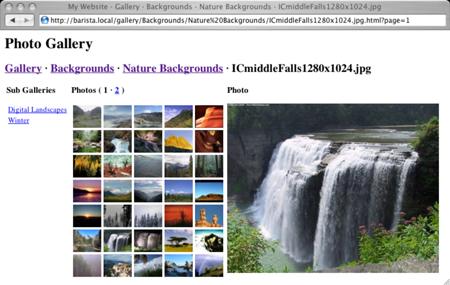
As an aside, that image was originally much larger, but I really wanted it to be just 450 pixels wide. I don’t have any image manipulation tools to do that job, but I do have Imager. Thanks to Imager, it took me 30 seconds to whip up the following command line snippet.
  perl -MImager -le'Imager->new->open(file=>shift,type=>"jpeg")
    ->scale(xpixels=>450)
    ->write(file=>shift,type=>"jpeg")' figure_0.jpg figure_0_0.jpg
Conclusion
We’ve just created a photo gallery that takes all the hard work out of maintaining photo galleries. There’s no need to pre-generate HTML or thumbnails. There’s no web application interface so you don’t have to change ownership of your gallery directory to the same user that Apache runs as. Using Mason’s built-in caching, photo galleries are nearly as fast as accessing the data directly from the file system. Well, at least on the second request. Our galleries have paging and infinite sub-galleries. Most importantly, using Mason to its full potential has given us a fully customizable, very tiny web application that can be dropped into any existing web site or framework.
In fact, this code is the majority of the faceplant project. The source code can be downloaded from faceplant on MetaCPAN. faceplant implements a few more features and is a bit more customizable. As such, its code is an excellent follow-up to this article. Go forth, now, and plant thy face on the Internet! " >}}
Tags
Feedback
Something wrong with this article? Help us out by opening an issue or pull request on GitHub







