


Adding Search Functionality to Perl Applications
Introduction to Searching
Usually, when building an application, a lot of thought goes into how the data is entered and updated, rather than finding it again. Finding data is an afterthought, especially when developing with a small dataset.
If you are building a small, simple database-backed web site with only a couple of hundred records, then relatively simple SQL should be all you need. It would be trivial to add a simple and Foo_Name like ‘%keyword%’ to the queries being used.
When your needs go beyond this, there are three ways you can proceed: you can use native database full-text searching, an external search engine, or you can roll your own. Most relational databases come with a full-text search functionality, but can have disadvantages:
- Mutually incompatible syntax and behavior.
- Poor and often unconfigurable ranking and scoring.
- Difficult or impossible to query across multiple tables.
- Require schema changes and rebuilding of indexes for any additional or removed fields.
- Lack of advanced features such as application context, word
An external search engine, such as htdig, offers independence from your database and application, as well as powerful indexing and searching functionality. However, this solution is limited in how it can interact with your application – it depends both on its crawler and own your applications interface. An external search engine can quickly become out of date, as changes to your data will not be reflected until it next reads through your site.
Integrating customized searching into your application can provide you with many benefits:
- A cross-platform search component that:
- Doesn’t tie you to a specific database.
- Is easy to abstract and re-use.
- The ability to customize how searching works:
- Search subsets of data or across tables.
- Tune scoring, weighting, stemming, stop-words, etc.
- Utilize relationships to provide additional data.
- Specify when and how to update the index according to your needs.
- Add extra columns or tables without modifying the schema or interface.
- Leverage the metadata and word index:
- Re-use the data to provide extra features, such as computing vectors to find similar records.
- Categorize data according to vectors or important keywords, rather than using tables or by hand.
When you build searching into your application, it can make the difference between users finding the right information on your site or going somewhere else – advanced search syntax and features are no substitute for finding the right results for the user in the first place!
Organizing and Indexing Your Data
Most search engines use a reverse (or inverted) index to store a list of words or phrases and locations where they are found. This means building up a list of locations, which could be web pages, files, objects or database records, and then adding an entry into the index for each word found, specifying the location, and possibly some metadata like a score or the type of location.
A reverse index can be just a simple table:
create table ReverseIndex (
 ReverseIndex_Word varchar(32) not null,
 ReverseIndex_Document varchar(255) not null,
 ReverseIndex_Score int,
 primary key (ReverseIndex_Word, ReverseIndex_Document)
)
This table assumes that each document has a score for each word, based on, perhaps, the number of occurrences. Some example data would look something like this:
| ReverseIndex_Word | ReverseIndex_Document | ReverseIndex_Score |
|---|---|---|
| art | /samantha/stuff/ballet.doc | 2 |
| ballet | /samantha/stuff/ballet.doc | 5 |
| boy | /aaron/simpsons/homer/quotes.foo | 2 |
| boy | /samantha/stuff/ballet.doc | 1 |
| dance | /aaron/simpsons/homer/quotes.foo | 2 |
| dance | /samantha/stuff/ballet.doc | 5 |
| monkey | /aaron/simpsons/homer/quotes.foo | 1 |
To search the index for Homer’s “Dance monkey boy dance!” quote, you would split, lowercase, remove duplicates and punctuation, and build a query from the array:
SELECT ReverseIndex_Document as Name,
       Sum(ReverseIndex_Score) as Total_Score,
       Count(ReverseIndex_Score) as Matches
FROM ReverseIndex
WHERE ReverseIndex_Word IN ('dance','monkey','boy')
GROUP BY ReverseIndex_Document
ORDER BY Matches DESC , Total_Score DESC
This query returns:
| Name | Total_Score | Count |
| /aaron/simpsons/homer/quotes.foo | 5 | 3 |
| /samantha/stuff/ballet.doc | 6 | 2 |
This query has a few features that make it more effective. The query tests not only the sum of scores, but also the number of matches. Ordering by matches before scores is a crude measure to give slightly better results than just by score, where a single highly scored word in a document can skew the results.
Because your search results are only as good as your index, it is worth investing the time to polishing your index to minimize skewed results. You can limit your scores per record or normalize the whole index. This would ensure that results are more even, and therefore more likely to give the results the user is looking for.
The key to integrating a customized search into your application is the ability to use additional contextual information to give more accurate results. This additional information could be records in other tables, filenames, or any other metadata you have available. In the example above, if we also indexed the words “homer” and “quote” from the file name and path, and the user had entered “homer” and/or “quote,” the score and rank for the “quotes.foo” document would be much better and more accurately reflect what the user was looking for.
Adding Indexing and Searching to a Legacy Application
Although it can be easier to provide a search engine externally through Lucene or Swish, you don’t have to tightly integrate searching at a code level to reap benefits from customized indexing. Adding your own search engine can be a high-level operation. When adding search functionality to a legacy application, you have the choice of reworking the code, annexing, or adding triggers.
Annexing Searching to an Application
Annexing searching to your application can be as simple as couple of extra tables in a database and a perl script called from cron. The database need only contain the reverse index and some summary information about the locations that would be displayed in search results.
Your searching logic should do the minimum of work to ensure fast results, with as much of the work as possible being done up front. This is the flaw in just adding simple SQL queries to pages to provide searching: they’re simply not efficient. Exact matches on indexed columns as, in a reverse index, are far faster than the SQL-like/wildcard queries people tack onto a page to allow searching, and built-in database full-text indexes will be very slow or may not even be available when searching columns not specified in the index. This leaves a lot of work to be done for each search, which is avoided when you roll your own.
This simple example uses two tables, a script for indexing, and a mod_perl handler for searching. The ReverseIndex table is going to be three columns: Word, Score, and Location.
create table ReverseIndex (
ReverseIndex_Word varchar(64),
ReverseIndex_Score float,
Location_ID int,
primary key( ReverseIndex_Word, ReverseIndex_Score )
)
The Location table will have seven columns: Location_ID, Title, Type, Key, Identifier, URL, and Summary.
create table Location (
Location_ID integer primary key auto_increment,
Location_Title varchar(64),
Location_Type varchar(16),
Location_Key varchar(32),
Location_Identifier integer,
Location_URL varchar(255),
Location_Summary text
)
The indexing script just reads records from the application table and populates the reverse index and locations tables. This example uses a simple local weighting based on the fields and doesn’t check if locations already exist. (If you store your application data in XML, it should still be relatively simple to change the code fetching data from the database to pull from XML files instead.)
# give fields weighting
my %weight = ( Pub_Name => 1,
               Pub_Type => 0.5,
               Pub_Description => 0.8,
               Brewery_Name=> 0.6,
               Town_Name => 0.4);

# fetch records from the Pub table, joined against Town and Brewery
my $sth = $dbh->prepare('select
    Pub_ID, Pub_Name, Pub_Type, Pub_Description,
    Brewery_Name, Town_Name
    from Pubs, Brewerys, Towns
    where Towns.Town_ID = Pubs.Town_ID and
          Brewerys.Brewery_ID = Pubs.Brewery_ID');
my $rv = $sth->execute();

while (my $record = $sth->fetchrow_hashref() ) {
  my %words = ();
  # create the location
  # index the record
  my $location_sth = $dbh->prepare_cached("
    insert into Location
        (Location_Title, Location_Type, Location_Key,
        Location_Identifier, Location_URL,
        Location_Summary )
    values (?,'Pub','Pub_ID',?,'/pub.cgi', ?)
  ");
  (my $summary) = $record->{Pub_Description} =~ /(\w+\s+){0,20}/;
  my $rv = $location_sth->execute(
        $record->{Pub_Name}, $record->{Pub_ID}, "$summary .."
  );
  my $location = $dbh->{mysql_insertid};

  # short stop-word dictionary
  my @stopwords = qw/a i you he she they the it is as to
                     not on or no/;
  my %stopwords; @stopwords{@stopwords} = @stopwords;

  # delete all old words for this location
  my $deleted = $dbh->do("
    delete from ReverseIndex
    where Location_ID = $location");

  foreach my $field ( keys %$record ) {
    # split the words out of the field ( from Tim Kientzle's article )
    my @words = split(/[^a-zA-Z0-9\xc0-\xff\+\/\_\-]+/,
                        lc $record->{$field});

                # Strip leading punct
    @words    = grep { s/^[^a-zA-Z0-9\xc0-\xff\_\-]+//; $_ }
                # Must be longer than one character
                grep { length > 1 }
                # must have an alphanumeric
                grep { /[a-zA-Z0-9\xc0-\xff]/ } @words;

    # score the words
    foreach (@words) {
      next if $stopwords{$_};
      $words{$_} += $weight{$field}
        unless defined $words{$_} && $words{$_} > 5;
    }
  }

  # insert the new words into the index
  my $sth = $dbh->prepare('
 insert into ReverseIndex
        (ReverseIndex_Word, ReverseIndex_Score, Location_ID)
 values (?,?,? ) ');
  foreach my $word (keys %words) {
    my $rv = $sth->execute($word,$words{$word},$location);
  }
}
The search handler only really needs a simple SQL query with an autogenerated clause, and a short dictionary of stop words (see above).
package Search::Pub;

use strict;
use DBI;
use Template;

use Apache;
use Apache::Constants;

my %stopwords;
@stopwords{(qw(a i at be do to or is not no the
               that they then these them who where
               why can find on an of and it by))} = 1 x 27;

my $dbh = DBI->connect("DBI:mysql:pubs:host", 'username', 'password');

# initialise and create template
my $config = {
    INCLUDE_PATH => '/search/path',  # or list ref
    POST_CHOMP   => 1,               # cleanup whitespace
};
my $template_file = 'results.tt';
my $template = Template->new($config);

sub handler {
  my $r = shift;

  # remove stoplist words
  my @wordlist  = split(/\s+/,$r->param('searchstring'));
  my @shortlist = ();
  my @arglist   = ();

  foreach my $word (@wordlist) {
    next if ($stopwords{$word});
    push(@shortlist, $word);
    push(@arglist,'?')
  }

  # build SQL
  my $where = 'WHERE ReverseIndex_Word IN ('
              . join(',',@arglist) . ') ';
  my $sql = qq{
  SELECT Location_Title,
         sum(ReverseIndex_Score) as score,
         count(*) as count,
         Location_Summary, Location_ID, Location_Key,
         Location_Identifier, Location_URL
  FROM   ReverseIndex, Location
  $where
  AND ReverseIndex.Location_ID = Location.Location_ID
  Group By ReverseIndex.Location_ID
  Order By score DESC, Count DESC };

  my $sth = $dbh->prepare($sql)
    or $r->warn("couldn't prepare statement!\n");
  $sth->execute(@shortlist);
  my $results = $sth->fetchall_arrayref();

  # populate template variables
  my $template_vars = { foo=>'bar'};
  $template_vars->{Results} = $results;
  $template_vars->{Words} = @shortlist;

  # output page
  $r->send_http_header('TEXT/HTML');
  $template->process($template_file, $template_vars, $r)
    || die $template->error();

  return OK;
}
Modifying Your Objects to Use a Trigger
An easy way to add indexing to objects is to use Class::Trigger. A good example of this can be seen in Kake Pugh’s article, where she combines Search::InvertedIndex with Class::DBI’s trigger support, or in Tony Bowden’s Class::DBI::mysql::FullTextSearch.
Using triggers provides an alternative to hacking calls to reindex the object in each place it is updated. More importantly, it allows you to separate the indexing from the object to another piece of code – possibly implementing the update outside of the object, in the application, or even in a mod_perl cleanup handler (tricky, but possible).
If you already have objects to which you wish to add indexing, then using triggers means minimal changes to your objects and therefore less regression testing – allowing you to get on with adding your indexing and searching code to your application. You can also build objects that index themselves with minimal code. For example:
 use Class::Trigger

 . . .

 sub set_foo {
      my ($self,$new_value) = @_;

      . . .

      $self->call_trigger('after_update');

      . . .
 }
You could then add a trigger elsewhere in the application, or possibly in a subclass, that would call your indexing logic:
 $object->add_trigger( after_update => sub {
      my $self = shift;
      # logic to index object
      reindex($self->{id},$self); # pass identifier and object
      return;
  } );
The indexing logic would update the reverse index table based on the object’s identifier and type. If you are keeping data about your objects/locations in a separate table, then you will need to get the foreign key that joins the tables before updating the reverse index table itself.
sub reindex {
  my ($id,$object) = @_;

  # fetch the foreign key if required
  my ($location) = $dbh->selectrow_array("
    select Location_ID
    from Location
    where Location_Type = '$type'
        and Location_Identifier = $id");

  # build new word/score data structure according to object type
  my %words = ();
  foreach my $field ( @{$objectfields{$type}} ) {
    my $text = $object->{$field->{name}};
    my @words = split(/[^a-zA-Z0-9\xc0-\xff\+\/\_\-]+/, lc $text);
    @words    = grep { s/^[^a-zA-Z0-9\xc0-\xff\_\-]+//; $_ }
            grep { length > 1 }
            grep { /[a-zA-Z0-9\xc0-\xff]/ }
            @words;

    # score the words
    foreach (@words) {
      next if $stopwords{$_};
      $words{$_} += $field->{weight}
        unless ($words{$_} > 5 );
    }
  }

  # mark old indexed values and fetch them
  $dbh->do("update ReverseIndex
            set ReverseIndex_Obselete = 1
            where Location_ID = $location");
  my @oldvalues = $dbh->selectcol_arrayref("
        select ReverseIndex_Word
        from ReverseIndex
        where Location_ID = $location" );

  # update values already present
  my $sth = $dbh->prepare('update ReverseIndex
    set ReverseIndex_Score = ?,
    set ReverseIndex_Obselete = 0
    where Location_ID = ? and ReverseIndex_Word = ?');

  foreach my $word (@oldvalues) {
    next unless ( defined $words{$word} );
    $sth->execute($words{$word},$location,$word);
    delete $words{$word};
  }

  # insert new values
  $sth = $dbh->prepare('
    insert into ReverseIndex
    (ReverseIndex_Word, ReverseIndex_Score,
        Location_ID, ReverseIndex_Obselete)
    values ( :word, :score, :location, 0) ');

  foreach my $word (keys %words) {
    $sth->execute($word,$words{$word},$location);
    delete $words{$word};
  }

  # delete remaining obselete values
  $dbh->do("delete from ReverseIndex
            where Location_ID = $location
                and ReverseIndex_Obselete = 1");
}
This process ensures the minimum of interruption to service – rather than doubling entries or removing all entries for an object while it was being updated. It would be slower than a simple wipe and replace, but for frequently read and updated objects, it would ensure more consistent search results. It would be simple to add object-level locking by checking before the update that no entries for an object are marked obselete; this would stop corruption of the index when multiple processes are updating a single object.
That takes care of indexing; for searching, you can either re-use the mod_perl search handler above, or add a new search method to your class. The following example assumes it is called as $objects = myapp->myclass::search($searchstring);:
sub search {
  my ($class,$searchstring) = @_;

  # remove stoplist words
  . . .

  # build SQL
  my $where = 'WHERE ReverseIndex_Word IN ('
                    . join(',',('?' x scalar @shortlist)) . ') ';
  my $sql = qq{
  SELECT Location_Title as title,
         sum(ReverseIndex_Score) as score,
         count(*) as count,
         Location_Summary as summary,
         Location_Identifier,
         Location_URL as url
  FROM   ReverseIndex, Location
  $where
      AND ReverseIndex.Location_ID = Location.Location_ID
  Group By ReverseIndex.Location_ID
  Order By score DESC, Count DESC };

  my $sth = $dbh->prepare($sql) or warn "couldn't prepare statement !\n";
  $sth->execute(@shortlist);

  # build a list of objects from the search results
  my $objects = [];
  while ( my $result = $sth->fetchrow_hashref ) {
    my $object = myapp::myclass->new(id => $result->{Location_Identifier}));
    push (@$objects, { object  => $object,
                       score   => $result->{score},
                       count   => $result->{count},
                       url     => $result->{url},
                       summary => $result->{summary},
                       title   => $result->{title} );
  }

  return $objects;
}
Integrating Indexing Into a New Class or Application
Whether building a new application or refactoring an old one, it is worth factoring “searchability” into the design. Designing in searching at the start can save a lot of work later as database schemas and business logic change.
The foundation of your application’s searching facilities will be the index. One way to proceed is to have a two-level index, with the normal reverse index table, plus a lookup table that provides additional information about the objects indexed. This lookup table can be used to hold all of the information you wish to display with the results in a single place.
create table ReverseIndex (
 ReverseIndex_Word varchar(64) not null,
 Location_ID int not null,
 ReverseIndex_Score int default 0,
 ReverseIndex_Fields text,
 primary key (ReverseIndex_Word,Location_ID)
)

create table Location (
 Location_ID int primary key auto_increment,
 Location_Type varchar(32),
 Location_Key varchar(32),
 Location_KeyValue int,
 Location_Title varchar(128),
 Location_Summary text,
 Location_URL varchar(255)
)
Any extra information you wish to show in the results – such as paths, icons, or the objects status – should be stored in the Location table. If a location has been replaced or should only be visible under certain conditions, you can keep relevant flags in this table and check them when processing the results.
Turning to the code side of searching, a good trick is to use perl’s multiple inheritance to make your application’s objects inherit from a superclass that contains the search logic. This IndexedObject class provides a fine-grained, incremental update to the index, reindexing individual object attributes as they are changed. If your object only updates the database when the object is synchronized explicitly, then you can either reindex the whole object or keep track of changes and index the fields that have been changed as part of your synchronize method. Here’s a sample base class that provides a few reverse indexing methods:
package myapp::classes::IndexedObject;
use strict;

use myapp::libraries::Search;

################
# public methods

sub index_object {
  my $self = shift;
  foreach $field (keys %{$self->{_RIND_fields}} ) {
    $self->index_field($self->,$field,$self->{$field});
  }
}

sub index_field {
  my ($self, $field, $value) = @_;
  return 0 unless $self->{_RIND_fields}{$field};
  my $location = $self->{_RIND_Location};
  my $query = "select * from $self->{table}
               where Location_ID = ?";
  my $sth = $self->{_RIND_DBH}->prepare($query);
  my $rv = $sth->execute($location);
  my %newwords = ();
  my @newwords = get_words($string);
  foreach my $word (@newwords) {
    next if ($stopwords{$word});
    $newwords{$word} += $self->{_RIND_fields}{$field}{weight};
  }

  while ( my $row = $sth->fetchrow_hashref() ) {
    next unless ($row->{ReverseIndex_Fields} =~ m/'$field'/);
    $self->{locationwords}{$row->{ReverseIndex_Word}} = $row;

    my %fields = ( $row->{ReverseIndex_Fields} =~ m/'(.*?)':([\d.]+)/g );

    if ( exists $newwords{$row->{ReverseIndex_Word}} ) {
      $self->_RIND_UpdateFieldEntry( $row, $field,
                       $newwords{$row->{ReverseIndex_Word}});
      delete $newwords{$row->{ReverseIndex_Word}};
    } else {
      $self->_RIND_RemoveFieldEntry($row,$field,$lid);
    }
  }

  foreach my $word ( keys %newwords ) {
    $self->_RIND_AddFieldEntry($lid,$word,$newwords{$word},$field);
  }

}

sub delete_location {
  my $self = shift;

  my $query = "delete from ReverseIndex where Location_ID = ?";
  my $sth = $self->{_RIND_DBH}->prepare($query);
  my $rv1 = $sth->execute($self->{_RIND_Location});

  $query = "delete from Location where Location_ID = ?";
  $sth = $self->{_RIND_DBH}->prepare($query);
  my $rv2 = $sth->execute($self->{_RIND_Location});

  return $rv1 + $rv2;
}

sub indexed_fields {
  my ($self,%args) = @_;
  if (keys %args) {
    $self->{_RIND_DBH} = $args{dbh} if defined $args{dbh};
    if defined $args{key} {
      $self->{_RIND_Key} = $args{key};
      ($self->{_RIND_Location}) =
        $self->{_RIND_DBH}->selectrow_array("
            select Location_ID
            from Location
            where Location_Key = '$args{key}'
            and Location_KeyValue = $self->{$args{key}}");
    }
    if ( defined $args{fields} ) {
      foreach (@{$args{$fields}}) {
        $self->{_RIND_fields}{$_->{name}} = $_ ;
      }
    }
  }
  return @{$self->{_RIND_FIELDS}} if wantarray;
}

#################
# private methods

sub _RIND_UpdateFieldEntry {
  my ($self,$row, $field,$score) = @_;
  my %fields = ($row->{Location_Fields} =~ m/'(.*?)':([\d.]+)/g);

  # recalculate total score
  my $newscore = ($row->{ReverseIndex_Score} - $fields{$field})
                 + $score;
  if ($fields{$field} == $score) {
    # skip if the same
    return 1;
  }

  # update entry, removing field and score from end
  $fields{$field} = $score;
  my $newfields;
  foreach (keys %fields) {
    $newfields .= "'$_':$fields{$_}";
  }
  $self->_RIND_UpdateIndex(
        word      => $row->{ReverseIndex_Word},
        location  => $row->{Location_ID},
        newscore  => $newscore,
        newfields => $newfields);
}

sub _RIND_AddFieldEntry {
  my ($self,$location, $word, $score, $field) = @_;

  # check if record already exists for this location
  # and update/insert entry
  if (exists $self->{locationwords}{$word}) {
    # recalculate total score
    my $newscore = $self->{locationwords}{$word}{ReverseIndex_Score}
                  + $score;
    # update entry, appending field and score to end
    my $newfields = $self->{locationwords}{$word}{Location_Fields}
                    . "'$field':$score";
    $self->_RIND_UpdateIndex(
        word      => $word,
        location  => $location,
        newscore  => $newscore,
        newfields => $newfields);
  } else {
    # insert new entry
    $self->_RIND_UpdateIndex(
        insert   => 1,
        word     => $word,
        location => $location,
        score    => $score,
        fields   =>"'$field':$score");
  }
}

sub _RIND_RemoveFieldEntry {
  my ($self,$row,$field,$lid) = @_;

  # check if record contains other fields
  my %fields = ( $row->{Location_Fields} =~ m/'(.*?)':([\d.]+)/g );
  if ( keys %fields > 1 ) {
    # recalculate total score
    my $newscore = $row->{ReverseIndex_Score} - $fields{$field};
    delete $fields{$field};
    # update entry, removing field and score from end
    my $newfields = '';
    foreach (keys %fields) {
      $newfields .= "'$_':$fields{$_}";
    }
    $self->_RIND_UpdateIndex(
        word      => $row->{ReverseIndex_Word},
        location  => $lid,
        newscore  => $newscore,
        newfields => $newfields
    );
  } else {
    # delete entry
    $self->_RIND_UpdateIndex(
        word      => $row->{ReverseIndex_Word},
        location  => $lid,
        newscore  => $newscore,
        newfields => $newfields,
        delete    => 1
    );
  }
}

sub _RIND_UpdateIndex {
  my ($self,%args) = @_;
  my $query = "update $self->{table}
               set ReverseIndex_Score = ?,
                   Location_Fields = ?
               where ReverseIndex_Word = ?
                   and Location_ID = ?";

  my @args = ($args{newscore},$args{newfields},$args{word},$args{location});

  SWITCH : {
    if ($args{insert} == 1) {
      $query = "insert into $self->{table}
                (ReverseIndex_Score, Location_Fields,
                 ReverseIndex_Word, Location_ID)
                values (?,?,?,?) ";
      last;
    }
    if ($args{delete} == 1) {
      $query = "delete from $self->{table}
                where ReverseIndex_Word = ?
                    and Location_ID = ?";
      @args = ($args{word},$args{location});
      last;
    }
  } # end of SWITCH
  my $sth = $self->{dbh}->prepare($query);
  my $rv = $sth->execute(@args);
  return;
}
The code that extracts words from objects and search queries has to be the same, so it is a good candidate for putting into a separate library; this also helps make the code more manageable.
myapp::libraries::Search;
use strict;
require Exporter;

our @ISA = qw(Exporter);
our @EXPORT = qw(%stopwords &get_words);

# stop words
my %stopwords;
@stopwords{(qw(a i at be do to or is not no the that they
    then these them who where why can find on an of and it by))} = 1 x 27;

sub get_words {
  my $text = shift;
  # Split text into Array of words
  my @words = split(/[^a-zA-Z0-9\xc0-\xff\+\/\_\-]+/, lc $text);
           # Strip leading punct
  @words = grep { s/^[^a-zA-Z0-9\xc0-\xff\_\-]+//; $_ }
           # Must be longer than one character
           grep { length > 1 }
           # must have an alphanumeric
           grep { /[a-zA-Z0-9\xc0-\xff]/ } @words;
  return @words;
}
Your own objects can then inherit the index and search methods from the superclass and provide their own logic to manage how metadata is stored.
package myapp::classes::Pub;
use strict;

our @ISA = qw(myapp::classes::IndexedObject
              myapp::classes::DatabaseObject);

sub new {

 . . .

 $self->indexed_fields(
                       dbh=>$self->get_dbh, key=>'Pub_ID',
                       fields=>[
                                { name=>'Pub_Name', weight=>1},
                                  . . .
                               ],
                      );
 return $self;
}

sub create {
  my ($class,%args) = @_;
  my $self = $class->_new();
  $self->_initialise_from_values(%args);
  $self->create_location(%args);
  $self->index_object();
  return $self;
}

sub load {
  my ($class,%args) = @_;
  my $self = $class->_new();
  $self->_initialise_from_db(%args);
  return $self;
}

sub update {
  my ($self, $field, $value) = @_;
  $self->{$field} = $value;
  $self->execute("update Pubs
                  set $field = ?
                  where Pub_ID = ?",
                  $value, $self->{Pub_ID});

  $self->IndexField($self->{Pub_ID},$field,$value);
  return 1;
}

sub delete {
  my $self = shift;
  $self->delete_location();
  $self->execute("delete from pubs
                  where = Pub_ID = ?",$value);
}
Adding lookups and replacements to your objects indexing logic can be pretty painless. Here’s the data that gets passed to indexed_fields for a Pub object.
      fields=>[
           { name=>'Pub_Name', weight=>1},
           { name   => 'Brewery_Name',
             weight => '0.4',
             lookup => 'Brewery_ID',
             table  => 'Brewery'},
           { name   =>'Pub_IsCAMRA',
             weight =>'0.6',
             replace=>'CAMRA Real Ale'}
          ],
      table=>'Pub',
The hard work can be done in the superclass, updating the index_fields method to do lookups and replacements.
sub index_fields {
my ($self, $field, $value) = @_;
return 0 unless $self->{_RIND_fields}{$field};
my $location = $self->{_RIND_Location};
my $query = ‘select * from $self->{table} where Location_ID = ?’;
my $sth = $self->{_RIND_DBH}->prepare($query);
my $rv = $sth->execute($location);
my %newwords = ();
  if ( defined $self->{_RIND_fields}{$field}{replace} ) {
    @words = get_words($self->{_RIND_fields}{$field}{replace});
  } elsif ( defined $self->{_RIND_fields}{$field}{lookup} ) {
    my $column = $self->{_RIND_fields}{$field}{lookup};
    my $table = $self->{_RIND_fields}{$field}{table};
    my $words = $self->{_RIND_DBH}->selectrow_array("
        select $field
        from $table
        where $table.$column = $self->{table}.$column ");
    @words = get_words($words);
  } else {
    warn "this is just a normal field\n";
    @words = get_words ($fields{$field->{name}});
  }

  my @newwords = get_words($string);
  foreach my $word (@newwords) {
    next if ($stopwords{$word});
    $newwords{$word} += $self->{_RIND_fields}{$field}{weight};
  }

  while ( my $row = $sth->fetchrow_hashref() ) {
    $self->{locationwords}{$row->{ReverseIndex_Word}} = $row;
    next unless ($row->{ReverseIndex_Fields} =~ m/'$field'/);
    my %fields = ( $row->{ReverseIndex_Fields} =~ m/'(.*?)':([\d.]+)/g );
    if ( exists $newwords{$row->{ReverseIndex_Word}} ) {
      $self->_RIND_UpdateFieldEntry($row,$field,
                        $newwords{$row->{ReverseIndex_Word}});
      delete $newwords{$row->{ReverseIndex_Word}};
    } else {
      $self->_RIND_RemoveFieldEntry($row,$field,$lid);
    }
  }

  foreach my $word ( keys %newwords ) {
    $self->_RIND_AddFieldEntry($lid,$word,$newwords{$word},$field);
  }

}
The problem with doing lookups is that it’s possible that another object could update some data that affects other objects. To avoid this, you’ll have to make the other object check which objects would be affected by changes to itself.
If you store the indexed fields in the database, it’s possible to only check those object types affected with two queries: the first query will get the object types that index the changed field, and the second will update the affected records, joining as per the original lookup. An alternative to keeping the indexed fields in the database would be to keep the indexing information in an XML file – such a file could also contain configuration options that the search system could check, such as whether to use stemming, ranges for grades, and so on.
The two-level solution we discussed with the additional metadata table lets us store data about which object attributes are indexed and how, and it also allows for easy reporting. Additionally, we can control the indexing process purely by updating the database or XML, without having to modify the codebase at all.
Normalizing and Global Weighting
Normalizing scores within the reverse index ensures that all scores are within constrained limits, making them much easier to interpret and use in your application. How you normalize the scores depends on both the data you have indexed and how it will be searched. A common scenario is that the index breaks down into three groups of words.
- A small number of high-scoring words, with relatively low frequency. These words are usually rare across the data set, but appear frequently in a small number of objects.
- Some middle-scoring words with a high frequency across the index. These words are common across the whole data set.
- A large number of low-scoring words with low frequency. These words occur rarely in the data set and rarely in any object.
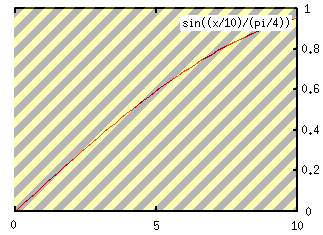 A simple way to normalize scores, while at the same time narrowing the gap between high-scoring and low-scoring words, is to use the sine curve to reshape the distribution of scores.
This graph shows the area of the sine curve we are using – the flat top reducing the impact of outlying high scores and translating scores into a value between 0 and 1 – in this case, the maximum is assumed to be 10. The normalize function show here can be added to the myapp::libraries::Search module and called from IndexObject’s indexing methods.
 sub normalise {
   my $score = shift;
   return sin(($score/$max)/(PI/4));
 }
If your data (scores by frequency) follow more of a bell curve, with a small number of low-scoring words, many middle-scoring words and a few high-scoring words, you would want to normalize using mu-law or a-law functions. In this example, outliers at top and bottom are compressed to fit within the range of 0 to 1 – see the chart below.
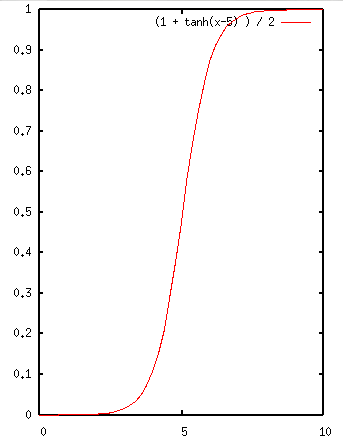 use Math::Trig;
. . .

sub normalise {
   my $score = shift;
   $score = ($score / $max) * 10;
   return sin(1 + tanh($score -5 )) / 2;
}
When indexing, you can weight scores both locally and globally. Local weighting is covered earlier in the article, and global weighting reduces the scores of frequently found or particularly highly scoring words that can skew results, as well as increase the scores of rare words.
For the best results when weighting scores globally, you should normalize in advance to ensure a limited range of scores; this can also reign in outlying scores that could skew the weighting. Global weighting of scores requires that scores still reflect the relevance of an object, and can be problematic if the solution doesn’t consider that a rare word with a low mean score can still have a few high scores that could end up being scored too highly, or vice versa, making results less, rather than more, useful.
sub global_weighted_score {
  my ($word,$score) = @_;
  my $word_avg = get_average($word); # get average score for word
  my $global_avg = get_average($word);       # get average score across index
  $score = normalise($score);                # normalise score before weighting
  if ($word_avg > $global_avg) {
    $score += (($global_avg - $word_avg) * 0.25) /
                ($global_avg / $score );
  } else {
    $score += (($global_avg - $word_avg) * 0.25) /
                ($score / $global_avg );
  }
  return $score;
}

sub get_average {
  my $word = shift;
  my $query = 'select avg(ReverseIndex_Score)
                 from ReverseIndex';
  if ($word) {
    $word = $dbh->quote($word);
    $query .= " where ReverseIndex_Word = $word";
  }
  my ($avg) = $dbh->selectrow_array($query);
  return $avg;
}
There is nothing stopping you from keeping multiple scores in your index for each word; as long as you index them appropriately, there will not be a significant impact on performance. In particular, you could weight scores at the class level as well as at the global level. Keeping track of original, normalized, and weighted scores means that changes to code require only recalculating of scores rather than re-indexing everything. This additional information could also be included in data made available through web services.
Stopwords
Integrating indexing and searching into your classes allows you to have class-level or even object-level stopwords. This can be particularly handy when one word is so frequent in one class or set of objects as to become meaningless, while rare and useful in others, and resolving the limitations of global weighting.
Stopwords can be normalized by ignoring them while building the word list and adding them later, based on other object attributes. For instance, if you had a load of objects representing pubs, you could add the pub’s town to the global or class stopword list and then give all pubs in “Watford” the same score for “Watford” in the index. Other options would be to score down words in the index based on object attributes such as location, or even having stopwords apply to specific fields – for example, if you ignored the word “watford” in the description of a pub, you could still increase the pub’s score for “watford” if it was in a name or address field – so a pub called “The Watford Arms” would score higher than “The Kings Head.”
Integrating the Search into Your Application
The results are the important part as far as the user is concerned – this where all the hard work should bear fruit with a responsive site and useful information.
Critical considerations are:
- What information is needed.
- How ranking and scoring will be determined.
- How to normalize scores if they are shown.
Showing results for subsets or grouping can also be important. Your presentation of the results can also make a difference – paging and balancing the trade-off between the amount of information you can show for each result and how many results you can fit on a page.
Assuming the database schema outlined earlier, it would be possible to denormalize some of the information held into the Location table. Although this will consume some more memory, it saves on joining tables when searching, and would be updated at the same time as the index, so remaining in sync with the application data itself.
When displaying results to your users, you are heavily constrained in how much data you can present at once. This means some form of paging is often required if you have more than a screenful of results. It also means that you must sacrifice the number of results shown per page if you want to show more than a trivial amount of information in that page.
Often it can be difficult to grade the quality of results returned to the user – although index scores are limited and normalized, you also need to be able to display scores in a meaningful way to the user. This means both simplifying and explaining the scores. A numeric score without qualification is meaningless: is 5 out of 5, or 10, or 100?
The simplest way to grade scores is to work out the maximum score and divide it into grades. For example, if you have a maximum of 5 points per word matched, then you could divide the score by the number of words searched for and grade it by rounding up to 1, 2, 3, 4 or 5 out of 5. This information can then be presented using text and/or graphics, the latter allowing for color-coding of results. A small colored bar for each result allows you to show both the score and the grade in the minimum of space. The bar can easily be replaced by stars or other symbols, to fit in with the look and feel of an application.
By normalizing the scores as you index the objects (see above), you make the results much easier to use. If you know that the maximum score per search term is 1, then scores can be easily graded with a simple piece of code into something users can understand.
my $wc = scalar @searchwords;
foreach my $result (@$results) {
  $result->{grade} = get_grade($result->{score}/$wc);
}

sub get_grade {
  my $score = shift;
  return 'poor' if ($score < 0.35);
  return 'good' if ($score < 0.65);
  return 'very good' if ($score < 0.85);
  return 'excellent';
}
There are many ways of getting extra value from your results. You can group results by object type, either by adding logic to the query or by using an Iterator class that differentiates between object types.
By checking the status or type of each item in the result list, you can present it in a different way or provide additional information. Items in a catalogue that have been recalled or replaced can include a link to the replacement or recall notice – again, this is one of the benefits of keeping such information in a metadata table.
You can check for spelling mistakes and alternative words using CPAN modules such as Lingua::Spelling::Alternative. You can also provide related links for items or keyword-based advertising.
Tuning and Customizing
Once you have your search engine working and integrated with your application, you can work on tuning it for more accurate scoring and more intuitive results. You can also work on customizing it further to meet the needs of your application.
For instance, if part of your application was a catalogue, then you could add a status field to your locations. This would allow your to mark old items as replaced and provide an alternative result in its place in search results, with a note saying which item it replaced. You could also provide similar features for items that have been recalled or books no longer in print.
You can further tune results using two powerful modules on CPAN – Lingua::Stem::En (replace En with whichever language suits your needs) and Lingua::EN::Tagger. For the sake of simplicity, I haven’t used these in this article, but they are relatively simple to integrate into searching and indexing.
Linga::Stem::En provides Porter Stemming for perl. Porter’s algorithm is a well-known way of cutting down a word to its stem – removing grammatical information from words to find their root. For instance, you’ll want “training” and “trains” both to match the same results as “train,” so Porter Stemming can be used to reduce both words to “train.” As well as increasing the accuracy of your search, this technique also drastically reduces the number of words in the index. If you are getting a high number of word misses on your index, this can improve results greatly – if you are already getting plenty of word hits on your index, then this can normalize your results more by losing grammatical information in the words that may distinguish results better. A simple rule of thumb is that if you get a low number of results for each word, then you need it; if you have a high number of results for each word, you don’t. To add stemming to your index with a module like Lingua::Stem::En, you would use the module’s function to extract words rather than (or as well as) your own, when splitting search phrases and text to be indexed into keywords.
Tagger is a clever module that can add something approaching phrase matching without having to muck about (too much) with your working index algorithm. Tagger will pull out groups of words from a string of text (optionally stemming words) by looking for nouns and “Parts Of Speech.” By passing text to be indexed and text to be searched for through the tagger, you can extract groups of words. For example, instead of just indexing “Justice Department” as two separate words, a good tagger will return it as a single phrase.
Once you’re used the tagger to segment your text, you can treat the individual words and the phrases alike for both indexing and searching purposes. This means you can avoid the slow and unpleasant task of doing phrase matching properly – because the tagger would also apply to the search query, a phrase like “Justice Department” in a search term would be automatically kept together. The phrase-matching process would be transparent to the user, meaning there’s no need for additional syntax such as putting quotes around phrases.
Both Tagger and Lingua::Stem can be integrated into the get_words function above, transparent to both index and search logic.
When you control the indexing, it is possible to recognize dates and convert them to an internal format for full-text searching, applying similar logic to stemming – as long as your internal date format is consistent, it doesn’t matter how dates are entered by the user or stored in the data. They can be converted to the internal date format when indexed or queried. This is useful if date information is particularly important to your objects.
References and Further Reading
- “Designing a Search Engine” by Pete Sergeant. Useful information on coping without an RDBMS and implementing phrase-matching/Boolean searches. (perl.com)
- “The Windows 2000 Content Index” by Bartosz Milewski. The principles and design of the Windows 2000 content index. (Dr. Dobb’s Journal – registration required.)
- “Web Site Searching and Indexing in Perl” by Neil Gunton. Indexing websites using MySQL and DBIx::FullTextSearch. (Dr. Dobb’s Journal – registration required.)
- “Full-text indexing in perl” by Tim Kientzle. A concise introduction to full-text indexing in
perl– an essential read. (Dr. Dobb’s Journal – registration required.) - “Building a Vector Space Search Engine in Perl” by Maciej Ceglowski. Covers the Vector-based alternative to Reverse Index searching, as well as pointers on splitting text into words, etc. (perl.com)
- “How to Avoid Writing Code” by Kake Pugh. Quick introduction to practical use of Class::DBI including how to add a full-text search to an object. (perl.com)
Tags
Feedback
Something wrong with this article? Help us out by opening an issue or pull request on GitHub





