


Embedding Web Servers
As with most of my previous articles, this one grew out of a project at my $DAY_JOB. The project du-jour involves large dependency graphs, often containing thousands of nodes and edges. Some of the relationships are automatically generated and can be quite complicated. When something goes wrong, it’s useful to be able to visualize the graph.
Simple Graph:
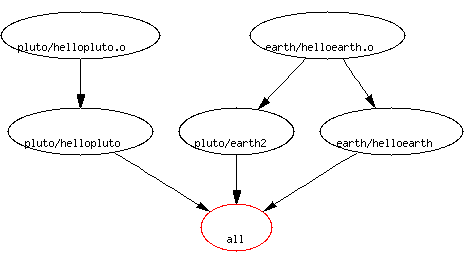 We use GraphViz for rendering the graph, but it falls down on huge graphs. They turn into an unreadable mess of thick lines – less than useful. To work around this, we trim down the graph to just a segment, centered around one node, and display only n inputs or outputs.
This works great, except that the startup time to create the graph data can be quite long, because of all the graph processing that is necessary to make sure the information is up to date. (The actually graph rendering is quite fast, for small graphs.)
The solution? Process the data once, and render it multiple times, using, yes, you guessed it, a Web interface!
Mechanics of HTTP
The Hyper Text Transfer Protocol (HTTP), is the protocol on which most of the Web thrives. It is a simple client/server protocol that runs over TCP/IP sockets.
Extremely oversimplified, it looks like this:
- Client sends request to server: “Send me document named X”
- Server responds to client: “Here’s the data you asked for” (or “Sorry! I don’t know what you mean.”)
In practice, it’s not much more complicated:
We will use wget to examine a sample HTTP request:
wget -dq http://www.perl.org/index.shtml
 ---request begin---
 GET /index.shtml HTTP/1.0
 User-Agent: Wget/1.8.1
 Host: www.perl.org
 Accept: */*
 Connection: Keep-Alive

 ---request end---
 HTTP/1.1 200 OK
 Date: Tue, 13 Aug 2002 18:12:23 GMT
 Server: Apache/2.0.40 (Unix)
 Accept-Ranges: bytes
 Content-Length: 10494
 Keep-Alive: timeout=15, max=100
 Connection: Keep-Alive
 Content-Type: text/html; charset=ISO-8859-1

 <... data downloaded to a file by wget...>
There’s a lot of things we don’t care about in a simple server - so lets boil it down to the guts.
Request:
GET /index.shtml HTTP/1.0
GET is the type of HTTP action. There are others, but they’re beyond the scope of this article.
/index.shtml is the name of the page to retrieve.
HTTP/1.0 is the protocol version supported by your client.
Response:
 HTTP/1.1 200 OK
 Content-Type: text/html;

 <data>
The first line is the status response. It includes the HTTP protocol version supported by the server, followed by the status code and a short text string defining the status.
For this article, we’ll just care about status code 200 (everything is ok, here’s the data) and code ‘404’ (not found).
The next line is the MIME content type. This is required so that the Web browser knows how to display the data.
Common Content-Types:
        text/html       a HTML document
        text/plain      a plain text document
        image/jpeg      a JPEG image
        image/gif       a GIF image
After the above “header” section, there must be a blank line, and then the bytes containing the data. There’s a lot more information that can go into the header block, but for the simple applications we will be developing, they are not needed.
You can use a telnet client to retrieve data from any Web server. You need to be careful though - many modern Web servers are virtual hosted, which means they require the Host: header in the request to retrieve the appropriate data.
Writing A Simple Web Server
The Basics
With the above information, it isn’t hard to write your own simple Web server. There are several ways to do this and a few already written on CPAN. We’re going to start from first principles though, and pretend, for the moment, we don’t know about CPAN.
A good place to start looking for client/server information is in the perlipc document. About 2/3 of the way through is a section on “Internet TCP Clients and Servers”. This section shows how to use simple socket commands to setup a simple server. A little further down is the section we’re interested in - it demonstrates using the IO::Socket module to write a simple TCP server. I’ll replicate that here.
 #!/usr/bin/perl -w
 use IO::Socket;
 use Net::hostent;              # for OO version of gethostbyaddr

 $PORT = 9000;                  # pick something not in use

 $server = IO::Socket::INET->new( Proto     => 'tcp',
                                  LocalPort => $PORT,
                                  Listen    => SOMAXCONN,
                                  Reuse     => 1);

 die "can't setup server" unless $server;
 print "[Server $0 accepting clients at http://localhost:$PORT/]\n";

 while ($client = $server->accept()) {
   $client->autoflush(1);
   print $client "Welcome to $0; type help for command list.\n";
   $hostinfo = gethostbyaddr($client->peeraddr);
   printf "[Connect from %s]\n", $hostinfo->name || $client->peerhost;
   print $client "Command? ";
   while ( <$client>) {
     next unless /\S/;       # blank line
     if    (/quit|exit/i)    { last; }
     elsif (/date|time/i)    { printf $client "%s\n", scalar localtime; }
     elsif (/who/i )         { print  $client `who 2>&1`; }
     elsif (/cookie/i )      { print  $client `/usr/games/fortune 2>&1`; }
     elsif (/motd/i )        { print  $client `cat /etc/motd 2>&1`; }
     else {
       print $client "Commands: quit date who cookie motd\n";
     }
   } continue {
      print $client "Command? ";
   }
   close $client;
 }
HTTPify It
That’s not a HTTP server by any stretch of the imagination, but with a different inner loop it could easily become one:
 while ($client = $server->accept()) {
   $client->autoflush(1);

   my $request = <$client>;
   if ($request =~ m|^GET /(.+) HTTP/1.[01]|) {
      if (-e $1) {
       print $client "HTTP/1.0 200 OK\nContent-Type: text/html\n\n";
       open(my $f,"<$1");
       while(<$f>) { print $client $_ };
      } else {
       print $client "HTTP/1.0 404 FILE NOT FOUND\n";
       print $client "Content-Type: text/plain\n\n";
       print $client "file $1 not found\n";
      }
   } else {
     print $client "HTTP/1.0 400 BAD REQUEST\n";
     print $client "Content-Type: text/plain\n\n
     print $client "BAD REQUEST\n";
   }
   close $client;
 }
Let’s look at the changes piece by piece:
my $request = <$client>;
Retrieve one line from the socket connected to the client. For this to be a valid HTTP request, it must match the following:
if ($request =~ m|^GET /(.+) HTTP/1.[01]|) {
That checks that it’s a HTTP GET request, and is of a protocol version we know about.
      if (-e $1) {
       print "HTTP/1.0 200 OK\nContent-Type: text/html\n\n";
       open(my $f,"<$1");
       while(<$f>) { print $client $_ };
If the requested file exists, then send back a HTTP header that says that, along with a content type, and then the data. (We are assuming the content type is HTML here. Most http servers figure out the content type from the extension of the file.)
      } else {
       print $client "HTTP/1.0 404 FILE NOT FOUND\n";
       print $client "Content-Type: text/plain\n\n"
       print $client "file $1 not found\n";
      }
If the file doesn’t exist, then send back a 404 error. The content of the error is a description of what went wrong.
   } else {
     print $client "HTTP/1.0 400 BAD REQUEST\n";
     print $client "Content-Type: text/plain\n\n
     print $client "BAD REQUEST\n";
   }
A similar error handler, in case we can’t parse the request.
Almost 50 percent of the code is for error handling, and that doesn’t even take into account the error handling we didn’t do for I/O issues. But that’s the core of a Web server, all in about 15 lines of Perl.
If you use the above code without modification, it will allow every file on your system to be read. Generally, this is a bad thing. An explanation of proper security is outside the scope of this article, but generally you want to limit access to a subset of files, located under some directory prefix. File::Spec::canonpath and Cwd::realpath are useful functions for testing this.
Single Threaded, Nonforking, Blocking
The Web server presented above is very simple. It only deals with one request at a time. If a second request is received while the first is being processed, then it will be blocked until the first completes.
There are two schemes used to take advantage of modern computers’ ability to multiprocess (run more than one thing at once.) The simplest way is to fork off a Web server process for each incoming request. Because of forking overhead, many servers pre-fork. The second method is to create multiple threads. (Threads are lighter weight than processes.)
For a simple embedded server, it isn’t much more difficult to build a forking server, but the extra work is unnecessary if it’s only going to be used by one person or with a low hit-rate. The only advantage to the forking method is that it can serve multiple pages at once. (Taking advantage of modern operating systems ability to multiprocess.)
More information on forking servers, can be found in the perlipc documentation.
With a simple modification to our loop, we can turn our Web server into a forking client:
 while ($client = $server->accept()) {
   my $pid = fork();
   die "Cannot fork" unless defined $pid;
   do { close $client; next; } if $pid; # parent
   # fall through in child
   $client->autoflush(1);
Structure
The example server above is useful for simple reporting of generated data. Because the accept loop is closed, all processing by the main part of the program needs to be complete before the Web server is run. (Of course, actions from the Web server can trigger other pieces of the program to run.)
There are other ways to integrate a simple Web server depending on the structure of your program, but for this article, we’ll stick with the design above.
Graph Walker
Above we mentioned using GraphViz to create an embedded graph viewer. To do that we’ll use a Graph class that has some methods that will make our life easier. (There isn’t actually a class that does all this, but you can do it with a combination of Graph and GraphViz available on CPAN.)
It is outside the scope of this article to cover graph operations, but I’ve named the methods so that they should be easy to figure out. I am also going to gloss over some of the GraphViz details. They can be picked up from a tutorial.
Three Easy Steps
-
Define the Goal
This is the easy part.
To develop a graph browser that allows the user to click on a node to recenter the graph.
-
Define the URL scheme
How is the Web browser going to communicate back to the Web server? The only way it can is by requesting pages (via URLs.) For a graph browser we need two different kinds.
First, an image representing the graph. Second, a HTML page containing the IMG tag for the graph and the imagemap.
Since every node has a unique name we can use that to represent which node, and then use an extension to determine whether it is the HTML page or the graphic.
node1.html - HTML page for graph centered on node1 node1.gif - GIF image for graph centered on node1 -
Implement!
Now that you know what you’re building, you can put it all together and implement it.
 my $graph = do_something_and_build_a_graph();

 while ($client = $server->accept()) {
   $client->autoflush(1);

   my $request = <$client>;
   if ($request =~ m|^GET /(.+)\.(html|gif) HTTP/1.[01]|) {
      if ($graph->has_node($1)) {
       if ($2 eq "gif") {
         send_gif( $client, $1 );
       } else { # $2 must be 'html'
         send_html( $client, $1 );
       }
      } else {
       print $client "HTTP/1.0 404 NODE NOT FOUND\n";
       print $client "Content-Type: text/plain\n\n";
       print $client "node $1 not found\n";
      }
   } else {
     print $client "HTTP/1.0 400 BAD REQUEST\n";
     print $client "Content-Type: text/plain\n\n
     print $client "BAD REQUEST\n";
   }
   close $client;
 }

 sub send_html {
    my ($client, $node) = @_;

    my $subgraph = $graph->subgraph( $node, 2, 2 );

    my $csimap = $subgraph->as_csimap( "graphmap" );
    my $time = scalar localtime;

    print $client "HTTP/1.0 200 OK\nContent-Type: text/html\n\n";

    print $client<<"EOF";

    <HTML>
     <HEAD>
      <TITLE>Graph centered on $node</TITLE>
      $csimap
     </HEAD>
     <BODY>
     <H1>Graph centered on $node</H1>
     <IMG SRC="/$node.gif" USEMAP="graphmap" BORDER=0>
     <HR>
     <SMALL>Page generated at $time</SMALL>
     </BODY>
    </HTML>

  EOF
     ;

  }

 sub send_gif {
    my ($client, $node) = @_;

    my $subgraph = $graph->subgraph( $node, 2, 2 );

    my $gif = $subgraph->as_gif();

    print $client "HTTP/1.0 200 OK\nContent-Type: text/gif\n\n";

    print $client $gif;

  }

And that's it!  We have created a dynamic graph browser.
I will admit that we glossed over some of the HTML and Client Side Imagemap details – because they’re tangential to the issue of embedding a Web server into a tool. An embedded Web server is like merging the Web server, cgi script and source of the data into one program – sometimes the best way to build one is to start with a standard CGI script and use that.
More Details
Query Strings
Because our embedded Web server isn’t serving actual files off of your hard drive you have lots of flexibility as to how to parse the requested URL. In normal Web servers the common way to pass extra arguments to requested pages/scripts is by using a query string.
A URL with a query string looks like this:
http://foo.bar/thepage.html?querystring
There is a convention for passing key/value data in query strings (from HTML FORM’s for example):
http://foo.bar/page.html?keyone=dataone&keytwo=datatwo&keythree=3"
It’s easy to modify our embedded webserver template to accept query strings. Just add it to the regular expression that parses the request:
if ($request =~ m|^GET /(.+)(?:\?(.*))? HTTP/1.[01]|) {
$2 will then contain the query string. You can parse it by hand or pass it to CGI.pm or another CGI Module to parse it.
URI Escaping
Some characters have special meaning in URIs. (We’ve already seen ? and &. Others are " (space), %, and #. See the RFC for the full list.) In order to allow them to be passed in requests they need to be escaped. Escaping a URI changes the special characters into their hex representation with a prepended %. For example, " becomes %20.
The easiest way to perform this encoding is to use the URI::Escape module.
 use URI::Escape;
 $safe = uri_escape("10% is enough\n");
  # $safe is "10%25%20is%20enough%0D";
 $str  = uri_unescape($safe);
  # $str is 10% is enough\n
We will want to unescape any data received from the client:
    if ($request =~ m|^GET /(.+)(?:\?(.*))? HTTP/1.[01]|) {
      my $page = uri_unescape($1);
      my $querystring = uri_unescape($2);
More Ideas
You might want to embed a Web server into a tool to display the status of a task in a complicated way. Sure, you could just write the file to disk, but that’s less fun!
If a task has multiple possible outputs, then you could use the Web server to allow the user to choose between them visually, or pop up a browser at various states of a project to let the user confirm that things are going according to plan.
Speaking of popping up, you don’t need to make the user do anything to see the results of the page. You can force the browser to do it for you.
On UNIX systems you can use Mozilla/Netscape’s X-Remote protocol:
system(q[netscape -remote 'openURL("http://localhost:9000/")' &]);
Our example code has a port number hardcoded into it. If that port is already being used on your system, then the IO::Socket::INET::new() call will fail. An easy improvement is to loop over a range of ports, or random port numbers, until an available port is found.
Reusable Code
In some cases, I’ve avoided the use of modules in this article. There are many things that could be done with modules including argument handling (CGI.pm), URI/URL parsing (the URI family of modules), and even the HTTP server itself. (HTTP::Daemon)
The code we’ve presented here tries to go through the behind the scenes process so you know what’s going on.
For quick and dirty servers, HTTP::Daemon is probably easier to use. Here’s an example:
 use HTTP::Daemon;
 use HTTP::Status;
 use Pod::Simple::HTML;

 my $file = shift;
 die "File $file not found" unless -e $file;

 my $d = HTTP::Daemon->new || die;
 print "Please contact me at: <URL:", $d->url, ">\n";
 while (my $c = $d->accept) {
   while (my $r = $c->get_request) {
     if ($r->method eq 'GET') {
       my $rs = new HTTP::Response(RC_OK);
       $rs->content( Pod::Simple::HTML->filter($file) );
       $c->send_response($rs);
     } else {
       $c->send_error(RC_FORBIDDEN)
     }
   }
   $c->close;
   undef($c);
 }
The above HTTP::Daemon based server is a simple, single purpose, POD->HTML converter. I provide it with the name of a pod file to parse, and every time I reload the page, it will pass it through Pod::Simple and display the HTML to the browser.
You’ll note it has the same structure as our hand-made examples, but it handles some of the nitty-gritty work for you by encapsulating it in classes.
(If you think that HTTP::Daemon is much simpler than the original, then you should see the first version of this article which used the low-level socket calls.)
In Conclusion
Embedded hardware is all the rage these days - but embedded software can be quite useful, too. By embedding a Web server into your software you gain lots of possible output options that were difficult to have before. Tables, graphics and color! (Not to mention, output can be viewed by multiple computers.) Embedded Web servers open a world of opportunities to you.
Tags
Feedback
Something wrong with this article? Help us out by opening an issue or pull request on GitHub





