


Retire your debugger, log smartly with Log::Log4perl!
You’ve rolled out an application and it produces mysterious, sporadic errors? That’s pretty common, even if fairly well-tested applications are exposed to real-world data. How can you track down when and where exactly your problem occurs? What kind of user data is it caused by? A debugger won’t help you there.
And you don’t want to keep track of only bad cases. It’s helpful to log all types of meaningful incidents while your system is running in production, in order to extract statistical data from your logs later. Or, what if a problem only happens after a certain sequence of ‘good’ cases? Especially in dynamic environments like the Web, anything can happen at any time and you want a footprint of every event later, when you’re counting the corpses.
What you need is well-architected logging: Log statements in your code and a logging package like Log::Log4perl providing a “remote-control,” which allows you to turn on previously inactive logging statements, increase or decrease their verbosity independently in different parts of the system, or turn them back off entirely. Certainly without touching your system’s code – and even without restarting it.
However, with traditional logging systems, the amount of data written to the logs can be overwhelming. In fact, turning on low-level-logging on a system under heavy load can cause it to slow down to a crawl or even crash.
Log::Log4perl is different. It is a pure Perl port of the widely popular Apache/Jakarta log4j library [3] for Java, a project made public in 1999, which has been actively supported and enhanced by a team around head honcho Ceki Gülcü during the years.
The comforting facts about log4j are that it’s really well thought out, it’s the alternative logging standard for Java and it’s been in use for years with numerous projects. If you don’t like Java, then don’t worry, you’re not alone – the Log::Log4perl authors (yours truly among them) are all Perl hardliners who made sure Log::Log4perl is real Perl.
In the spirit of log4j, Log::Log4perl addresses the shortcomings of typical ad-hoc or homegrown logging systems by providing three mechanisms to control the amount of data being logged and where it ends up at:
- Levels allow you to specify the priority of log messages. Low-priority messages are suppressed when the system’s setting allows for only higher-priority messages.
- Categories define which parts of the system you want to enable logging in. Category inheritance allows you to elegantly reuse and override previously defined settings of different parts in the category hierarchy.
- Appenders allow you to choose which output devices the log data is being written to, once it clears the previously listed hurdles.
In combination, these three control mechanisms turn out to be very powerful. They allow you to control the logging behavior of even the most complex applications at a granular level. However, it takes time to get used to the concept, so let’s start the easy way:
Getting Your Feet Wet With Log4perl
If you’ve used logging before, then you’re probably familiar with logging priorities or levels . Each log incident is assigned a level. If this incident level is higher than the system’s logging level setting (typically initialized at system startup), then the message is logged, otherwise it is suppressed.
Log::Log4perl defines five logging levels, listed here from low to high:
    DEBUG
    INFO
    WARN
    ERROR
    FATAL
Let’s assume that you decide at system startup that only messages of level WARN and higher are supposed to make it through. If your code then contains a log statement with priority DEBUG, then it won’t ever be executed. However, if you choose at some point to bump up the amount of detail, then you can just set your system’s logging priority to DEBUG and you will see these DEBUG messages starting to show up in your logs, too.
Listing drink.pl shows an example. Log::Log4perl is called with the qw(:easy) target to provide a beginner’s interface for us. We initialize the logging system with easy_init($ERROR), telling it to suppress all messages except those marked ERROR and higher (ERROR and FATAL that is). In easy mode, Log::Log4perl exports the scalars $DEBUG, $INFO etc. to allow the user to easily specify the desired priority.
Listing 1: drink.pl
    01 use Log::Log4perl qw(:easy);
    02
    03 Log::Log4perl->easy_init($ERROR);
    04
    05 drink();
    06 drink("Soda");
    07
    08 sub drink {
    09     my($what) = @_;
    10
    11     my $logger = get_logger();
    12
    13     if(defined $what) {
    14         $logger->info("Drinking ", $what);
    15     } else {
    16         $logger->error("No drink defined");
    17     }
    18 }
drink.pl defines a function, drink(), which takes a beverage as an argument and complains if it didn’t get one. In the Log::Log4perl world, logger objects do the work. They can be obtained by the get_logger() function, returning a reference to them.
There’s no need to pass around logger references between your system’s functions. This effectively avoids cluttering up your beautifully crafted functions/methods with parameters unrelated to your implementation. get_logger() can be called by every function/method directly with little overhead in order to obtain a logger. get_logger makes sure that no new object is created unnecessarily. In most cases, it will just cheaply return a reference to an already existing object (singleton mechanism).
The logger obtained by get_logger() (also exported by Log::Log4perl in :easy mode) can then be used to trigger logging incidents using the following methods, each taking one or more messages, which they just concatenate when it comes to printing them:
    $logger->debug($message, ...);
    $logger->info($message, ...);
    $logger->warn($message, ...);
    $logger->error($message, ...);
    $logger->fatal($message, ...);
The method names are corresponding with messages priorities: debug() logs with level DEBUG, info with INFO and so forth. You might think that five levels are not enough to effectively block the clutter and let through what you actually need. But before screaming for more, read on. Log::Log4perl has different, more powerful mechanisms to control the amount of output you’re generating.
drink.pl uses $logger->error() to log an error if a parameter is missing and $logger->info() to tell what it’s doing in case everything’s OK. In :easy mode, log messages are just written to STDERR, so the output we’ll see from drink.pl will be:
2002/08/04 11:43:09 ERROR> drink.pl:16 main::drink - No drink defined
Along with the current date and time, this informs us that in line 16 of drink.pl, inside the function main::drink(), a message of priority ERROR was submitted to the log system. Why isn’t there a another message for the second call to drink(), which provides the beverage as required? Right, we’ve set the system’s logging priority to ERROR, so INFO-messages are being suppressed. Let’s correct that and change line 3 in drink.pl to:
Log::Log4perl->easy_init($INFO);
This time, both messages make it through:
    2002/08/04 11:44:59 ERROR> drink.pl:14 main::drink - No drink defined
    2002/08/04 11:44:59 INFO> drink.pl:16 main::drink - Drinking Soda
Also, please note that the info() function was called with two arguments but just concatenated them to form a single message string.
Moving On to the Big Leagues
The :easy target brings beginners up to speed with Log::Log4perl quickly. But what if you don’t want to log your messages solely to STDERR, but to a logfile, to a database or simply STDOUT instead? Or, if you’d like to enable or disable logging in certain parts of your system independently? Let’s talk about categories and appenders for a second.
Logger Categories
In Log::Log4perl, every logger has a category assigned to it. Logger Categories are a way of identifying loggers in different parts of the system in order to change their behavior from a central point, typically in the system startup section or a configuration file.
Every logger has has its place in the logger hierarchy. Typically, this hierarchy resembles the class hierarchy of the system. So if your system defines a class hierarchy Groceries, Groceries::Food and Groceries::Drinks, then chances are that your loggers follow the same scheme.
To obtain a logger that belongs to a certain part of the hierarchy, just call get_logger with a string specifying the category:
    ######### System initialization section ###
    use Log::Log4perl qw(get_logger :levels);

    my $food_logger = get_logger("Groceries::Food");
    $food_logger->level($INFO);
This snippet is from the initialization section of the system. It defines the logger for the category Groceries::Food and sets its priority to INFO with the level() method.
Without the :easy target, we have to pass the arguments get_logger and :levels to use Log::Log4perl in order to get the get_logger function and the level scalars ($DEBUG, $INFO, etc.) imported to our program.
Later, most likely inside functions or methods in a package called Groceries::Food, you’ll want to obtain the logger instance and send messages to it. Here’s two methods, new() and consume(), that both grab the (yes, one) instance of the Groceries::Food logger in order to let the user know what’s going on:
    ######### Application section #############
    package Groceries::Food;

    use Log::Log4perl qw(get_logger);

    sub new {
        my($class, $what) = @_;

        my $logger = get_logger("Groceries::Food");

        if(defined $what) {
            $logger->debug("New food: $what");
            return bless { what => $what }, $class;
        }

        $logger->error("No food defined");
        return undef;
    }

    sub consume {
        my($self) = @_;

        my $logger = get_logger("Groceries::Food");
        $logger->info("Eating $self->{what}");
    }
Since we’ve defined the Groceries::Food logger earlier to carry priority $INFO, all messages of priority INFO and higher are going to be logged, but DEBUG messages won’t make it through – at least not in the Groceries::Food part of the system.
So do you have to initialize loggers for all possible classes of your system? Fortunately, Log::Log4perl uses inheritance to make it easy to specify the behavior of entire armies of loggers. In the above case, we could have just said:
    ######### System initialization section ###
    use Log::Log4perl qw(get_logger :levels);

    my $food_logger = get_logger("Groceries");
    $food_logger->level($INFO);
and not only the logger defined with category Groceries would carry the priority INFO, but also all of its descendants – loggers defined with categories Groceries::Food, Groceries::Drinks::Beer and all of their subloggers will inherit the level setting from the Groceries parent logger (see figure 1).
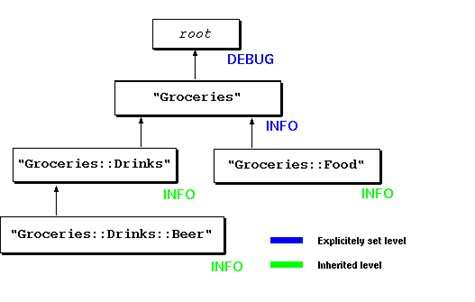 **Figure 1: Explicitly set vs. inherited priorities**
Of course, any child logger can choose to override the parent's `level()` setting -- in this case the child's setting takes priority. We'll talk about typical use cases shortly.
**Figure 1: Explicitly set vs. inherited priorities**
Of course, any child logger can choose to override the parent's `level()` setting -- in this case the child's setting takes priority. We'll talk about typical use cases shortly.
At the top of the logger hierarchy sits the so-called root logger, which doesn’t have a name. This is what we’ve used earlier with the :easy target: It initializes the root logger that we will retrieve later via get_logger() (without arguments). By the way, nobody forces you to name your logger categories after your system’s class hierarchy. But if you’re developing a system in object-oriented style, then using the class hierarchy is usually the best choice. Think about the people taking over your code one day: The class hierarchy is probably what they know up front, so it’s easy for them to tune the logging to their needs.
Let’s summarize: Every logger belongs to a category, which is either the root category or one of its direct or indirect descendants. A category can have several children but only one parent, except the root category, which doesn’t have a parent. In the system’s initialization section, loggers can define their priority using the level() method and one of the scalars $DEBUG, $INFO, etc. which can be imported from Log::Log4perl using the :levels target.
While loggers must be assigned to a category, they may choose not to set a level. If their actual level isn’t set, then they inherit the level of the first parent or ancestor with a defined level. This will be their effective priority. At the top of the category hierarchy resides the root logger, which always carries a default priority of DEBUG. If no one else defines a priority, then all unprioritized loggers inherit their priority from the root logger.
Categories allow you to modify the effective priorities of all your loggers in the system from a central location. With a few commands in the system initialization section (or, as we will see soon, in a Log::Log4perl configuration file), you can remote-control low-level debugging in a small system component without changing any code. Category inheritance enables you to modify larger parts of the system with just a few keystrokes.
Appenders
But just a logger with a priority assigned to it won’t log your message anywhere. This is what appenders are for. Every logger (including the root logger) can have one or more appenders attached to them, objects, that take care of sending messages without further ado to output devices like the screen, files or the syslog daemon. Once a logger has decided to fire off a message because the incident’s effective priority is higher or equal than the logger level, all appenders attached to this logger will receive the message – in order to forward it to each appender’s area of expertise.
Moreover, and this is very important, Log::Log4perl will walk up the hierarchy and forward the message to every appender attached to one of the logger’s parents or ancestors.
Log::Log4perl makes use of all appenders defined in the Log::Dispatch namespace, a separate set of modules, created by Dave Rolsky and others, all freely available on CPAN. There’s appenders to write to the screen (Log::Dispatch::Screen), to a file (Log::Dispatch::File), to a database (Log::Dispatch::DBI), to send messages via e-mail (Log::Dispatch::Email), and many more.
New appenders are defined using the Log::Log4perl::Appender class. The exact number and types of parameters required depends on the type of appender used, here’s the syntax for one of the most common ones, the logfile appender, which appends its messages to a log file:
        # Appenders
    my $appender = Log::Log4perl::Appender->new(
        "Log::Dispatch::File",
        filename => "test.log",
        mode     => "append",
    );

    $food_logger->add_appender($appender);
This will create a new appender of the class Log::Dispatch::File, which will append messages to the file test.log. If we had left out the mode => "append" pair, then it would just overwrite the file each time at system startup.
The wrapper class Log::Log4perl::Appender provides the necessary glue around Log::Dispatch modules to make them usable by Log::Log4perl as appenders. This tutorial shows only the most common ones: Log::Dispatch::Screen to write messages to STDOUT/STDERR and Log::Dispatch::File, to print to a log file. However, you can use any Log::Dispatch-Module with Log::Log4perl. To find out what’s available and how to their respective parameter settings are, please refer to the detailed Log::Dispatch documentation. Using add_appender(), you can attach as many appenders to any logger as you like.
After passing the newly created appender to the logger’s add_appender() method like in
$food_logger->add_appender($appender);
it is attached to the logger and will handle its messages if the logger decides to fire. Also, it will handle messages percolating up the hierarchy if a logger further down decides to fire.
This will cause our Log::Dispatch::File appender to add the following line
INFO - Eating Sushi
to the logfile test.log. But wait – where did the nice formatting with date, time, source file name, line number and function go we saw earlier on in :easy mode? By simply specifying an appender without defining its layout, Log::Log4perl just assumed we wanted the no-frills log message layout SimpleLayout, which just logs the incident priority and the message, separated by a dash.
Layouts
If we want to get fancier (the previously shown :easy target did this behind our back), then we need to use the more flexible PatternLayout instead. It takes a format string as an argument, in which it will – similar to printf() – replace a number of placeholders by their actual values when it comes down to log the message. Here’s how to attach a layout to our appender:
        # Layouts
    my $layout =
      Log::Log4perl::Layout::PatternLayout->new(
                     "%d %p> %F{1}:%L %M - %m%n");
    $appender->layout($layout);
Since %d stands for date and time, %p for priority, %F for the source file name, %M for the method executed, %m for the log message and %n for a newline, this layout will cause the appender to write the message like this:
2002/08/06 08:26:23 INFO> eat:56 Groceries::Food::consume - Eating Sushi
The %F{1} is special in that it takes the right-most component of the file, which usually consists of the full path – just like the basename() function does.
That’s it – we’ve got Log::Log4perl ready for the big league. Listing eat.pl shows the entire “system”: Startup code, the main program and the application wrapped into the Groceries::Food class.
Listing 2: eat.pl
    01 ######### System initialization section ###
    02 use Log::Log4perl qw(get_logger :levels);
    03
    04 my $food_logger = get_logger("Groceries::Food");
    05 $food_logger->level($INFO);
    06
    07     # Appenders
    08 my $appender = Log::Log4perl::Appender->new(
    09     "Log::Dispatch::File",
    10     filename => "test.log",
    11     mode     => "append",
    12 );
    13
    14 $food_logger->add_appender($appender);
    15
    16     # Layouts
    17 my $layout =
    18   Log::Log4perl::Layout::PatternLayout->new(
    19                  "%d %p> %F{1}:%L %M - %m%n");
    20 $appender->layout($layout);
    21
    22 ######### Run it ##########################
    23 my $food = Groceries::Food->new("Sushi");
    24 $food->consume();
    25
    26 ######### Application section #############
    27 package Groceries::Food;
    28
    29 use Log::Log4perl qw(get_logger);
    30
    31 sub new {
    32     my($class, $what) = @_;
    33
    34     my $logger = get_logger("Groceries::Food");
    35
    36     if(defined $what) {
    37         $logger->debug("New food: $what");
    38         return bless { what => $what }, $class;
    39     }
    40
    41     $logger->error("No food defined");
    42     return undef;
    43 }
    44
    45 sub consume {
    46     my($self) = @_;
    47
    48     my $logger = get_logger("Groceries::Food");
    49     $logger->info("Eating $self->{what}");
    50 }
Beginner’s Pitfalls
Remember when we said that if a logger decides to fire, then it forwards the message to all of its appenders and also has it bubble up the hierarchy to hit all other appenders it meets on the way up?
Don’t underestimate the ramifications of this statement. It usually puzzles Log::Log4perl beginners. Imagine the following logging requirements for a new system:
- Messages of level FATAL are supposed to be written to STDERR, no matter which subsystem has issued them.
- Messages issued by the
Groceriescategory, priorized DEBUG and higher need to be appended to a log file for debugging purposes.
Easy enough: Let’s set the root logger to FATAL and attach a Log::Dispatch::Screen appender to it. Then, let’s set the Groceries logger to DEBUG and attach a Log::Dispatch::File appender to it.
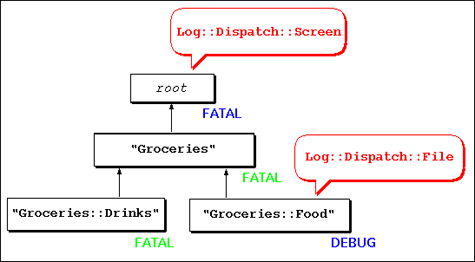 **Figure 2: A Groceries::Food and a root appender**
Now, if any logger anywhere in the system issues a `FATAL` message and decides to 'fire,' the message will bubble up to the top of the logger hierarchy, be caught by every appender on the way and ultimately end up at the root logger's appender, which will write it to STDERR as required. Nice.
**Figure 2: A Groceries::Food and a root appender**
Now, if any logger anywhere in the system issues a `FATAL` message and decides to 'fire,' the message will bubble up to the top of the logger hierarchy, be caught by every appender on the way and ultimately end up at the root logger's appender, which will write it to STDERR as required. Nice.
But what happens to DEBUG messages originating within Groceries? Not only will the Groceries logger ‘fire’ and forward the message to its appender, but it will also percolate up the hierarchy and end up at the appender attached to the root logger. And, it’s going to fill up STDERR with DEBUG messages from Groceries, whoa!
This kind of unwanted appender chain reaction causes duplicated logs. Here’s two mechanisms to keep it in check:
-
Each appender carries an additivity flag. If this is set to a false value, like in
$appender->additivity(0);then the message won’t bubble up further in the hierarchy after the appender is finished.
-
Each appender can define a so-called appender threshold, a minimum level required for an oncoming message to be honored by the appender:
$appender->threshold($ERROR);If the level doesn’t meet the appender’s threshold, then it is simply ignored by this appender.
In the case above, setting the additivity flag of the Groceries-Appender to a false value won’t have the desired effect, because it will stop FATAL messages of the Groceries category to be forwarded to the root appender. However, setting the root logger’s threshold to FATAL will do the trick: DEBUG messages bubbling up from Groceries will simply be ignored.
Compact Logger Setups With Configuration Files
Configuring Log::Log4perl can be accomplished outside of your program in a configuration file. In fact, this is the most compact and the most common way of specifying the behavior of your loggers. Because Log::Log4perl originated out of the Java-based log4j system, it understands log4j configuration files:
    log4perl.logger.Groceries=DEBUG, A1
    log4perl.appender.A1=Log::Dispatch::File
    log4perl.appender.A1.filename=test.log
    log4perl.appender.A1.mode=append
    log4perl.appender.A1.layout=Log::Log4perl::Layout::PatternLayout
    log4perl.appender.A1.layout.ConversionPattern=%d %p> %F{1}:%L %M - %m%n
This defines a logger of the category Groceries, whichs priority is set to DEBUG. It has the appender A1 attached to it, which is later resolved to be a new Log::Dispatch::File appender with various settings and a PatternLayout with a user-defined format (ConversionPattern).
If you store this in eat.conf and initialize your system with
Log::Log4perl->init("eat.conf");
then you’re done. The system’s compact logging setup is now separated from the application and can be easily modified by people who don’t need to be familiar with the code, let alone Perl.
Or, if you store the configuration description in $string, then you can initialize it with
Log::Log4perl->init(\$string);
You can even have your application check the configuration file in regular intervals (this obviously works only with files, not with strings):
Log::Log4perl->init_and_watch("eat.conf", 60);
checks eat.conf every 60 seconds upon log requests and reloads everything and re-initializes itself if it detects a change in the configuration file. With this, it’s possible to tune your logger settings while the system is running without restarting it!
The compatibility of Log::Log4perl with log4j goes so far that Log::Log4perl even understands log4j Java classes as appenders and maps them, if possible, to the corresponding ones in the Log::Dispatch namespace. Log::Log4perl will happily process the following Java-fied version of the configuration shown at the beginning of this section:
    log4j.logger.Groceries=DEBUG, A1
    log4j.appender.A1=org.apache.log4j.FileAppender
    log4j.appender.A1.File=test.log
    log4j.appender.A1.layout=org.apache.log4j.PatternLayout
    log4j.appender.A1.layout.ConversionPattern=%F %L %p %t %c - %m%n
The Java-specific FileAppender class will be mapped by Log::Log4perl to Log::Dispatch::File behind the scenes and the parameters adjusted (The Java-specific File will become filename and an additional parameter mode will be set to "append" for the Log::Dispatch world).
Typical Use Cases
The configuration file format is more compact than the Perl code, so let’s use it to illustrate some real-world cases (although you could do the same things in Perl, of course!):
We’ve seen before that a configuration line like:
log4perl.logger.Groceries=DEBUG, A1
will turn on logging in Groceries::Drink and Groceries::Food (and all of their descendants if they exist) with priority DEBUG via inheritance. What if Groceries::Drink gets a bit too noisy and you want to raise its priority to at least INFO while keeping the DEBUG setting for Groceries::Food? That’s easy, no need to change your code, just modify the configuration file:
    log4perl.logger.Groceries.Drink=INFO, A1
    log4perl.logger.Groceries.Food=DEBUG, A1
or, you could use inheritance to accomplish the same thing. You define INFO as the priority for Groceries and override Groceries.Food with a less restrictive setting:
    log4perl.logger.Groceries=INFO, A1
    log4perl.logger.Groceries.Food=DEBUG, A1
Groceries::Food will be still on DEBUG after that, while Groceries and Groceries::Drinks will be on INFO.
Or, you could choose to turn on detailed DEBUG logging all over the system and just bump up the minimum level for the noisy Groceries.Drink:
    log4perl.logger=DEBUG, A1
    log4perl.logger.Groceries.Drink=INFO, A1
This sets the root logger to DEBUG, which all other loggers in the system will inherit. Except Groceries.Drink and its descendents, of course, which will carry the INFO priority.
Or, similarily to what we’ve talked about in the Beginner’s Pitfalls section, let’s say you wanted to print FATAL messages system-wide to STDOUT, while turning on detailed logging under Groceries::Food and writing the messages to a log file? Use this:
    log4perl.logger=FATAL, Screen
    log4perl.logger.Groceries.Food=DEBUG, Log

    log4perl.appender.Screen=Log::Dispatch::Screen
    log4perl.appender.Screen.stderr=0
    log4perl.appender.Screen.Threshold=FATAL
    log4perl.appender.Screen.layout=Log::Log4perl::Layout::SimpleLayout

    log4perl.appender.Log=Log::Dispatch::File
    log4perl.appender.Log.filename=test.log
    log4perl.appender.Log.mode=append
    log4perl.appender.Log.layout=Log::Log4perl::Layout::SimpleLayout
As mentioned in Appenders, setting the appender threshold of the screen appender to FATAL keeps DEBUG messages out of the root appender and so effectively prevents message duplication.
According to the Log::Dispatch::Screen documentation, setting its stderr attribute to a false value causes it log to STDOUT instead of STDERR. log4perl.appender.XXX.layout is the configuration file way to specify the no-frills Layout seen earlier.
You could also have multiple appenders attached to one category, like in
log4perl.logger.Groceries=DEBUG, Log, Database, Emailer
if you had Log::Dispatch-type appenders defined for Log, Database and Emailer.
Performance Penalties and How to Minimize Them
Logging comes with a (small) price tag: We figure out at runtime if a message is going to be logged or not. Log::Log4perl’s primary design directive has been to run this check at maximum speed in order to avoid slowing down the application. Internally, it has been highly optimized so that even if you’re using large category hierarchies, the impact of a call to e.g. $logger->debug() in non-DEBUG mode is negligable.
While Log::Log4perl tries hard not to impose a runtime penalty on your application, it has no control over the code leading to Log::Log4perl calls and needs your cooperation with that. For example, take a look at this:
   use Data::Dumper;
   $log->debug("Dump: ", Dumper($resp));
Passing arguments to the logging functions can impose a severe runtime penalty, because there’s often expensive operations going on before the arguments are actually passed on to Log::Log4perl’s logging functions. The snippet above will have Data::Dumper completely unravel the structure of the object behind $resp, pass the whole slew on to debug(), which might then very well decide to throw it away. If the effective debug level for the current category isn’t high enough to actually forward the message to the appropriate appender(s), then we should have never called Dumper() in the first place.
With this in mind, the logging functions don’t only accept strings as arguments, but also subroutine references which, in case the logger is actually firing, it will call the subroutine behind the reference and take its output as a message:
$log->debug("Dump: ", sub { Dumper($resp) } );
The snippet above won’t call Dumper() right away, but pass on the subroutine reference to the logger’s DEBUG method instead. Perl’s closure mechanism will make sure that the value of $resp will be preserved, even if the subroutine will be handed over to Log::Log4perls lower level functions. Once Log::Log4perl will decide that the message is indeed going to be logged, it will execute the subroutine, take its return value as a string and log it.
Also, your application can help out and check if it’s necessary to pass any parameters at all:
   if($log->is_debug()) {
       $log->debug("Interpolation: @long_array");
   }
At the cost of a little code duplication, we avoid interpolating a huge array into the log string in case the effective log level prevents the message from being logged anyway.
Installation
Log::Log4perl is freely available from CPAN. It also requires the presence of two other modules, Log::Dispatch (2.00 or better, which is a bundle itself) and Time::HiRes (1.20 or better). If you’re using the CPAN shell to install Log::Log4perl, then it will resolve these and other recursive dependencies for you automatically and download the required modules one by one from CPAN.
At the time this article went to print, 0.22 was the stable release of Log::Log4perl, available from [1] and CPAN. Also on [1], the CVS source tree is publicly available for those who want the (sometimes shaky) bleeding development edge. The CPAN releases, on the other hand are guaranteed to be stable.
If you have questions, requests for new features, or if you want to contribute a patch to Log::Log4perl, then please send them to our mailing list at log4perl-devel@lists.sourceforge.net on SourceForge.
Project Status and Similar Modules
Log::Log4perl has been inspired by Tatsuhiko Miyagawa’s clever Log::Dispatch::Config module, which provides a wrapper around the Log::Dispatch bundle and understands a subset of the log4j configuration file syntax. However, Log::Dispatch::Config does not provide a full Perl API to log4j – and this is a key issue which Log::Log4perl has been designed to address. Log::Log4perl is a log4j port, not just a subset.
The Log::Log4perl project is still under development, but its API has reached a fairly mature state, where we will change things only for (very) good reasons. There’s still a few items on the to-do list, but these are mainly esoteric features of log4j that still need to find their way into Log::Log4perl, since the overall goal is to keep it compatible. Also, Log::Log4perl isn’t thread safe yet – but we’re working on it.
Thanks
Special thanks go to fellow Log4perl founder Kevin Goess (cpan@goess.org), who wrote half of the code, helped generously to correct the manuscript for this article and invented these crazy performance improvements, making log4j jealous!
Mission
Scatter plenty of debug statements all over your code – and put them to sleep via the Log::Log4perl configuration. Let the INFO, ERROR and FATAL statements print to a log file. If you run into trouble, then lower the level in selected parts of the system, and redirect the additional messages to a different file. The dormant DEBUG statements won’t cost you anything – but if you run into trouble, then they might save the day, because your system will have an embedded debugger on demand. Have fun!
Infos
[1] The log4perl project page: http://log4perl.com
[2] The Log::Log4perl documentation
[3] The log4j project page on the Apache site: https://logging.apache.org/log4j/2.x/
[4] Documentation to Log::Dispatch modules
Tags
Feedback
Something wrong with this article? Help us out by opening an issue or pull request on GitHub





