


Web Basics with LWP
Sean M. Burke is the author of Perl & LWP
Introduction
LWP (short for “Library for WWW in Perl”) is a popular group of Perl modules for accessing data on the Web. Like most Perl module-distributions, each of LWP’s component modules comes with documentation that is a complete reference to its interface. However, there are so many modules in LWP that it’s hard to know where to look for information on doing even the simplest things.
Introducing you to using LWP would require a whole book–a book that just happens to exist, called Perl & LWP. This article offers a sampling of recipes that let you perform common tasks with LWP.
Getting Documents with LWP::Simple
If you just want to access what’s at a particular URL, the simplest way to do it is to use LWP::Simple’s functions.
In a Perl program, you can call its get($url) function. It will try getting that URL’s content. If it works, then it’ll return the content; but if there’s some error, it’ll return undef.
  my $url = 'http://freshair.npr.org/dayFA.cfm?todayDate=current';
    # Just an example: the URL for the most recent /Fresh Air/ show

  use LWP::Simple;
  my $content = get $url;
  die "Couldn't get $url" unless defined $content;

  # Then go do things with $content, like this:

  if($content =~ m/jazz/i) {
    print "They're talking about jazz today on Fresh Air!\n";
  } else {
    print "Fresh Air is apparently jazzless today.\n";
  }
The handiest variant on get is getprint, which is useful in Perl one-liners. If it can get the page whose URL you provide, it sends it to STDOUT; otherwise it complains to STDERR.
% perl -MLWP::Simple -e "getprint 'http://cpan.org/RECENT'"
This is the URL of a plain-text file. It lists new files in CPAN in the past two weeks. You can easily make it part of a tidy little shell command, like this one that mails you the list of new Acme:: modules:
  % perl -MLWP::Simple -e "getprint 'http://cpan.org/RECENT'"  \
     | grep "/by-module/Acme" | mail -s "New Acme modules! Joy!" $USER
There are other useful functions in LWP::Simple, including one function for running a HEAD request on a URL (useful for checking links, or getting the last-revised time of a URL), and two functions for saving and mirroring a URL to a local file. See the LWP::Simple documentation for the full details, or Chapter 2, “Web Basics” of Perl & LWP for more examples.
The Basics of the LWP Class Model
LWP::Simple’s functions are handy for simple cases, but its functions don’t support cookies or authorization; they don’t support setting header lines in the HTTP request; and generally, they don’t support reading header lines in the HTTP response (most notably the full HTTP error message, in case of an error). To get at all those features, you’ll have to use the full LWP class model.
While LWP consists of dozens of classes, the two that you have to understand are LWP::UserAgent and HTTP::Response. LWP::UserAgent is a class for “virtual browsers,” which you use for performing requests, and HTTP::Response is a class for the responses (or error messages) that you get back from those requests.
The basic idiom is $response = $browser->get($url), or fully illustrated:
  # Early in your program:

  use LWP 5.64; # Loads all important LWP classes, and makes
                #  sure your version is reasonably recent.

  my $browser = LWP::UserAgent->new;

  ...

  # Then later, whenever you need to make a get request:
  my $url = 'http://freshair.npr.org/dayFA.cfm?todayDate=current';

  my $response = $browser->get( $url );
  die "Can't get $url -- ", $response->status_line
   unless $response->is_success;

  die "Hey, I was expecting HTML, not ", $response->content_type
   unless $response->content_type eq 'text/html';
     # or whatever content-type you're equipped to deal with

  # Otherwise, process the content somehow:

  if($response->content =~ m/jazz/i) {
    print "They're talking about jazz today on Fresh Air!\n";
  } else {
    print "Fresh Air is apparently jazzless today.\n";
  }
There are two objects involved: $browser, which holds an object of the class LWP::UserAgent, and then the $response object, which is of the class HTTP::Response. You really need only one browser object per program; but every time you make a request, you get back a new HTTP::Response object, which will have some interesting attributes:
-
A status code indicating success or failure (which you can test with
$response->is_success). -
An HTTP status line, which I hope is informative if there is a failure (which you can see with
$response->status_line, and which returns something like “404 Not Found”). -
A MIME content-type like “text/html”, “image/gif”, “application/xml”, and so on, which you can see with
$response->content_type -
The actual content of the response, in
$response->content. If the response is HTML, that’s where the HTML source will be; if it’s a GIF, then$response->contentwill be the binary GIF data. -
And dozens of other convenient and more specific methods that are documented in the docs for
HTTP::Response, and its superclasses,HTTP::MessageandHTTP::Headers.
Adding Other HTTP Request Headers
The most commonly used syntax for requests is $response = $browser->get($url), but in truth, you can add extra HTTP header lines to the request by adding a list of key-value pairs after the URL, like so:
$response = $browser->get( $url, $key1, $value1, $key2, $value2, ... );
For example, here’s how to send more Netscape-like headers, in case you’re dealing with a site that would otherwise reject your request:
  my @ns_headers = (
   'User-Agent' => 'Mozilla/4.76 [en] (Win98; U)',
   'Accept' => 'image/gif, image/x-xbitmap, image/jpeg,
        image/pjpeg, image/png, */*',
   'Accept-Charset' => 'iso-8859-1,*,utf-8',
   'Accept-Language' => 'en-US',
  );

  ...

  $response = $browser->get($url, @ns_headers);
If you weren’t reusing that array, you could just go ahead and do this:
  $response = $browser->get($url,
   'User-Agent' => 'Mozilla/4.76 [en] (Win98; U)',
   'Accept' => 'image/gif, image/x-xbitmap, image/jpeg,
        image/pjpeg, image/png, */*',
   'Accept-Charset' => 'iso-8859-1,*,utf-8',
   'Accept-Language' => 'en-US',
  );
If you were only going to change the ‘User-Agent’ line, you could just change the $browser object’s default line from “libwww-perl/5.65” (or the like) to whatever you like, using LWP::UserAgent’s agent method:
$browser->agent('Mozilla/4.76 [en] (Win98; U)');
Enabling Cookies
A default LWP::UserAgent object acts like a browser with its cookies support turned off. There are various ways of turning it on, by setting its cookie_jar attribute. A “cookie jar” is an object representing a little database of all the HTTP cookies that a browser can know about. It can correspond to a file on disk (the way Netscape uses its cookies.txt file), or it can be just an in-memory object that starts out empty, and whose collection of cookies will disappear once the program is finished running.
To give a browser an in-memory empty cookie jar, you set its cookie_jar attribute like so:
$browser->cookie_jar({});
To give it a copy that will be read from a file on disk, and will be saved to it when the program is finished running, set the cookie_jar attribute like this:
  use HTTP::Cookies;
  $browser->cookie_jar( HTTP::Cookies->new(
    'file' => '/some/where/cookies.lwp',
        # where to read/write cookies
    'autosave' => 1,
        # save it to disk when done
  ));
That file will be an LWP-specific format. If you want to access the cookies in your Netscape cookies file, you can use the HTTP::Cookies::Netscape class:
  use HTTP::Cookies;
    # yes, loads HTTP::Cookies::Netscape too

  $browser->cookie_jar( HTTP::Cookies::Netscape->new(
    'file' => 'c:/Program Files/Netscape/Users/DIR-NAME-HERE/cookies.txt',
        # where to read cookies
  ));
You could add an 'autosave' => 1 line as we did earlier, but at time of writing, it’s uncertain whether Netscape might discard some of the cookies you could be writing back to disk.
Posting Form Data
Many HTML forms send data to their server using an HTTP POST request, which you can send with this syntax:
 $response = $browser->post( $url,
   [
     formkey1 => value1,
     formkey2 => value2,
     ...
   ],
 );
Or if you need to send HTTP headers: $response = $browser->post( $url, [ formkey1 => value1, formkey2 => value2, … ], headerkey1 => value1, headerkey2 => value2, );
For example, the following program makes a search request to AltaVista (by sending some form data via an HTTP POST request), and extracts from the HTML the report of the number of matches:
  use strict;
  use warnings;
  use LWP 5.64;
  my $browser = LWP::UserAgent->new;

  my $word = 'tarragon';

  my $url = 'http://www.altavista.com/sites/search/web';
  my $response = $browser->post( $url,
    [ 'q' => $word,  # the Altavista query string
      'pg' => 'q', 'avkw' => 'tgz', 'kl' => 'XX',
    ]
  );
  die "$url error: ", $response->status_line
   unless $response->is_success;
  die "Weird content type at $url -- ", $response->content_type
   unless $response->content_type eq 'text/html';

  if( $response->content =~ m{AltaVista found ([0-9,]+) results} ) {
    # The substring will be like "AltaVista found 2,345 results"
    print "$word: $1\n";
  } else {
    print "Couldn't find the match-string in the response\n";
  }
Sending GET Form Data
Some HTML forms convey their form data not by sending the data in an HTTP POST request, but by making a normal GET request with the data stuck on the end of the URL. For example, if you went to imdb.com and ran a search on Blade Runner, the URL you’d see in your browser window would be:
http://us.imdb.com/Tsearch?title=Blade%20Runner&restrict=Movies+and+TV
To run the same search with LWP, you’d use this idiom, which involves the URI class:
  use URI;
  my $url = URI->new( 'http://us.imdb.com/Tsearch' );
    # makes an object representing the URL

  $url->query_form(  # And here the form data pairs:
    'title'    => 'Blade Runner',
    'restrict' => 'Movies and TV',
  );

  my $response = $browser->get($url);
See Chapter 5, “Forms” of Perl & LWP for a longer discussion of HTML forms and of form data, as well as Chapter 6 through Chapter 9 for a longer discussion of extracting data from HTML.
Absolutizing URLs
The URI class that we just mentioned above provides all sorts of methods for accessing and modifying parts of URLs (such as asking sort of URL it is with $url->scheme, and asking what host it refers to with $url->host, and so on, as described in the docs for the URI class. However, the methods of most immediate interest are the query_form method seen above, and now the new_abs method for taking a probably relative URL string (like “../foo.html”) and getting back an absolute URL (like “/stuff/foo.html”), as shown here:
  use URI;
  $abs = URI->new_abs($maybe_relative, $base);
For example, consider this program that matches URLs in the HTML list of new modules in CPAN:
  use strict;
  use warnings;
  use LWP 5.64;
  my $browser = LWP::UserAgent->new;

  my $url = 'http://www.cpan.org/RECENT.html';
  my $response = $browser->get($url);
  die "Can't get $url -- ", $response->status_line
   unless $response->is_success;

  my $html = $response->content;
  while( $html =~ m/<A HREF=\"(.*?)\"/g ) {
      print "$1\n";
  }
When run, it emits output that starts out something like this:
  MIRRORING.FROM
  RECENT
  RECENT.html
  authors/00whois.html
  authors/01mailrc.txt.gz
  authors/id/A/AA/AASSAD/CHECKSUMS
  ...
However, if you actually want to have those be absolute URLs, you can use the URI module’s new_abs method, by changing the while loop to this:
  while( $html =~ m/<A HREF=\"(.*?)\"/g ) {
      print URI->new_abs( $1, $response->base ) ,"\n";
  }
(The $response->base method from HTTP::Message is for returning the URL that should be used for resolving relative URLs–it’s usually just the same as the URL that you requested.)
That program then emits nicely absolute URLs:
  http://www.cpan.org/MIRRORING.FROM
  http://www.cpan.org/RECENT
  http://www.cpan.org/RECENT.html
  http://www.cpan.org/authors/00whois.html
  http://www.cpan.org/authors/01mailrc.txt.gz
  http://www.cpan.org/authors/id/A/AA/AASSAD/CHECKSUMS
  ...
See Chapter 4, “URLs”, of Perl & LWP for a longer discussion of URI objects.
Of course, using a regexp to match hrefs is a bit simplistic, and for more robust programs, you’ll probably want to use an HTML-parsing module like HTML::LinkExtor, or HTML::TokeParser, or even maybe HTML::TreeBuilder.
Other Browser Attributes
LWP::UserAgent objects have many attributes for controlling how they work. Here are a few notable ones:
-
$browser->timeout(15): This sets this browser object to give up on requests that don’t answer within 15 seconds. -
$browser->protocols_allowed( [ 'http', 'gopher'] ): This sets this browser object to not speak any protocols other than HTTP and gopher. If it tries accessing any other kind of URL (like an “ftp:” or “mailto:” or “news:” URL), then it won’t actually try connecting, but instead will immediately return an error code 500, with a message like “Access to ftp URIs has been disabled”. -
use LWP::ConnCache; $browser->conn_cache(LWP::ConnCache->new()): This tells the browser object to try using the HTTP/1.1 “Keep-Alive” feature, which speeds up requests by reusing the same socket connection for multiple requests to the same server. -
$browser->agent( 'SomeName/1.23 (more info here maybe)' ): This changes how the browser object will identify itself in the default “User-Agent” line is its HTTP requests. By default, it’ll send “libwww-perl/versionnumber”, like “libwww-perl/5.65”. You can change that to something more descriptive like this:$browser->agent( 'SomeName/3.14 (contact@robotplexus.int)' );Or if need be, you can go in disguise, like this:
$browser->agent( 'Mozilla/4.0 (compatible; MSIE 5.12; Mac_PowerPC)' ); -
push @{ $ua->requests_redirectable }, 'POST': This tells this browser to obey redirection responses to POST requests (like most modern interactive browsers), even though the HTTP RFC says that should not normally be done.
For more options and information, see the full documentation for LWP::UserAgent.
Writing Polite Robots
If you want to make sure that your LWP-based program respects robots.txt files and doesn’t make too many requests too fast, you can use the LWP::RobotUA class instead of the LWP::UserAgent class.
LWP::RobotUA class is just like LWP::UserAgent, and you can use it like so:
  use LWP::RobotUA;
  my $browser = LWP::RobotUA->new(
    'YourSuperBot/1.34', 'you@yoursite.com');
    # Your bot's name and your email address

  my $response = $browser->get($url);
But HTTP::RobotUA adds these features:
-
If the robots.txt on
$url’s server forbids you from accessing$url, then the$browserobject (assuming it’s of the classLWP::RobotUA) won’t actually request it, but instead will give you back (in$response) a 403 error with a message “Forbidden by robots.txt”. That is, if you have this line: -
If this
$browserobject sees that the last time it talked to$url’s server was too recently, then it will pause (viasleep) to avoid making too many requests too often. How long it will pause for, is by default one minute–but you can control it with the$browser->delay( minutes )attribute.
For more options and information, see the full documentation for LWP::RobotUA.
Using Proxies
In some cases, you will want to (or will have to) use proxies for accessing certain sites or for using certain protocols. This is most commonly the case when your LWP program is running (or could be running) on a machine that is behind a firewall.
To make a browser object use proxies that are defined in the usual environment variables (HTTP_PROXY), just call the env_proxy on a user-agent object before you go making any requests on it. Specifically:
  use LWP::UserAgent;
  my $browser = LWP::UserAgent->new;

  # And before you go making any requests:
  $browser->env_proxy;
For more information on proxy parameters, see the LWP::UserAgent documentation, specifically the proxy, env_proxy, and no_proxy methods.
HTTP Authentication
Many Web sites restrict access to documents by using “HTTP Authentication”. This isn’t just any form of “enter your password” restriction, but is a specific mechanism where the HTTP server sends the browser an HTTP code that says “That document is part of a protected ‘realm’, and you can access it only if you re-request it and add some special authorization headers to your request”.
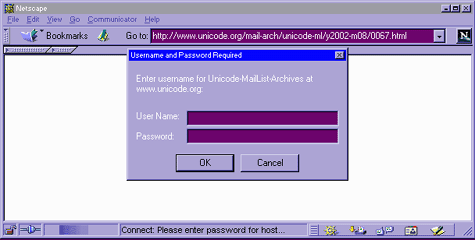
For example, the Unicode.org administrators stop email-harvesting bots from harvesting the contents of their mailing list archives by protecting them with HTTP Authentication, and then publicly stating the username and password (at http://www.unicode.org/mail-arch/)–namely username “unicode-ml” and password “unicode”.
For example, consider this URL, which is part of the protected area of the Web site:
http://www.unicode.org/mail-arch/unicode-ml/y2002-m08/0067.html
If you access that with a browser, you’ll get a prompt like “Enter username and password for ‘Unicode-MailList-Archives’ at server ‘www.unicode.org’”, or in a graphical browser, something like this:
 |
In LWP, if you just request that URL, like this:
  use LWP 5.64;
  my $browser = LWP::UserAgent->new;

  my $url =
   'http://www.unicode.org/mail-arch/unicode-ml/y2002-m08/0067.html';
  my $response = $browser->get($url);

  die "Error: ", $response->header('WWW-Authenticate') ||
    'Error accessing',
    #  ('WWW-Authenticate' is the realm-name)
    "\n ", $response->status_line, "\n at $url\n Aborting"
   unless $response->is_success;
Then you’ll get this error:
  Error: Basic realm="Unicode-MailList-Archives"
   401 Authorization Required
   at http://www.unicode.org/mail-arch/unicode-ml/y2002-m08/0067.html
   Aborting at auth1.pl line 9.  [or wherever]
because the $browser doesn’t know any the username and password for that realm (“Unicode-MailList-Archives”) at that host (“www.unicode.org”). The simplest way to let the browser know about this is to use the credentials method to let it know about a username and password that it can try using for that realm at that host. The syntax is:
  $browser->credentials(
    'servername:portnumber',
    'realm-name',
    'username' => 'password'
  );
In most cases, the port number is 80, the default TCP/IP port for HTTP; and you usually call the credentials method before you make any requests. For example:
  $browser->credentials(
    'reports.mybazouki.com:80',
    'web_server_usage_reports',
    'plinky' => 'banjo123'
  );
So if we add the following to the program above, right after the $browser = LWP::UserAgent->new; line:
  $browser->credentials(  # add this to our $browser 's "key ring"
    'www.unicode.org:80',
    'Unicode-MailList-Archives',
    'unicode-ml' => 'unicode'
  );
and then when we run it, the request succeeds, instead of causing the die to be called.
Accessing HTTPS URLs
When you access an HTTPS URL, it’ll work for you just like an HTTP URL would–if your LWP installation has HTTPS support (via an appropriate Secure Sockets Layer library). For example:
  use LWP 5.64;
  my $url = 'https://www.paypal.com/';   # Yes, HTTPS!
  my $browser = LWP::UserAgent->new;
  my $response = $browser->get($url);
  die "Error at $url\n ", $response->status_line, "\n Aborting"
   unless $response->is_success;
  print "Whee, it worked!  I got that ",
   $response->content_type, " document!\n";
If your LWP installation doesn’t have HTTPS support set up, then the response will be unsuccessful, and you’ll get this error message:
  Error at https://www.paypal.com/
   501 Protocol scheme 'https' is not supported
   Aborting at paypal.pl line 7.   [or whatever program and line]
If your LWP installation does have HTTPS support installed, then the response should be successful, and you should be able to consult $response just like with any normal HTTP response.
For information about installing HTTPS support for your LWP installation, see the helpful README.SSL file that comes in the libwww-perl distribution.
Getting Large Documents
When you’re requesting a large (or at least potentially large) document, a problem with the normal way of using the request methods (like $response = $browser->get($url)) is that the response object in memory will have to hold the whole document–in memory. If the response is a 30-megabyte file, this is likely to be quite an imposition on this process’s memory usage.
A notable alternative is to have LWP save the content to a file on disk, instead of saving it up in memory. This is the syntax to use:
  $response = $ua->get($url,
                         ':content_file' => $filespec,
                      );
For example,
  $response = $ua->get('https://metacpan.org/',
                         ':content_file' => '/tmp/sco.html'
                      );
When you use this :content_file option, the $response will have all the normal header lines, but $response->content will be empty.
Note that this “:content_file” option isn’t supported under older versions of LWP, so you should consider adding use LWP 5.66; to check the LWP version, if you think your program might run on systems with older versions.
If you need to be compatible with older LWP versions, then use this syntax, which does the same thing:
  use HTTP::Request::Common;
  $response = $ua->request( GET($url), $filespec );
Resources
Remember, this article is just the most rudimentary introduction to LWP–to learn more about LWP and LWP-related tasks, you really must read from the following:
-
LWP::Simple: Simple functions for getting, heading, and mirroring URLs. -
LWP: Overview of the libwww-perl modules. -
LWP::UserAgent: The class for objects that represent “virtual browsers.” -
HTTP::Response: The class for objects that represent the response to a LWP response, as in$response = $browser->get(...). -
HTTP::MessageandHTTP::Headers: Classes that provide more methods toHTTP::Response. -
URI: Class for objects that represent absolute or relative URLs. -
URI::Escape: Functions for URL-escaping and URL-unescaping strings (like turning “this & that” to and from “this%20%26%20that”). -
HTML::Entities: Functions for HTML-escaping and HTML-unescaping strings (like turning “C. & E. Brontë” to and from “C. & E. Brontë”). -
HTML::TokeParserandHTML::TreeBuilder: Classes for parsing HTML. -
HTML::LinkExtor: Class for finding links in HTML documents. -
And last but not least, my book Perl & LWP.
Copyright ©2002, Sean M. Burke. You can redistribute this document and/or modify it, but only under the same terms as Perl itself.
Tags
Feedback
Something wrong with this article? Help us out by opening an issue or pull request on GitHub







