


Taglib TMTOWTDI
As with many Perl systems, AxKit often provides multiple ways of doing things. Developers from other programming cultures may find these choices and freedom a bit bewildering at first but this (hopefully) soon gives way to the realization that the options provide power and freedom. When a tool set limits your choices too much, you end up doing things like driving screws with a nailgun. Of course, too many choices isn’t necessarily a good thing, but it’s better than too few.
Last time, we saw how to build a weather reporting application by implementing a simple taglib module, My::WeatherTaglib, in Perl and deploying it in a pipeline with other XML filters. The pipeline approach allows one kind of flexibility: the freedom to decompose an application in the most appropriate manner for the requirements at hand and for the supporting organization.
Another kind of flexibility is the freedom to implement filters using different technologies. For instance, it is sometimes wise to build taglibs in different ways. In this article, we’ll see how to build the same taglib using two other approaches. The first rebuild uses the technique implemented by the Cocoon project, LogicSheets. The second uses Jörg Walter’s relatively new SimpleTaglib in place of the TaglibHelper used for My::WeatherTaglib in the previous article. SimpleTaglib is a somewhat more powerful, and, oddly, more complex module than TaglibHelper (though the author intends to make it a bit simpler to use in the near future).
CHANGES
AxKit v1.6 is now out with some nice bug fixes and performance improvements, mostly by Matt Sergeant and Jörg Walter, along with several new advanced features from Kip Hampton which we’ll be covering in future articles.
Matt has also updated his AxKit compatible AxPoint PowerPoint-like HTML/PDF/etc. presentation system. If you’re going to attend any of the big Perl conferences this season, then you’re likely to see presentations built with AxPoint. It’s a nice system that’s also covered in an XML.com article by Kip Hampton.
AxTraceIntermediate
The one spiffy new feature I used – rather more often than I’d like to admit – in writing this article is the debugging directive AxTraceIntermediate, added by Jörg Walter. This directive defines a directory in which AxKit will place a copy each of the intermediate documents passed between filters in the pipeline. So a setting like:
AxTraceIntermediate /home/barries/AxKit/www/axtrace
will place one file in the axtrace directory for each intermediate document. The full set of directives in httpd.conf used for this article is shown later.
Here is the axtrace directory after requesting the URIs / (from the first article), /02/weather1.xsp (from the second article), /03/weather1.xsp and /03/weather2.xsp (both from this article):
    |index.xsp.XSP         # Perl source code for /index.xsp
    |index.xsp.0           # Output of XSP filter

    |02|weather1.xsp.XSP   # Perl source code for /02/weather1.xsp
    |02|weather1.xsp.0     # Output of XSP
    |02|weather1.xsp.1     # Output of weather.xsl
    |02|weather1.xsp.2     # Output of as_html.xsl

    |03|weather1.xsp.XSP   # Perl source code for /03/weather1.xsp
    |03|weather1.xsp.0     # Output of XSP
    |03|weather1.xsp.1     # Output of weather.xsl
    |03|weather1.xsp.2     # Output of as_html.xsl

    |03|weather2.xsp.XSP   # Perl source code for /02/weather2.xsp
    |03|weather2.xsp.0     # output of my_weather_taglib.xsl
    |03|weather2.xsp.1     # Output of XSP
    |03|weather2.xsp.2     # Output of weather.xsl
    |03|weather2.xsp.3     # Output of as_html.xsl
Each filename is the path portion of the URI with the /s replaced with |s and a step number (or .XSP) appended. The numbered files are the intermediate documents and the .XSP files are the Perl source code for any XSP filters that happened to be compiled for this request. Compare the |03|weather2.xsp.* files to the the pipeline diagram for the /03/weather2.xsp request.
Watch those “|” characters: they force you to quote the filenames in most shells (and thus foil any use of wildcards):
    $ xmllint --format "www/axtrace/|03|weather2.xsp.3"
    <?xml version="1.0" standalone="yes"?>
    <html>
      <head>
        <meta content="text/html; charset=UTF-8" http-equiv="Content-Type"/>
        <title>My Weather Report</title>
      </head>
      <body>
        <h1><a name="title"/>My Weather Report</h1>
        <p>Hi! It's 12:43:52</p>
        <p>The weather in Pittsburgh is Sunny
        ....
NOTE: The .XSP files are only generated if the XSP sheet is recompiled, so you may need to touch the source document or restart the server to generate a new one. Another gotcha is that if an error occurs halfway down the processing pipeline, then you can end up with stale files. In this case, the lower-numbered files (those generated by successful filters) will be from this request, but the higher-numbered files will be stale, left over from the previous requests. A slightly different issue can occur when using dynamic pipeline configurations (which we’ll cover in the future): you can end up with a shorter pipeline that only overwrites the lower-numbered files and leaves stale higher-numbered files around.
These are pretty minor gotchas when compared to the usefulness of this feature, you just need to be aware of them to avoid confusion. When debugging for this article, I used a Perl script that does something like:
    rm -f www/axtrace/*
    rm www/logs/*
    www/bin/apachectl stop
    sleep 1
    www/bin/apachectl start
    GET http://localhost:8080/03/weather1.xsp
to start each test run with a clean fileset.
Under the XSP Hood
Before we move on to the examples, let’s take a quick peek at how XSP pages are handled by AxKit. This will help us understand the tradeoffs inherent in the different approaches.
AxKit implements XSP filters by compiling the source XSP page into a handler() function that is called to generate the output page. This is compiled in to Perl bytecode, which is then run to generate the XSP output document:
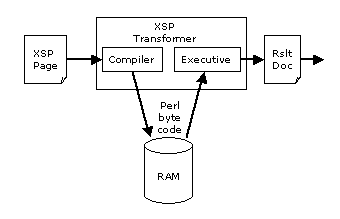 This means that XSP page is not executed directly, but by running relatively efficient compiled Perl code. The bytecode is kept in memory so the overhead of parsing and code generation is not incurred for each request.
There are three types of Perl code used in building the output document: code to build the bits of static content, code that was present verbatim in the source document – enclosed in tags like <xsp:logic> and <xsp:expr> – and code that implements tags handled by registered taglib modules like My::WeatherTaglib from the last article.
Taglib modules hook in to the XSP compiler by registering themselves as handlers for a namespace and then coughing up snippets of code to be compiled in to the handler() routine:
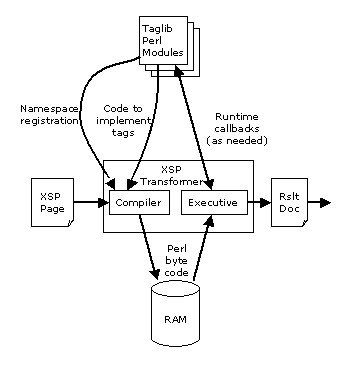 The snippets of code can call back into the taglib module or out to other modules as needed. Modules like TaglibHelper, which we used to build My::WeatherTaglib and SimpleTaglib, which we use later in this article for My::SimpleWeatherTaglib, automate the drudgery of building a taglib module so you don’t need to parse XML or even (usually) generate XML.
You can view the source code that AxKit generates by cranking the AxDebugLevel up to 10 (which places the code in Apache’s ErrorLog) or using the AxTraceIntermediate directive mentioned above. Then you must persuade AxKit to recompile the XSP page by restarting the server and requesting a page. If either of the necessary directives are already present in a running server, then simply touching the file to update its modification time will suffice.
This can be useful for getting a really good feel for what’s going on under the hood. I encourage new taglib authors to do this to see how the code for your taglib is actually executed. You’ll end up needing to do it to debug anyway (trust me :).
LogicSheets: Upstream Taglibs
AxKit uses a pipeline processing model and XSP includes tags like <xsp:logic> and <xsp:expr> that allow you to embed Perl code in an XSP page. This allows taglibs to be implemented as XML filters that are placed upstream of the XSP processor. These usually use XSLT to and convert taglib invocations to inline code using XSP tags:
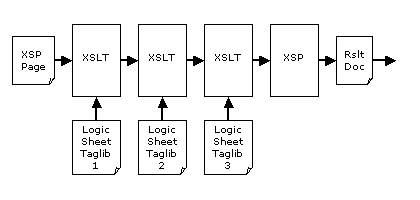 In fact, this is how XSP was originally designed to operate and Cocoon uses this approach exclusively to this day (but with inline Java instead of Perl). I did not show this approach in the first article because it is considerably more awkward and less flexible than the taglib module approach offered by AxKit.
The Cocoon project calls XSLT sheets that implement taglibs LogicSheets a convention I follow in this article (I refer to the all-Perl taglib implementation as “taglib modules”).
weather2.xsp
Before we look at the logicsheet version of the weather report taglib, here is the XSP page from the last article updated to use it:
<?xml-stylesheet href="my_weather_taglib.xsl" type="text/xsl"?>
<?xml-stylesheet href="NULL"                  type="application/x-xsp"?>
<?xml-stylesheet href="weather.xsl"           type="text/xsl"?>
<?xml-stylesheet href="as_html.xsl"           type="text/xsl"?>

<xsp:page
    xmlns:xsp="http://apache.org/xsp/core/v1"
    xmlns:util="http://apache.org/xsp/util/v1"
    xmlns:param="http://axkit.org/NS/xsp/param/v1"
    xmlns:weather="http://slaysys.com/axkit_articles/weather/"
>
<data>
  <title><a name="title"/>My Weather Report</title>
  <time>
    <util:time format="%H:%M:%S" />
  </time>
  <weather>
    <weather:report>
      <!-- Get the ?zip=12345 from the URI and pass it
           to the weather:report tag as a parameter -->
      <weather:zip><param:zip/></weather:zip>
    </weather:report>
  </weather>
</data>
</xsp:page>
In This Series Introducing AxKit XSP, Taglibs and Pipelines |
The <?xml-stylesheet href="my_weather_taglib.xsl" type="text/xsl"?> processing instruction causes my_weather_taglib.xsl (which we’ll cover next) to be applied to the weather2.xsp page before the XSP processor sees it. The other three PIs are identical to the previous version: the XSP processor is invoked, followed by the same presentation and HTMLification XSLT stylesheets that we used last time.
The only other change from the previous version is that this one uses the corrent URI for XSP tags. I accidently used a deprecated URI for XSP tags in the previous article and ended up tripping over it when I used the up-to-date URI in the LogicSheet for this one. Such is the life of a pointy-brackets geek.
The ability to switch implementations without altering (much) code is one of XSP’s advantages over things like inline Perl code: the implementation is nicely decoupled from the API (the tags). The only reason we had to alter weather1.xsp at all is because we’re switching from a more advanced approach (a taglib module, My::WeatherTaglib) that is configured in the httpd.conf file to LogicSheets, which need per-document configuration when using <xml-stylesheet> stylesheet specifications. AxKit has more flexible httpd.conf, plugin and Perl based stylesheet specification mechanisms which we will cover in a future article; I’m using the processing instructions here because they are simple and obvious.
The pipeline built by the processing instructions looks like:
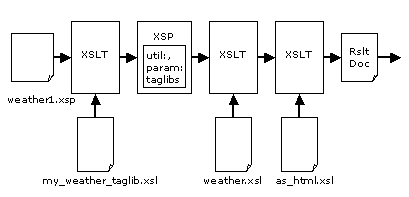 (does not show final compression stage).
my_weather_taglib.xsl
Now that we’ve seen the source document and the overall pipeline, here is My::WeatherTaglib recast as a LogicSheet, my_weather_taglib.xsl:
<xsl:stylesheet
  version="1.0"
  xmlns:xsl="http://www.w3.org/1999/XSL/Transform"
  xmlns:xsp="http://apache.org/xsp/core/v1"
  xmlns:weather="http://slaysys.com/axkit_articles/weather/"
>

<xsl:output indent="yes" />

<xsl:template match="xsp:page">
  <xsl:copy>
    <xsp:structure>
      use Geo::Weather;
    </xsp:structure>
    <xsl:apply-templates select="@*|node()"/>
  </xsl:copy>
</xsl:template>

<xsl:template match="weather:report">
  <xsp:logic>
    my $zip = <xsl:apply-templates select="weather:zip/*" />;
    my $w = Geo::Weather->new->get_weather( $zip );
    die "Could not get weather for zipcode '$zip'\n" unless ref $w;
  </xsp:logic>
  <state><xsp:expr>$w->{state}</xsp:expr></state>
  <heat><xsp:expr>$w->{heat}</xsp:expr></heat>
  <page><xsp:expr>$w->{page}</xsp:expr></page>
  <wind><xsp:expr>$w->{wind}</xsp:expr></wind>
  <city><xsp:expr>$w->{city}</xsp:expr></city>
  <cond><xsp:expr>$w->{cond}</xsp:expr></cond>
  <temp><xsp:expr>$w->{temp}</xsp:expr></temp>
  <uv><xsp:expr>$w->{uv}</xsp:expr></uv>
  <visb><xsp:expr>$w->{visb}</xsp:expr></visb>
  <url><xsp:expr>$w->{url}</xsp:expr></url>
  <dewp><xsp:expr>$w->{dewp}</xsp:expr></dewp>
  <zip><xsp:expr>$w->{zip}</xsp:expr></zip>
  <baro><xsp:expr>$w->{baro}</xsp:expr></baro>
  <pic><xsp:expr>$w->{pic}</xsp:expr></pic>
  <humi><xsp:expr>$w->{humi}</xsp:expr></humi>
</xsl:template>

<xsl:template match="@*|node()">
  <!-- Copy the rest of the doc almost verbatim -->
  <xsl:copy>
    <xsl:apply-templates select="@*|node()"/>
  </xsl:copy>
</xsl:template>

</xsl:stylesheet>
The first <xsl:template> inserts an <xsp:structure> at the top of the page with some Perl code to use Geo::Weather; so the Perl code in the later <xsl:logic> element can refer to it. You could also preload Geo::Weather in httpd.conf to share it amongst httpd processes and simplify this stylesheet, but that would introduce a bit of a maintainance hassle: keeping the server config and the LogicSheet in synchronization.
The second <xsl:template> replaces all occurences of <weather:report> (assuming the weather: prefix happens to map to the taglib URI; see James Clark’s introduction to namespace for more details). In place of the <weather:report> tag(s) will be some Perl code surrounded by <xsp:logic> and <xsp:expr> tags. The <xsp:logic> tag is used around Perl code that is just logic: any value the code returns is ignored. The <xsp:expr> tags surround Perl code that returns a value to be emitted as text in the result document.
The get_weather() call returns a hash describing the most recent weather oberservations somewhere close to a given zip code:
{ ‘city’ => ‘Pittsburgh’, ‘state’ => ‘PA’, ‘cond’ => ‘Sunny’, ’temp’ => ‘77’, … };
All those <xsp:expr> tags extract the values from the hash one by one and build an XML data structure. The resulting XSP document looks like:
    <?xml version="1.0"?>
    <xsp:page xmlns:xsp="http://apache.org/xsp/core/v1"
 xmlns:util="http://apache.org/xsp/util/v1"
 xmlns:param="http://axkit.org/NS/xsp/param/v1"
 xmlns:weather="http://slaysys.com/axkit_articles/weather/">
      <xsp:structure>
          use Geo::Weather;
      </xsp:structure>
      <data>
        <title><a name="title"/>My Weather Report</title>
        <time>
          <util:time format="%H:%M:%S"/>
        </time>
        <weather>
          <xsp:logic>
            my $zip = <param:zip/>;
            my $w = Geo::Weather->new->get_weather( $zip );
            die "Could not get weather for zipcode '$zip'\n" unless ref $w;
          </xsp:logic>
          <state><xsp:expr>$w->{state}</xsp:expr></state>
          <heat><xsp:expr>$w->{heat}</xsp:expr></heat>
          <page><xsp:expr>$w->{page}</xsp:expr></page>
          <wind><xsp:expr>$w->{wind}</xsp:expr></wind>
          <city><xsp:expr>$w->{city}</xsp:expr></city>
          <cond><xsp:expr>$w->{cond}</xsp:expr></cond>
          <temp><xsp:expr>$w->{temp}</xsp:expr></temp>
          <uv><xsp:expr>$w->{uv}</xsp:expr></uv>
          <visb><xsp:expr>$w->{visb}</xsp:expr></visb>
          <url><xsp:expr>$w->{url}</xsp:expr></url>
          <dewp><xsp:expr>$w->{dewp}</xsp:expr></dewp>
          <zip><xsp:expr>$w->{zip}</xsp:expr></zip>
          <baro><xsp:expr>$w->{baro}</xsp:expr></baro>
          <pic><xsp:expr>$w->{pic}</xsp:expr></pic>
          <humi><xsp:expr>$w->{humi}</xsp:expr></humi>
        </weather>
      </data>
    </xsp:page>
and the output document of that XSP page looks like:
    <?xml version="1.0" encoding="UTF-8"?>
    <data>
      <title><a name="title"/>My Weather Report</title>
      <time>17:06:15</time>
      <weather>
        <state>PA</state>
        <heat>77</heat>
        <page>/search/search?what=WeatherLocalUndeclared
        &where=15206</page>
        <wind>From the Northwest at 9 gusting to 16</wind>
        <city>Pittsburgh</city>
        <cond>Sunny</cond>
        <temp>77</temp>
        <uv>4</uv>
        <visb>Unlimited miles</visb>
        <url>http://www.weather.com/search/search?
        what=WeatherLocalUndeclared&where=15206</url>
        <dewp>59</dewp>
        <zip>15206</zip>
        <baro>29.97 inches and steady</baro>
        <pic>http://image.weather.com/web/common/wxicons/52/30.gif</pic>
        <humi>54%</humi>
      </weather>
    </data>
LogicSheet Advantages
- One taglib can generate XML that calls another taglib. Taglib modules may call each other at the Perl level, but taglib modules are XSP compiler plugins and do not cascade: The XSP compiler lives in a pipeline environment but does not use a pipeline internally.
- No need to add an
AxAddXSPTaglibdirective and restart the Web server each time you write a tag lib.
Restarting a Web server just because a taglib has changed can be awkward in some environments, but this seems to be rare; restarting an Apache server is usually quick enough in a development environment and better not be necessary too often in a production environment.
In the Cocoon community, LogicSheets can be registered and shared somewhat like the Perl community uses CPAN to share modules. This is an additional benefit when Cocooning, but does not carry much weight in the Perl world, which already has CPAN (there are many taglib modules on CPAN). There is no Java equivalent to CPAN in wide use, so Cocoon logic sheets need their own mechanism.
LogicSheet Disadvantages
There are two fundamental drwabacks with LogicSheets, each with several symptoms. Many of the symptoms are minor, but they add up:
- Requires inline code, usually in an XSLT stylesheet.
- Putting Perl code in XML is awkward: You can’t easily syntax check the code (I happen to like to run
perl -cw ThisFile.pma lot while writing Perl code) or take advantage of language-oriented editor features such as autoindenting, tags and syntax highlighting. - The taglib author needs to work in four languages/APIs: XSLT (typically), XSP, Perl, and the taglib under development. XSLT and Perl are far from trivial, and though XSP is pretty simple, it’s easy to trip yourself up when context switching between them.
- LogicSheets are far less flexible than taglib modules. For instance, compare the rigidity of
my_weather_taglib.xsl’s output structure with the that of My::WeatherTaglib or My::SimpleWeatherTaglib. The LogicSheet approach requires hardcoding the result values, while the two taglib modules simply convert whatever is in the weather report data structures to XML. - XSLT requires a fair amount of extra boilerplate to copy non-taglib bits of XSP pages through. This can usually be set up as boilerplate, but boilerplate in a program is just another thing to get in the way and require maintainance.
- LogicSheet are inherently single-purpose. Taglib modules, on the other hand, can be used as regular Perl modules. An authentication module can be used both as a taglib and as a regular module, for instance.
- LogicSheets need a working Web server for even the most basic functional testing since they need to be run in an XSP environment and AxKit does not yet support XSP outside a Web server. Writing taglib modules allows simple test suites to be written to vet the taglib’s code without needing a working Web server.
- Writing LogicSheets works best in an XML editor, otherwise you’ll need to escape all your
<characters, at least, and reading / writing XML-escaped Perl and Java code can be irksome. - Embracing and extending a LogicSheet is difficult to do: The source XSP page needs to be aware of the fact that the taglib it’s using is using the base taglib and declare both of their namespaces. With taglib modules, Perl’s standard function import mechanism can be used to releive XSP authors of this duty.
- Putting Perl code in XML is awkward: You can’t easily syntax check the code (I happen to like to run
- Requires an additional stylesheet to process, usually XSLT. This means:
- A more complex processing chain, which leads to XSP page complexity (and thus more likelihood of bugs) because each page must declare both the namespace for the taglib tags and a processing instruction to run the taglib. As an example of a gotcha in this area, I used an outdated version of the XSP namespace URI in
weather2.xspand the current URI inmy_weather_taglib.xsl. This caused me a bit of confusion, but theAxTraceIntermediatedirective helped shed some light on it. - More disk files to check for changes each time an XSP page is served. Since each LogicSheet affects the output, each LogicSheet must be
stat()ed to see if it has changed since the last time the XSP page was compiled.
- A more complex processing chain, which leads to XSP page complexity (and thus more likelihood of bugs) because each page must declare both the namespace for the taglib tags and a processing instruction to run the taglib. As an example of a gotcha in this area, I used an outdated version of the XSP namespace URI in
As you can probably tell, I feel that LogicSheets are a far more awkward and less flexible approach than writing taglibs as Perl modules using one of the helper libraries. Still, using upstream LogicSheets is a valid and perhaps occasionally useful technique for writing AxKit taglibs.
Upstream Filters good for?
So what is XSLT upstream of an XSP processor good for? You can do many things with it other than implementing LogicSheets. One use is to implement branding: altering things like logos, site name, and perhaps colors, or other customization, like administrator’s mail addresses on a login page that is shared by several sub-sites.
A key advantage of doing transformations upstream of the XSP processor is that the XSP process caches the results of upstream transformations. XSP converts whatever document it receives in to Perl bytecode in memory and then just runs that bytecode if none of the upstream documents have changed.
Another use is to convert source documents that declare what should be on a page to XSP documents that implement the machinery of a page. For instance, a survey site might have the source documents declare what questions to ask:
    <survey>
      <question>
        <text>Have you ever eaten a Balut</text>
        <response>Yes</response>
        <response>No</response>
        <response>Eeeewww</response>
      </question>
      <question>
        <text>Ok, then, well how about a nice haggis</text>
        <response>Yes</response>
        <response>No</response>
        <response>Now that's more like it!</response>
      </question>
      ...
    </survey>
XSLT can be used to transform the survey definition in to an XSP page that uses the PerForm taglib to automate form filling, etc. This approach allows pages to be defined in terms of what they are instead of how they should work.
You can also use XSLT upstream of the XSP processor to do other things, like translate from a limited or simpler domain-specific tagset to a more complex or general purpose taglib written as a taglib module. This can allow you to define taglibs that are easier to use in terms of more powerful (but scary!) taglibs that are loaded in to the XSP processor.
My::SimpleWeatherTaglib
A new-ish taglib helper module has been bundled in recent AxKit releases: Jörg Walter’s SimpleTaglib (the full module name is Apache::AxKit::Language::XSP::SimpleTaglib). This module performs roughly the same function as Steve Willer’s TaglibHelper, but supports namespaces and uses a feature new to Perl, subroutine attributes, to specify the parameters and result formatting instead of a string.
Here is My::SimpleWeatherTaglib:
    package My::SimpleWeatherTaglib;

    use Apache::AxKit::Language::XSP::SimpleTaglib;

    $NS = "http://slaysys.com/axkit_articles/weather/";

    package My::SimpleWeatherTaglib::Handlers;

    use strict;
    require Geo::Weather;

    ## Return the whole report for fixup later in the processing pipeline
    sub report :  child(zip) struct({}) {
        return 'Geo::Weather->new->get_weather( $attr_zip );'
    }

    1;
The $NS variable defines the namespace for this taglib. This module uses the same namespace as my_weather_taglib.xsl and My::WeatherTaglib, because all three implement the same taglib (this repetetiveness is to demonstrate the differences between the approaches). See the Mixing and Matching Taglibs section to see how My::WeatherTaglib and My::SimpleWeatherTaglib can both be used in the same server instance.
My::SimpleWeatherTaglib then shifts gears in to a new package, My::SimpleWeatherTaglib::Handlers to define the subroutines for the taglib tags. Using a virgin package like this provides a clean place with which to declare the tag handlers. SimpleTaglib looks for the modules in the Foo::Handlers package if it’s use()d in the Foo package (don’t use require for this!).
My::SimpleWeatherTaglib requires Geo::Weather and declares a single tag, which handles the <weather:report> tag in weather1.xsp (which we’ll show in a moment).
The require Geo::Weather; instead of use Geo::Weather; is to avoid importing subroutines in to our otherwise ...::Handlers namespace which might look like a handler.
There’s something new afoot in the declaration for sub report: subroutine attributes. Subroutine attributes are a new feature of Perl (as of perl5.6) that allow us to hang additional little bits of information on the subroutine declaration that describe it a bit more. perldoc perlsub for the details of this syntax. Some attributes are predefined by Perl, but modules may define others for their own purposes. In this case, the SimpleTaglib module defines a handful of attributes, some of which describe what parameters the taglib tag can take and others which describe how to convert the result value from the taglib implementation into XML output.
The child(zip) subroutine attribute tells the SimpleTaglib module that this handler expects a single child element named zip in the taglib’s namespace. In weather1.xsp, this ends up looking like:
    <weather:report>
      <!-- Get the ?zip=12345 from the URI and pass it
           to the weather:report tag as a parameter -->
      <weather:zip><param:zip/></weather:zip>
    </weather:report>
The text from the <weather:zip> element (which will be filled in from the URI query string using the param: taglib) will be made available in a variable named $attr_zip at request time. The fact that the text from an element shows up in a variable beginning with $attr_ is confusing, but it does actually work that way.
The struct({}) attribute specifies that the result of this tag will be returned as a Perl data structure that will be converted into XML. Geo::Weather->new->get_weather( $zip ) returns a HASH reference that looks like:
{ ‘city’ => ‘Pittsburgh’, ‘state’ => ‘PA’, ‘cond’ => ‘Sunny’, ’temp’ => ‘77’, … };
The struct attribute tells SimpleTaglib to turn this in to XML like:
    <city>Pittsburgh</city>
    <state>PA</state>
    <cond>Sunny</cond>
    <temp>77</temp>
    ....
The {} in the struct({}) attribute specifies that the result nodes should be not be in a namespace (and thus have no namespace prefix), just like the static portions of our weather1.xsp document. This is one of the advantages that SimpleTaglib has over other methods: It’s easier to emit nodes in different namespaces. To emit nodes in a specific namespace, put the namespace URI for that namespace inside the curlies: struct({http://my.namespace.com/foo/bar}). The {} notation is referred to as James Clark (or jclark) notation.
Now, the tricky bit. Harkening back to our discussion of how XSP is implemented, remember that the XSP processor compiles the XSP document into Perl code that is executed to build the output document. As XSP compiles the page, it keeps a lookout for tags in namespaces handled by taglib modules that have been configured in with AxAddXSPTaglib. When XSP sees one of these tags, it calls in to the taglib module–My::SimpleWeatherTaglib here–for that namespace and requests a chunk of Perl source code to compile in place of the tag.
Taglibs implemented with the SimpleTaglib module covered here declare handlers for each taglib tag (sub report, for instance). That handler subroutine is called at parse time, not at request time. Its job is to return the chunk of code that will be compiled and then run later, at request time, to generate the output. So report() returns a string containing a snippet of Perl code that calls into Geo::Weather. This Perl code will be compiled once, then run for each request.
This is a key difference between the TaglibHelper module that My::WeatherTaglib used in the previous article and the SimpleTaglib module used here. SimpleTaglib calls My::SimpleWeatherTaglib’s report() subroutine at compile time whereas TaglibHelper quietly, automatically arranges to call My::WeatherTaglib’s report() subroutine at request time.
This difference makes SimpleTaglib not so simple unless you are used to writing code that generates code that will be compiled and run later. On the other hand, “Programs that write programs are the happiest programs in the world” (Andrew Hume, according to a few places on the net). This is true here because we are able to return whatever code is appropriate for the task at hand. In this case, the code is so simple that we can return it directly. If the work to be done was more complicated, then we could also return a call to a subroutine of our own devising. So, while a good deal less simple than the approach taken by TaglibHelper, this approach does offer a bit more flexibility.
SimpleTaglib’s author does promise that a new version of SimpleTaglib will offer the “call this subroutine at request time” API which I (and I suspect most others) would prefer most of the time.
I will warn you that the documentation for SimpleTaglib does not stand on its own, so you need to have the source code for an example module or two to put it all together. Beyond the overly simple example presented here, the documentation refers you to a couple of others. Mind you, I’m casting stones while in my glass house here, because nobody has ever accused me of fully documenting my own modules.
For reference, here is the weather1.xsp from the previous article, which we are reusing verbatim for this example:
    <?xml-stylesheet href="NULL"        type="application/x-xsp"?>
    <?xml-stylesheet href="weather.xsl" type="text/xsl"?>
    <?xml-stylesheet href="as_html.xsl" type="text/xsl"?>

    <xsp:page
        xmlns:xsp="http://www.apache.org/1999/XSP/Core"
        xmlns:util="http://apache.org/xsp/util/v1"
        xmlns:param="http://axkit.org/NS/xsp/param/v1"
        xmlns:weather="http://slaysys.com/axkit_articles/weather/"
    >
    <data>
      <title><a name="title"/>My Weather Report</title>
      <time>
        <util:time format="%H:%M:%S" />
      </time>
      <weather>
        <weather:report>
          <!-- Get the ?zip=12345 from the URI and pass it
               to the weather:report tag as a parameter -->
          <weather:zip><param:zip/></weather:zip>
        </weather:report>
      </weather>
    </data>
    </xsp:page>
The processing pipeline and intermediate files are also identical to those from the previous article, so we won’t repeat them here.
Mixing and Matching Taglibs using httpd.conf
As detailed in the first article in this series, AxKit integrates tightly with Apache and Apache’s configuration engine. Apache allows different files and directories to have different configurations applied, including what taglibs are used. In the real world, for instance, it is sometimes necessary to have part of a site to use a new version of a taglib that might break an old portion.
In the server I used to build the examples for this article, for instance, the 02/ directory still uses My::WeatherTaglib from the last article, while the 03/ directory uses the my_weather_taglib.xsl for one of this article’s examples and My::SimpleWeatherTaglib for the other. This is done by combining Apache’s <Directory> sections with the AxAddXSPTaglib directive:
## ## Init the httpd to use our “private install” libraries ## PerlRequire startup.pl
    ##
    ## AxKit Configuration
    ##
    PerlModule AxKit

    <Directory "/home/me/htdocs">
        Options -All +Indexes +FollowSymLinks

        # Tell mod_dir to translate / to /index.xml or /index.xsp
        DirectoryIndex index.xml index.xsp
        AddHandler axkit .xml .xsp

        AxDebugLevel 10

        AxTraceIntermediate /home/me/axtrace

        AxGzipOutput Off

        AxAddXSPTaglib AxKit::XSP::Util
        AxAddXSPTaglib AxKit::XSP::Param

        AxAddStyleMap application/x-xsp \\
                      Apache::AxKit::Language::XSP

        AxAddStyleMap text/xsl \\
                      Apache::AxKit::Language::LibXSLT
    </Directory>

    <Directory "/home/me/htdocs/02">
        AxAddXSPTaglib My::WeatherTaglib
    </Directory>

    <Directory "/home/me/htdocs/03">
        AxAddXSPTaglib My::SimpleWeatherTaglib
    </Directory>
See How Directory, Location and Files sections work from the apache httpd documentation (v1.3 or 2.0) for the details of how to use <Directory> and other httpd.conf sections to do this sort of thing.
Help and thanks
Jörg Walter as well as Matt Sergeant were of great help in writing this article, especially since I don’t do LogicSheets. Jörg also fixed a bug in absolutely no time and wrote the SimpleTaglib module and the AxTraceIntermediate feature.
In case of trouble, have a look at some of the helpful resources we listed in the first article.
Copyright 2002, Robert Barrie Slaymaker, Jr. All Rights Reserved.
Tags
Feedback
Something wrong with this article? Help us out by opening an issue or pull request on GitHub








