


Request Tracker
If you’ve ever had to do user support, then you’ll be familiar with the following scenario: A question comes in from a user, and you write an e-mail reply. However, by the time you’ve hit “send,” another member of your team has already dealt with the problem. Or maybe you’re fortunate enough not to have to support end-users, but you have a terrible time managing the various projects that you’re working on. Or maybe you just can’t remember what you have to do today. How can Perl help here?
Enter Request Tracker. Request Tracker is a free trouble ticketing system written in Perl. It is used widely for everything from bug tracking and customer support to personal project management and to-do lists.
Some of you may be familiar with the first edition of Request Tracker, RT1. RT1 was successful, but internally, it was a bit crufty. RT2 is a complete rewrite designed to be much more capable, flexible and extensible.
Overview
So what is it?
On the simplest level, RT tracks requests - tickets - and correspondence about them. If you aren’t already familiar with such systems, consider sending a support request to your ISP. It might go something like this:
        You: My e-mail isn't working.

        ISP: Have you looked at the FAQ list?
        Can you be more specific about what isn't working.

        You: When I hit send in mumble mailer, it says
        "Cannot connect to server"

        ISP: Please make sure you have your SMTP server configured
        as documented ...

        You: Thanks!  That did it!
This exchange most likely won’t happen all at once, and could happen over the span of several days involving several technicians from your ISP. Each technician will want to know the specifics of what the previous technician told you, and your response. The ISP will also want to know who is handling a particular ticket, how long it’s been open, how many total tickets are open, what category your ticket falls into (“e-mail problems”), etc. This is the problem that RT was built to solve. Some companies use tools such as “Remedy” or “Clarify” for similar purposes, but RT is a free and open-source solution.
RT isn’t only for help-desk situations. The same system can be used to track bugs in software, outstanding action items or any other issue. In this domain, RT overlaps with programs such as Bugzilla and Gnats. In fact, RT’s being used by the Perl 6 developers to track what they need to work on.
Presentation and Interface
RT provides the most natural way of displaying exchanges such as the one in the example above. Every request is displayed as a sequence of transactions, starting with the initial message that created it. A transaction can also represent a change in metadata - for instance, the person who is working on a ticket may change as another member of the team takes over, or the ticket may be re-prioritized; it can change its status to reflect whether it’s new, open, resolved or waiting for more input from the requestor.
Requests live in queues, where a queue provides a loose grouping of both what the ticket is about and who is likely to respond to it. For instance, queries to the Web master of a site could end up in the “web” queue, whereas each development team would have a queue per project they were working on.
There are a bunch of ways to get data into RT. The two most popular are the Web interface and the e-mail interface. You can also have RT automatically insert data from CVS commit logs, via command-line interface or through more specialist tools.
The e-mail interface is easy to use and uses a simple tag in the subject line to determine what to do with a message. This tag will generally look like [site #40] where “site” is a special tag identifying your RT setup and the number (40) is the ticket number. All e-mails sent to RT with that information in the subject will be appended to the appropriate request. Most RT systems are configured so that an e-mail without a recognized tag in the subject line automatically creates a new request.
    From: John Doe <john@doe.com>
    To: rt@myisp.com
    Subject: Re: [myisp #3120] Email doesn't work
    Date: Tue Nov 27 21:57:58 PST 2001

    I tried to configure Netscape Communicator as your instructions
    said, but I'm still getting the same error as before.  What else
    would you suggest?
The Web interface allows for more flexible display of the information about a ticket. You can enter new information about a ticket or change its metadata.
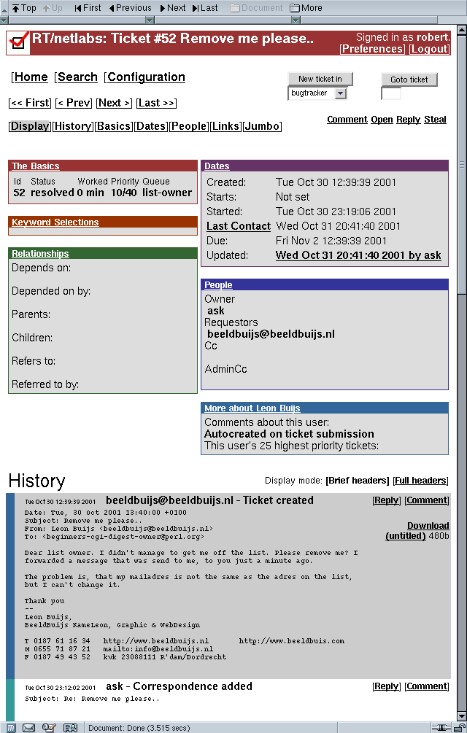
Meta-data
RT stores lots of information about each ticket. By default, it maintains information about the requestor, owner, (the person who’s currently working on the ticket) status, subject, creation date, due date, priority, queue, links to other tickets, as well as the people who are interested in that particular ticket.
This information is important for sorting, categorization and reporting. RT also allows for custom meta-data to be added to a ticket in the form of keywords. Returning to our ISP example, they might configure their RT setup to record the platform and software being used. One reason to do this is so that specialists can be assigned to focus on issues in their areas of specialization. Similarly, you can gather statistics on, say, the number of users reporting problems using Outlook Express.
- As a side note, it’s important to note that it’s impossible to present all the possible configurations of RT in this article. As we’ll continue to see later, it’s extremely flexible and each organization will need to configure it for their particular needs.
Scrips and Templates
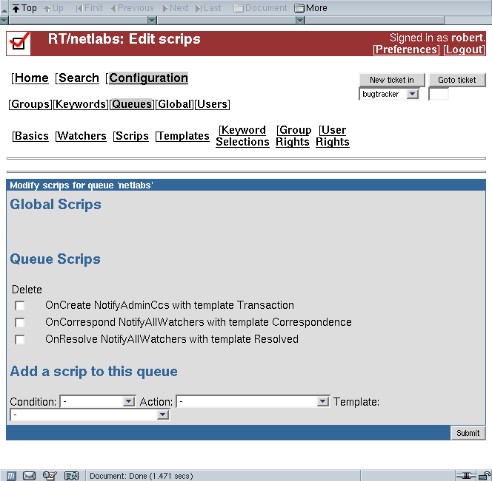
As configured “out of the box,” RT does not send any e-mail by default. The end user needs to use the Web interface to configure RT’s “scrips.” Scrips are a way of telling RT to trigger certain actions based on when something happens.
For example, one important scrip would be:
When a new ticket is opened, send an e-mail to the person who created it.
This way, your requestor would get an autoresponse telling them that their query was being looked at. Another useful scrip would be:
   When someone e-mails new information into a ticket, send that information
   to everyone who is interested in the ticket.
Correspondence and Comments
One important aspect of RT is how it differentiates between correspondence and comments. Correspondence is something that is sent by one of the RT users to the requestor, to solicit further information or inform them of developments; comments are normally set up to be internal to RT users, and never sent to the end-user. Think of it as being the support team’s chance to be rude to the end-user behind their back.
RT is smart. When correspondence is e-mailed out to the user, it appears as if the author had written it, but has a tweaked From: line so that replies are also sent back into RT and added to the ticket.
The ISP, using RT
Here is the above ISP example, as it might look as an RT ticket:
 Ticket #3120
 Opened: Nov 17, 2001.
 Subject: Email problems
 Requestor: John Doe <john@doe.com>
 Owner: Stef
 Current Status: Resolved

 Correspondence from John Doe <john@doe.com> on Nov 17, 2001 3pm
 > My Email Isn't Working

 Taken by Stef at Nov 17, 2001, 3:48pm

 Status Changed from New to Open by Stef at Nov 17, 2001, 3:49pm

 Correspondence from Stef Murky <stef@userfriendly.comic> on Nov 17, 2001 4:00pm
 > Have you looked at the FAQ list?  Can you be more specific
   about what isn't working.

 Correspondence from John Doe <john@doe.com> on Nov 18, 2001 1:00pm
 > When I hit send in mumble mailer, it says "Cannot connect to
   server"

 Comment from Stef Murky <stef@userfriendly.comic> on Nov 18, 2001 3:15pm
 > Looked at our records, it appears that John uses Netscape under windows.

 Correspondence from Stef Murky <stef@userfriendly.comic> on Nov 18, 2001 3:19pm
 > Please make sure you have your SMTP server configured as
   documented at ...

 Correspondence from John Doe <john@doe.com> on Nov 19, 2001 9:05am
 > Thanks!  That did it!

 Status Changed from Open to Resolved by Stef
The Guts
You may be thinking that RT is a horribly complicated piece of software, impossible to understand, use and extend. If you are, you’re completely wrong. Through extensive modularization and a well thought out architecture and design, RT is quite easy to understand, use and extend.
RT2 is built upon standard modules that many people use. There isn’t anything esoteric used; in fact, you may already be using many of the modules on which it depends.
But you might think that installing all the dependent modules might be a chore. Again, RT is smart. It comes with a script that uses the CPAN.pm module to retrieve and install the correct versions of everything it needs.
This is probably the hardest part of installing RT. (Assuming you have CPAN.pm configured properly.) You run “make fixdeps,” and it all happens for you. It may be necessary to run it multiple times or install one or two modules by hand, but that’s easy compared to manually installing almost 30 modules.
 DBI DBIx::DataSource DBIx::SearchBuilder HTML::Entities MLDBM
 Net::Domain Net::SMTP Params::Validate HTML::Mason CGI::Cookie
 Apache::Cookie Apache::Session Date::Parse Date::Format MIME::Entity
 Mail::Mailer Getopt::Long Tie::IxHash Text::Wrapper Text::Template
 File::Spec Errno FreezeThaw File::Temp Log::Dispatch DBD::mysql or DBD::Pg
The most important module is probably DBIx::SearchBuilder. It provides a standard mechanism for persistent object-oriented storage. By using it, RT doesn’t need to worry about the details of the SQL queries to access its database. The details of DBIx::SearchBuilder are beyond the scope of this article - in fact, they’ll be covered in a future perl.com article - but in a nutshell, your classes will subclass the SearchBuilder class, and the module will take care of the persistence for you. SearchBuilder also makes it easy to port RT to your SQL backend of choice; since it’s all done through the DBI, the architecture is completely database-independent.
Configurability & Extensibility
Ninety-five percent of RT is configured via the Web interface. Once the system is up and running, most changes can be made through the Configuration menu. Everything from adding users to configuring automatic e-mail responses can be done there.
Because the Web interface is created using HTML::Mason, it’s easy to extend RT using the internal API. Whole pages or just individual Mason elements can be easily overridden or updated. Common customizations include specialized reports, user interface tweaks or new authentication systems. Any trouble ticketing system will need adapting to the needs of the local users, and RT makes it easy to do this. The API by which the Mason site accesses the ticketing database is the same thing that all of the interfaces use natively, so it’s possible to completely re-implement any interface from scratch - in fact, you can write your own tools to access the system quickly and easily by using the RT::* modules in your own code.
More Configuration Examples
rt.cpan.org Recently, to demonstrate the strength of RT as well as to provide a needed service to the community, Jesse Vincent, the author of RT, set up an RT instance for all perl modules on CPAN. rt.cpan.org showcases many features of RT.
For more information on rt.cpan.org, visit it, or see this article on use.perl |
Currently, I’m using RT for several different projects. Here are a few more details about each RT setup to provide you with more ideas and examples.
- Bug Tracking As mentioned above, the perl 6 project is using RT to track bugs and todo items. Right now the Parrot project has one queue set up; this is a little slow at the moment, but will be ramping up as Parrot stabilizes. A custom report was written to show only items marked with the “Todo” keyword, so that we can update a Web page listing the things that need doing. The scrips are configured to keep the requestor in the loop with the progress of their issue.
- Help-Desk perl.org maintains many mailing lists, which means dealing with lots of users who have trouble subscribing, or more likely unsubscribing from lists. The list-owner@perl.org e-mail address is filtered into RT, where a ticket is created automatically. Thus, each user’s case can be tracked. For this, we wrote a special template system that allows us to easily insert common answers into correspondence.
- Project Management This is similar to bug tracking, but doesn’t require the same kind of notification or categorization. At perl.org we use our RT setup to track the status of a variety of internal projects, such as our CVS server and Web site development.
- Personal Todo and Information Store At home, I use RT as “yet another TODO list” and information store. Instead of cluttering my e-mail inbox, or stuffing things into folders where I might forget about them, I open tickets in my “personal RT.” I can then categorize them and add comments to them. There are a range of different things I stick into RT, ranging from “Remember to look at this Web site” to “Get new cellphone.” For the latter, I add comments that include the details of my research. I can easily access this from work or anywhere there is Web access.
More!
There’s a lot more to RT than I’ve covered in this article. Some things I’ve glossed over include:
- Access control RT has a sophisticated access control system that supports different levels of access to tickets based on a user’s identity, group memberships or role. You can grant permissions globally or per queue. It’s possible to configure read-only access or only allow someone to see tickets they requested.
- Command Line Interface There is a full-featured command line interface that allows you to do almost anything. This provides another way to script and customize things.
- Scalability Request Tracker is very scalable and is being used in production environments with several tens of thousands of tickets in the database. (Not on a 486, of course.)
Future Directions
The current version of RT2 is 2.0.9. The 2.1 development series will be starting soon leading toward 2.2. While nothing has been finalized, items on the table for 2.2 include better ACL support, more flexible keywords, asset trackin, and several other cool things.
Best Practical
Commercial Support for Request Tracker is available from Best Practical Solutions, LLC. Best Practical Solutions was formed by RT’s author, Jesse Vincent, to sell support and custom development for RT. They do all sorts of customization, interfaces, and custom import tools.
Other URLS
http://bestpractical.com/rt/ - RT Site mailto:sales@bestpractical.com - Support and customization inquiries http://www.masonhq.com/ - HTML::Mason Site http://rt.cpan.org/ - RT for every module in CPAN
Tags
Feedback
Something wrong with this article? Help us out by opening an issue or pull request on GitHub






