The e-smith Server and Gateway: a Perl Case Study
by Kirrily "Skud" Robert
February 20, 2001
The e-smith server and gateway system is a Linux distribution designed for
small to medium enterprises. It's intended to simplify the process of
setting up Internet and file-sharing services and can be administered by a
non-technical user with no prior Linux experience.
We chose Perl as the main development language for the e-smith server and
gateway because of its widespread popularity (making it easier to recruit
developers) and it's well suited to e-smith's blend of system
administration, templating and Web-application development.
Of course, the system isn't just Perl. Other parts of the system include the
base operating system (based on Red Hat 7.0), a customized installer using Red
Hat's Anaconda (which is written in Python), and a range of applications
including mail and Web servers, file sharing, and Web-based e-mail using IMP
(which is written in PHP). However, despite the modifications and quick hacks
we've made in other languages, the bulk of development performed by the e-smith
team is in Perl.
Administration of an e-smith server and gateway system is performed primarily
via a Web interface called the "e-smith manager." This is essentially a
collection of CGI programs that display system information and allow the
administrator to modify it as necessary.
This allows system owners with no previous knowledge of Linux to administer
their systems easily without the need to understand the arcana of the command
line, text configuration files, and so on.
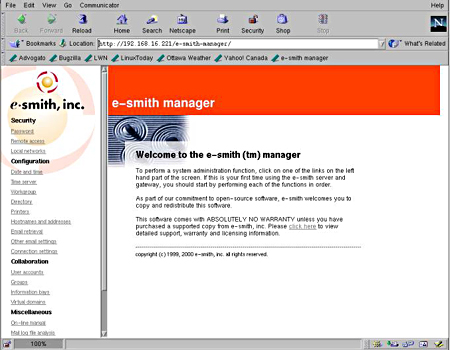
The manager interface is based on the CGI module
that comes standard with the Perl distribution. However, a module esmith::cgi has been written to provide further
abstractions of common tasks such as:
- generating page headers and footers
- generating commonly used widgets
- generating status report pages
It is likely that this module will be further extended in the next version to
provide more abstract ways of building "wizard" style interfaces, so that
developers don't have to copy and paste huge swathes of code calling the CGI module directly.
The e-smith server and gateway is a collection of many parts, all of which
can be configured in different ways depending on the user's needs. All the
global configuration data is kept in a central repository and this information
is used as the base for specific configurations for the various software on the
system.
Much of the system configuration data is kept in a simple text file,
/home/e-smith/configuration. The basic format is name=value,
as shown below:
AccessType=dedicated
ExternalDHCP=off
ExternalNetmask=255.255.255.0
Obviously, this can be simply parsed with Perl, by using something equivalent
to:
my %conf;
while (<>) {
chomp;
my ($name, $value) = split(/=/);
$conf{$name} = $value;
}
print "$conf{DomainName}\n"; However, it is also possible to store more information in a single line by
adding zero or more pairs of property names and values delimited by pipe symbols
(|), like this:
fetchmail=service|status|enabled
flexbackup=backupservice|erase_rewind_only|true
ftp=service|access|private|status|enabled
Parsing this gets tricky, requiring an additional split and
putting the property names and values into a hash.
As it happens, e-smith has a module with common utilities such as this built
in, so a developer would only write something like this:
use esmith::db;
my %conf;
tie %conf, 'esmith::config', '/home/e-smith/configuration';
my $domain = db_get(\%conf, 'DomainName');
my ($type, %properties) = db_get(\%conf, 'ftp');
Similar to the main configuration file, user and group information is kept
in /home/e-smith/accounts, in a format that is also
simple to parse.
This simplicity is intentional; although the data could have been stored in a
more complex database, the developers decided to keep the core of e-smith as
simple as possible so that the learning curve for new developers would not be
steep.
Things become more complex when we examine the configuration files stored in /etc. Each piece of software has its own configuration
format, and writing parsers for each one can be a complex, time-consuming and
error-prone process. The e-smith software avoids this by using a
template-driven system instead, using Text::Template.
Templates are stored in a directory hierarchy rooted at /etc/e-smith/templates. Each configuration file is either a
Text::Template file or can be given a subdirectory in
which template fragments are stored. These templates are then parsed (and in the
case of a subdirectory of fragments, concatenated together) to generate the
config files for each service on the system. The fragmented approach is part of
e-smith's modular and extensible architecture; it allows third-party modules to
add fragments to the configuration, if necessary.
For example, let's look at the ntpd service (which keeps the system's clock right by querying a time server using
the Network Time Protocol). It usually has a config file
/etc/ntp.conf. On an e-smith server, this is built out of
the template fragments found in the /etc/e-smith/templates/etc/ntp.conf/ directory.
This is a simple template, and only requires basic variable substitutions.
(Since Text::Template evaluates anything in braces and
replaces it with the return value of the code, some templates have more complex
code embedded within them.) Here is what is in the template fragment file
/etc/e-smith/templates/etc/ntp.conf/template-begin:
Server { $NTPServer }
driftfile /etc/ntp/drift
authenticate no In this example, $NTPServer would be replaced with the
value of that variable.
Instead of calling Text::Template directly, e-smith
developers use the e-smith::util module to automate the
process. Here's how we would generate the ntp.conf file:
use esmith::util;
processTemplate({
CONFREF => \%conf, # this is the %conf from the last section
TEMPLATE_PATH => '/etc/ntp.conf',
}); The above example takes advantage of a number of default values set by the
processTemplate(). If we want more control, we can
specify such things as the user ID (UID), group ID (GID) and permissions to use
when writing the configuration file.
use esmith::util;
processTemplate({
CONFREF => \%conf, # this is the %conf from the last section
TEMPLATE_PATH => '/etc/ntp.conf',
UID => $username,
GID => $group,
PERMS => 0644,
}); Incidentally, the way in which the processTemplate() routine lets the programmer override the default values is a good example of
Perlish idiom:
# the parameter hash the programmer passed to the routine is
my %p = (Þfaults, %params_hash);
When the user hits "submit" on a Web form, a number of things can occur:
- master configuration files are updated
- templated configuration files in /etc are updated
- network services restarted
- new user account created
- backup performed
- ... or any of a number of other events.
The model used to make these things happen is one of actions and events. An
event is something that happens on the system (such as the user submitting a Web
form, an installation completing, a reboot, etc). An action is the atomic unit
of things-that-need-doing, several of which may be called when an event occurs.
For instance, the post-install event calls actions to
configure and start various services, initialize the password file, and so
on.
Actions are written as Perl scripts, and stored in /etc/e-smith/events/actions. Some of them just use
system() calls to do what's needed, as in this example (
/etc/e-smith/events/actions/reboot):
package esmith;
use strict;
use Errno;
exec ("/sbin/shutdown", qw(-r now)) or die "Can't exec shutdown: $!";
exit (2); Others are more complex and can contain as many as a few hundred lines of Perl
code.
An event is defined by creating a subdirectory under /etc/e-smith/events and filling it with symlinks to the
actions to be performed.
[root@e-smith events]# ls -l user-create/
total 0
lrwxrwxrwx 1 root root 27 Jan 24 00:07 S15user-create-unix -> ../actions/user-create-unix
lrwxrwxrwx 1 root root 27 Jan 24 00:07 S20conf-httpd-admin -> ../actions/conf-httpd-admin
lrwxrwxrwx 1 root root 28 Jan 24 00:07 S20email-update-user -> ../actions/email-update-user
lrwxrwxrwx 1 root root 30 Jan 24 00:07 S25email-update-shared -> ../actions/email-update-shared
lrwxrwxrwx 1 root root 22 Jan 24 00:07 S25ldap-update -> ../actions/ldap-update
lrwxrwxrwx 1 root root 29 Jan 24 00:07 S25reload-httpd-admin -> ../actions/reload-httpd-admin
lrwxrwxrwx 1 root root 23 Jan 24 00:07 S50email-assign -> ../actions/email-assign
lrwxrwxrwx 1 root root 21 Jan 24 00:07 S80pptpd-conf -> ../actions/pptpd-conf
Events are called via a script called /sbin/e-smith/signal-event, itself written in Perl. It's
included here nearly in full, as a detailed example of e-smith code.
#!/usr/bin/perl -w
package esmith;
use strict;
my $event = $ARGV [0];
my $handlerDir = "/etc/e-smith/events/$event";
opendir (DIR, $handlerDir)
|| die "Can't open directory /etc/e-smith/events/$event\n";
my @handlers = sort (grep (!/^\.\.?$/, readdir (DIR)));
closedir (DIR);
open (LOG, "|/usr/bin/logger -i -t e-smith");
my $ofh = select (LOG);
$| = 1;
select ($ofh);
print LOG "Processing event: @ARGV\n";
my $exitcode = 0;
my $handler;
foreach $handler (@handlers)
{
my $filename = "$handlerDir/$handler";
if (-f $filename)
{
print LOG "Running event handler: $filename\n";
print LOG `$filename @ARGV 2>&1`;
if ($? != 0)
{
$exitcode = 1;
}
}
}
close LOG;
exit ($exitcode); There is currently a locking issue with the global configuration files. The
techniques used to manipulate these files do not allow multiple processes to
modify them concurrently. If two programs try to manipulate the files at the
same time, one of them will overwrite the other's changes. This is obviously
a serious issue, albeit one that seldom causes problems in normal use, as most
e-smith servers do not have multiple administrators working on the system at the
same time.
A seemingly obvious solution is to use DBM instead of the current flat-text
file system. However, the flat-text files are important because they make the
system config readable and modifiable using a standard text editor from the
Linux shell prompt. A simple command can then regenerate other configs or stop
or start services based on the changes, without requiring the Web interface to
be used. This is useful in the situation when the Web interface might have
been broken (a rare situation) or when a configuration option is hidden from
less technical users.
A solution combining the benefits of text files and DBM has been suggested,
in which the routine that reads the config database would check to see whether
the text file has been changed recently. If it has been changed, it would convert it to
DBM, otherwise it would just use the DBM directly. When a configuration option
is changed, it would be written to both the DBM and the text file.
Another problem is the way that multiple instances of the Perl interpreter
are invoked to run events and actions, causing some performance problems. A
number of alternatives are being considered, including mod_perl and POE. The goal is to reduce the wait
experienced by the user when they click "submit" via the Web interface;
ideally, response should be near-instantaneous.
Other forthcoming improvements include a simpler way to create "wizard"
interfaces for the e-smith manager (possibly using the FormMagick Perl module currently under development), and internationalisation (probably
using the Locale::Maketext module).
The e-smith server and gateway is a great example of a large project using
Perl both as a system administration scripting tool and a Serious Programming
Language. Although it has about 20,000 lines of Perl code, the system
is easy to understand and the Perl code is maintainable and readable,
even by relatively inexperienced Perl programmers.
If you're interested in taking a closer look at the e-smith code, or maybe
contributing to it, more information is available from the e-smith developer
Web site.




